
Create: Adventure Begins!
A modpack to make the create mod less of a hustle and more of a adventure!
截图
介绍
Create: Adventure Begins!
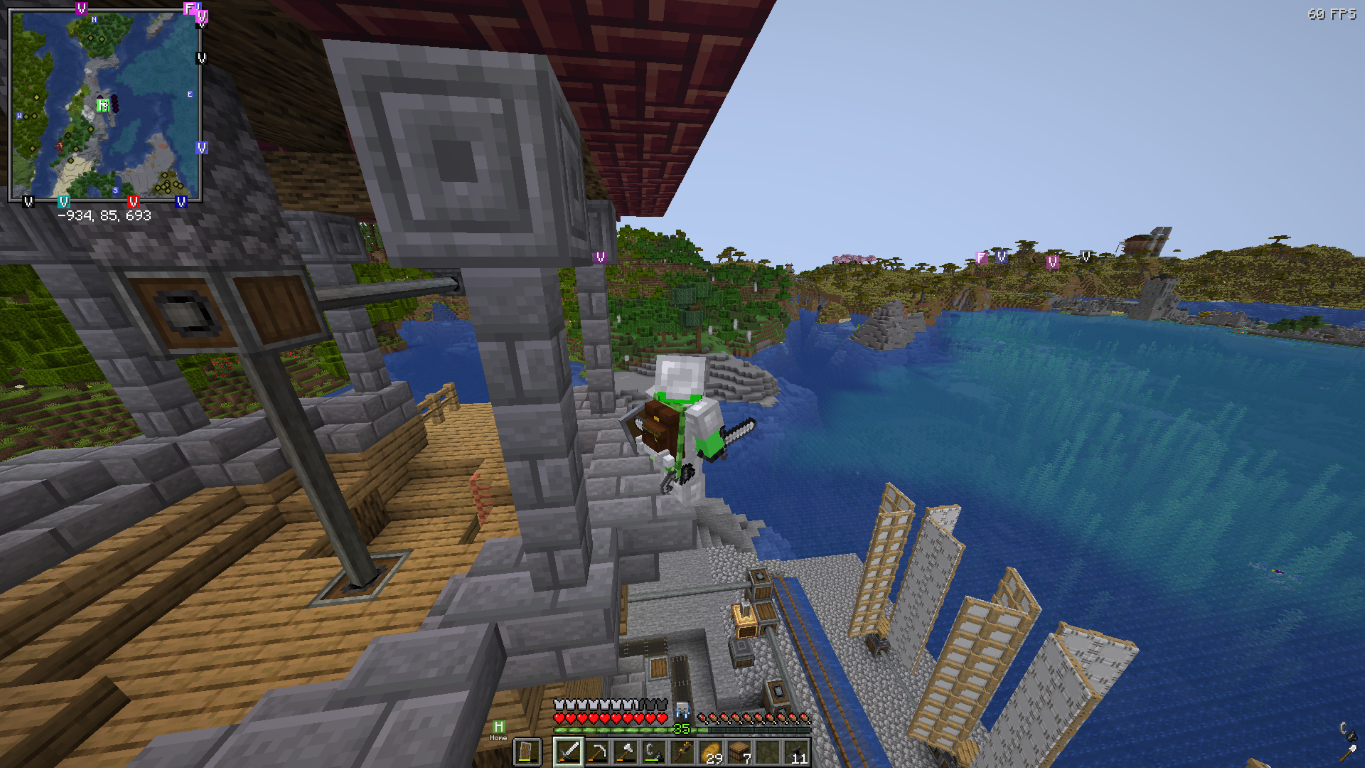
Welcome to a world where engineering meets exploration. Create: Adventure Begins! is designed to be a balanced experience that enhances the core charm of Minecraft without making it feel like a completely different game. Whether you want to build a massive automated factory, trek through overhauled dungeons, or simply enjoy a more vibrant world, this pack is built to provide a stable and immersive journey.
Features
- Mechanical Mastery: Build intricate moving contraptions and automated systems using the Create mod. This version expands your engineering toolkit with The Factory Must Grow, Dreams n’ Desires, and Power Loader.
- A Living World: Encounter a massive variety of wildlife with Alex’s Mobs. Explore beautifully enhanced biomes from Geophilic.
- Total Dungeon Overhaul: Discover completely redesigned caves, mineshafts, and strongholds thanks to the full YUNG’s Better series and Explorify.
- Homesteading & Storage: Master the culinary arts with Farmer’s Delight and Ratatouille. Keep your items organized with Sophisticated Backpacks, Tom’s Simple Storage, and Lootr.
- The Stars Above: Journey beyond the world with the Northstar Redux space expansion.
- Atmospheric Detail: Experience the world through AmbientSounds, Presence Footsteps, and Sound Physics Remastered.
Performance First
This pack is built on a high-performance foundation. By utilizing Sodium, Lithium, Ferrite Core, and ModernFix, we ensure the game runs as smoothly as possible even with complex machinery.
PC Specification Settings (Recommended)
Low-End PCs (Integrated Graphics / 4GB RAM)
- Video Settings: Set Render Distance to 6-8 chunks.
- Graphics: Set to ‘Fast’.
- Clouds: Set to ‘Fast’ or ‘Off’.
- Shaders: Keep disabled for best performance.
- Resource Packs: Disable “Stay True” to save memory.
Mid-Range PCs (Dedicated GPU / 8GB RAM)
- Video Settings: Set Render Distance to 10-12 chunks.
- Graphics: Set to ‘Fancy’.
- Shaders: Complementary or BSL (Medium settings).
- Resource Packs: All enabled.
High-End PCs (Modern GPU / 12GB+ RAM)
- Video Settings: Set Render Distance to 16+ chunks.
- Graphics: Set to ‘Fabulous!’.
- Shaders: Bliss or Photon (Ultra settings).
- Resource Packs: All enabled.
Setup & Launch Guide
How to Launch
- Download the pack via the Modrinth App.
- Ensure you have allocated at least 4GB to 6GB of RAM in the profile settings.
- Hit Play and wait for the Seamless Loading Screen to finish.
Shaders Setup (Optional)
The pack includes Iris for shader support. To use them:
- Go to Options > Video Settings > Shader Packs.
- Select your preferred shader from the list:
- Bliss: For a realistic, atmospheric look.
- BSL: The classic, high-performance standard.
- Complementary: A perfect balance of visuals and performance.
- Photon: Lightweight and modern.
Resource Packs Setup (Optional)
To enable the custom look of the pack, go to Options > Resource Packs and move these to the right side:
- Fresh Animations: (Classic horses, Creepers, Details, Emissive, Objects, and Quivers).
- Lower utilities and eating animations: For a cleaner first-person view.
- Mandala’s GUI: For a polished, themed interface.
- Stay True: For enhanced vanilla-style textures.
包含的模组 168 个,另有 9 个其他文件
 (Sodium) Chloride
 [EMF] Entity Model Features
 [ETF] Entity Texture Features
 Alex's Mobs (Unofficial Port)
 Alternate Current
 AmbientSounds
 Amendments
 苹果皮
 Architectury API
BadOptimizations
 BaguetteLib
 Balm
 Better Advancements
 Better Beds
 Better Climbing
 Better Clouds
 Better ModList
 Better Than Mending
 Bliss Shaders
 BSL Shaders
 Carry On
 Chat Animation [Smooth Chat]
 Chat Heads
 Cherished Worlds
 Chunky
 Citadel (Unofficial Port)
 Clean F3
 Cloth Config API
 Clumps
 Collective
 Colorwheel
 Colorwheel Patcher
 Complementary Shaders - Reimagined
 Concurrent Chunk Management Engine (NeoForge)
 Controlling
 Corpse
 Corpse x Curios API Compat
 机械动力
 Create Contraption Terminals
 Create Goggles
展开全部 168 个
 Create Railways Navigator
 Create Ratatouille
 Create Waystones Recipes
 Create: Bells & Whistles
 Create: Central Kitchen
 Create: Connected
 Create: Copycats+
 Create: Design n' Decor
 Create: Diesel Generators
 Create: Dragons Plus
 Create: Dreams & Desires
 Create: Easy Structures
 Create: Enchantment Industry
 Create: Northstar - Redux
 Create: Power Loader
 Create: The Factory Must Grow
 CreateBetterFps
 CreativeCore
 Cristel Lib
 Curios API
 Customizable Player Models
 遥远的地平线
 Do a Barrel Roll
 Double Doors
 Dynamic FPS
 EMI
 EMI++
 实体剔除
 Euphoria Patches
 Explorify
 Exposure
 Exposure Catalog
 Exposure: Expanded
 Exposure: Polaroid
 Falling Leaves (NeoForge/Forge)
 农夫乐事
 FerriteCore
 Forgified Fabric API
 Freecam
 Fresh Animations
 Fresh Animations: Classic Horses
 Fresh Animations: Creepers
 Fresh Animations: Details
 Fresh Animations: Emissive
 Fresh Animations: Objects
 Fresh Animations: Quivers
 Geckolib
 Geophilic
 HT's TreeChop
 I Like Vanilla
 ImmediatelyFast
 Iris Shaders
 Jade Addons (Neo/Forge)
 Jade 🔍
 JamLib
 旅行地图
 Just Zoom
 Konkrete
 Kotlin for Forge
 锂
 Lootr
 Low Fire, Shield & More
 Mandala's GUI - Dark mode
 MidnightLib
 ModernFix
 Moonlight Lib
 More Culling
 鼠标微调
 自然指南针
 No Chat Reports
 No Telemetry
 Not Enough Animations
 Not Enough Crashes
 开放派对与领地
 Packet Fixer
 Particle Rain
 Paxi
 Photon Shaders
 Ping Wheel
 Plasmo Voice
 Presence Footsteps [FORGE]
 pv-addon-soundphysics
 Reese's Sodium Options
 Remove Reloading Screen
 Screenshot to Clipboard
 Screenshot Viewer
 Seamless Loading Screen
 Searchables
 ServerCore
 Sinytra Connector
 钠
 Sodium Dynamic Lights
 Sodium Extra
 Sodium Extras
 Sodium Options API
 精妙背包
 Sophisticated Core
 Sort It Out!
 Sound Physics Remastered
 spark
 Structory
 Super Duper Vanilla
 锦致装饰
 TerraBlender
 Tom's Simple Storage Mod
 TooManyRecipeViewers
 Towns and Towers
 TrashSlot
 Visuality: Reforged
 传送石碑
 Xaero的小地图
 Xaero的世界地图
 YetAnotherConfigLib (YACL)
 YUNG's API
 YUNG's Better Caves
 YUNG's Better Desert Temples
 YUNG's Better Dungeons
 YUNG's Better End Island
 YUNG's Better Jungle Temples
 YUNG's Better Mineshafts
 YUNG's Better Nether Fortresses
 YUNG's Better Ocean Monuments
 YUNG's Better Strongholds
 YUNG's Better Witch Huts
 YUNG's Bridges
 YUNG's Cave Biomes
 YUNG's Extras
 YUNG's Menu Tweaks
绿色边框的模组本站有收录,点进去看中文介绍;其余跳转到 Modrinth。
常见问题
Create: Adventure Begins! 支持哪些 Minecraft 版本?
Create: Adventure Begins! 基于 Minecraft Java 版 1.21.1,使用 NeoForge 加载器。
Create: Adventure Begins! 怎么安装?
点本页「前往下载」拿到整合包文件(Modrinth 的是 .mrpack,CurseForge 的是 .zip),在 PCL2 或 HMCL 启动器里选择「导入整合包」,启动器会自动装好 Minecraft、加载器和全部模组。这个整合包有 168 个模组,建议在启动器里给游戏分配 6–8 GB 内存。
Create: Adventure Begins! 开服需要多大内存?
推荐服务器内存 12 GB。在线人数多、或者建了大量机器和区块加载器时,可以再加 2–4 GB。
怎么和朋友一起玩 Create: Adventure Begins!?
点本页的「一键开服」,选好配置后会自动安装 Create: Adventure Begins! 的服务端,几分钟就能开好。把服务器地址发给朋友,大家用同一个版本的整合包连进去就行。


评论
登录后评论和评分