
Voltick
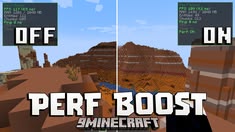
Optimization modpack that helps you run the game better and have a better gaming experience. Configure it and you'll get a huge difference in FPS.
截图
介绍
Take your gaming experience to the next level with this ultimate optimization modpack. Meticulously designed to squeeze every last frame per second out of your game, this pack is the definitive solution to say goodbye to lag and screen tearing, even on low-end PCs or laptops.
Unlike other packs that drastically alter the visual content, this modpack focuses on what truly matters: pure performance and system stability. Through a smart selection of enhanced rendering engines, efficient RAM management, and optimized code patches, you’ll notice a dramatic FPS boost from the very first second of gameplay.
Furthermore, it significantly reduces world loading times and smooths real-time terrain generation. This will allow you to enjoy fluid multiplayer matches and fully immersive single-player sessions, while preserving the original visual essence.
Don’t let performance issues ruin your games or limit your potential. Download this modpack today, configure your ideal visual settings, and get ready to enjoy total, stable, and uninterrupted smoothness. It’s time to play the way you’ve always wanted!
包含的模组 74 个
 [ETF] Entity Texture Features
 Almanac
 Animatica
 AsyncParticles
BadOptimizations
 Better Mount HUD
 BetterGrassify
 Capes
 CIT Resewn
 Clean F3
 Cloth Config API
 Clumps
 Configured Defaults
 Continuity
 Controlify (Controller support)
 Cubes Without Borders
 Debugify
 Dynamic FPS
 E-LITE shaders (MakeUp edit)
 e4mc
 Enhanced Block Entities
 实体剔除
 Fabric API
 Fabric Language Kotlin
 Fabrishot
 Fast IP Ping
 FastQuit
 FerriteCore
 FPS - Display
 ImmediatelyFast
 Iris Shaders
 Ixeris
 Language Reload
 lazy-language-loader
 Let Me Despawn
 LIGHT Shaders
 锂
 Main Menu Credits
 MakeUp - Ultra Fast
 MCC Island Optimised Assets
展开全部 74 个
 MidnightLib
 MixinTrace
 模组菜单
 Model Gap Fix
 ModernFix
 More Chat History
 More Culling
 MotionFlow
 No Chat Reports
 No Telemetry
 Noxesium
 Nuit
 Nuit Interop
 ObsidianUI
 OptiGUI
 Paginated Advancements & Custom Frames
 Polytone
 Puzzle
 Reese's Sodium Options
 Remove Reloading Screen
 RenderScale
 ScalableLux
 Server Pinger Fixer
 钠
 Sodium Dynamic Lights
 Sodium Extra
 Sodium Shadowy Path Blocks (SSPB)
 Text Placeholder API
 ToolTipFix
 Vanillin
 Very Many Players (Fabric)
 YetAnotherConfigLib (YACL)
 Your Options Shall Be Respected (YOSBR)
 Zoomify (Zoom)
绿色边框的模组本站有收录,点进去看中文介绍;其余跳转到 Modrinth。
常见问题
Voltick 支持哪些 Minecraft 版本?
Voltick 基于 Minecraft Java 版 26.1.2、1.21.1,使用 Fabric 加载器。
Voltick 怎么安装?
点本页「前往下载」拿到整合包文件(Modrinth 的是 .mrpack,CurseForge 的是 .zip),在 PCL2 或 HMCL 启动器里选择「导入整合包」,启动器会自动装好 Minecraft、加载器和全部模组。这个整合包有 74 个模组,建议在启动器里给游戏分配 4–6 GB 内存。
Voltick 开服需要多大内存?
推荐服务器内存 12 GB。在线人数多、或者建了大量机器和区块加载器时,可以再加 2–4 GB。
怎么和朋友一起玩 Voltick?
点本页的「一键开服」,选好配置后会自动安装 Voltick 的服务端,几分钟就能开好。把服务器地址发给朋友,大家用同一个版本的整合包连进去就行。
评论
登录后评论和评分