
Shades ‘n’ Shine
This modpack aims to create a semi-realistic, vanilla-style environment, visual and interactive adventure with minimal FPS drops and high customisability.
截图


介绍
If you want to play the full version of the modpack, please download the latest 1.21.11 version!!!

This Modpack is a collection of Mods and Resourcepacks that you can find on Modrinth that aims to create a semi-realistic, vanilla-style environment, visual and interactive adventure with minimal FPS drops and high customisability. I have gone through many, many Modrinth pages to find the best optimisations and debug mods to squeeze out every last drop of FPS.
NOTE: When playing in multiplayer, ensure that you disable the mod “Wet Sand” as the game becomes unplayable as block id’s get messed up easily; you might find your deepslate becoming water!
Q: How often do updates come out?
Answer: I try my best to push out updates as quickly as possible, but with school and testing needs for the modpack, it may take a week or two to upload an update.
Q: How do I install it?
Answer: Download the file and double-click it. This should start creating the modpack for you in Modrinth if you have Modrinth installed.
Q: Can you make the modpack for older versions?
Answer: Unfortunately, outside of 1.21.11, the main mods that bring the life together are not compatible with 1.21.10 and earlier. 1.21.10 is the earliest version I will update for, as 1.21.9 has little to no features regarding this mopack; there aren’t even replacement mods I could find.
Q: Can you update the modpack for a newer version?
Answer: Currently, no. Most of the mods still need to be upgraded.
Common Errors and Fixes:
Java Version Incompatibility Error:
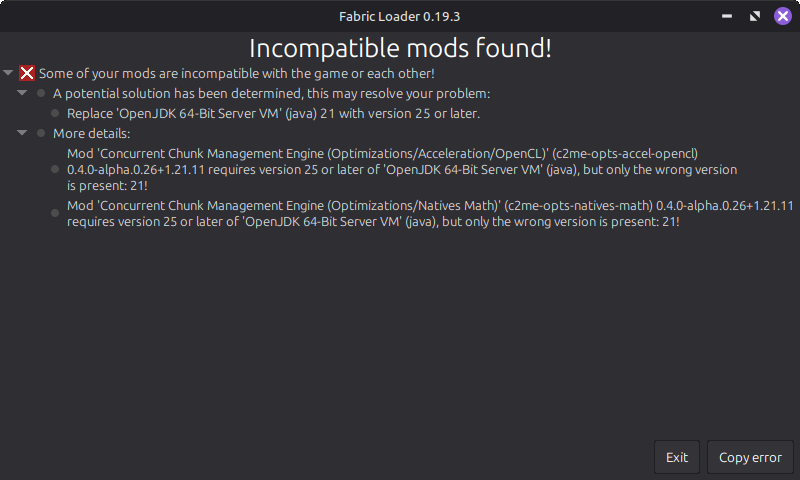
For this error, you must install said version of Java on your computer and then go to Shades ‘n’ Shine> Instance Settings> Java and memory> Java version. Here you need to tick the box that says: “Custom Java Installation” and then choose “Detect” and then choose the correct version of Java.
JDK Error:
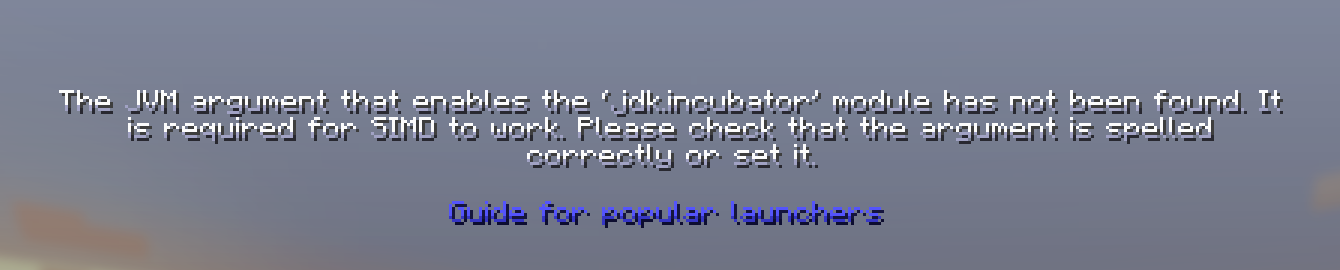
For this error, click on “Guide for popular launchers”, and it should be smooth sailing from their – It’ll have an easy step-by-step on their site.
Future Additions:
- My custom music
- Custom quests and advancements
- More simple QoL improvements
- Enhanced Structures (without adding much)
- Missing blocks (stairs, slabs, etc)
- Better balanced loot tables and chests
- Better Crafting Recipes
- Woodcutter
- Stonecutter Crafting Recipes
Minecraft Title created using the “Minecraft Title” plugin, which can be found on Blockbench: https://blockbench.net
My Music: https://musescore.com/s/user/62305303/sets/14941418 (to be added in the update 2.0)
Vanilla Tweaks: https://vanillatweaks.net/
Note: For an even better visual experience for skin customisation and emotes, I would recommend Essentials (mod), but remember to disable the Fresh Animations Player extension and HMI and HMI X Fresh Player Patch to avoid armour and player animations from being broken.

包含的模组 180 个,另有 3 个其他文件
 (Bee's) Fancy Crops
 (Bee's) Fluffy Carpets and Wool
 3D Armor
 3D皮肤层
 [EMF] Entity Model Features
 [ETF] Entity Texture Features
 AL's Dungeons Boss Bars
 AL's Enderman Revamped x Fresh Animations
 AL's Ghasts Revamped x Fresh Animations
 AL's Piglins Revamped x Fresh Animations
 Almanac
 AmbientSounds
 苹果皮
 Architectury API
 Armorstands Reimagined
 Atmospheric Fauna
 bad packets
BadOptimizations
 Better Biome Reblend
 Better Block Entities
 Better Clouds
 Better Mount HUD
 Better paths
 BiomeWater+
 Blooming Biosphere
 Boat Item View
 C2ME OpenCL Acceleration Module
 Cassette Music Disc
 Cerulean Fork
 Chat Animation [Smooth Chat]
 Chat Heads
 CleanCut
 Cloth Config API
 Collective
 Concurrent Chunk Management Engine (Fabric)
 Continuity
 Controlling
 Cool Rain
 Countered's Terrain Slabs
 CreativeCore
展开全部 180 个
 Crops Love Rain
 Cursors Extended
 Debugify
 Drip Sounds
 Dungeons Crit Sound REMAKE
 Dynamic FPS
 Effectual
 Elytra Contrails Mod
 Emissive Glowing Ores
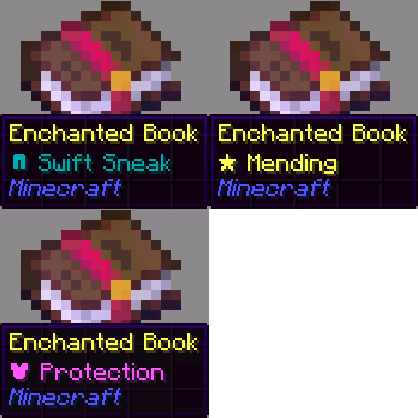 Enchant Icons
 Enchantment Glows
 Even Better Enchants
 Extra Sodium Fog Fix
 F.M.R.P
 FA: Player × HMI Patches
 Fabric API
 Fabric Language Kotlin
 facebar
 砍树
 Fancy World Animations [FWA]
 Fast IP Ping
 Fast Links
 Fast Noise
 Faster Crouching
 FerriteCore
 Forge Config API Port
 Fresh Animations
 Fresh Animations Patch - Variants and Ventures
 Fresh Animations: Creepers
 Fresh Animations: Details
 Fresh Animations: Emissive
 Fresh Animations: Player Extension
 Fresh Animations: Quivers
 Fresh Animations: Spiders
 Fresh Flowers and Plants
 Fresh Skeleton Physics
 Friends&Foes (Fabric/Quilt)
 Friends&Foes - Beekeeper Hut (Fabric/Quilt)
 Friends&Foes - Flowery Mooblooms (Fabric/Quilt)
 Fzzy Config
 Get It Together, Drops!
 Gnetum
 GPUBooster
 Gravestones
 Head in the Clouds
 Hold My Items
 ImmediatelyFast
 Immersive Optimization
 Immersive Storms
 Interactive Foliage
 Ixeris
 Jade 🔍
 JamLib
 Jasione
 Just Zoom
 Konkrete
 Krypton
 Ladders Don't Suck
 LambDynamicLights - Dynamic Lights
 Language Reload
 lazy-language-loader
 Let Me Despawn
 libIPN
 LibJF
 锂
 Make Bubbles Pop
 Map Distance Fix
 Marlow's Crystal Optimizer
 模组菜单
 ModernFix-mVUS
 More Chat History
 More Culling
 鼠标微调
 Natural Motion Blur
 No Chat Restrictions
 No More Gap
 No Realms Button
 No Telemetry
 Os' Colorful Grasses
 Packet Fixer
 Particle Core
 Particle Interactions
 Particle Rain
 Particular ✨ Reforged
 Pick Up Notifier
 PneumonoCore
 Polytone
 Presence Footsteps
 Puzzle
 Puzzles Lib
 RailOptimization
 Ray's Better Sugarcane
 Replanter Plus
 Resourceful Lib
 Respackopts
 Rethoughted Spawn Eggs
 Riding Mouse Fix
 Roman Numerals for Enchant Icons
 ScalableLux
 Scribble
 Searchables
ServerAddressSpaceFix
 Shaded Font
 Shield Fixes
 Shulker Box Tooltip
 Shulker Buddies
 Shut Up GL Error
 shut up realms
 Signs Faster
 Simply No Shading
 small totem pop
 钠
 Sodium Extra
 Sodium FPS Cap Fix
 Soft Imprints
 Stfu
 Stoneworks
 Streams Reflowing
 Sunbathing Godrays
 SWAY API
 Theone's Eating Animation Pack
 TLib
 ToadLib
 uku's Armor HUD
 ukulib
 Variants&Ventures
 Very Many Players (Fabric)
 ViaFabricPlus
 ViaVersion
 Visual: Armor Trims
 Visuality
 Vocal Villagers
 VTDownloader
 Wakes
 WalksyLib
 Wet sand
 World Alive: Ambient birds and wildlife
 XXL Enderchest
 XXL Packets
 YetAnotherConfigLib (YACL)
绿色边框的模组本站有收录,点进去看中文介绍;其余跳转到 Modrinth。
常见问题
Shades ‘n’ Shine 支持哪些 Minecraft 版本?
Shades ‘n’ Shine 基于 Minecraft Java 版 1.21.11、1.21.10,使用 Fabric 加载器。
Shades ‘n’ Shine 怎么安装?
点本页「前往下载」拿到整合包文件(Modrinth 的是 .mrpack,CurseForge 的是 .zip),在 PCL2 或 HMCL 启动器里选择「导入整合包」,启动器会自动装好 Minecraft、加载器和全部模组。这个整合包有 180 个模组,建议在启动器里给游戏分配 6–8 GB 内存。
Shades ‘n’ Shine 开服需要多大内存?
推荐服务器内存 12 GB。在线人数多、或者建了大量机器和区块加载器时,可以再加 2–4 GB。
怎么和朋友一起玩 Shades ‘n’ Shine?
点本页的「一键开服」,选好配置后会自动安装 Shades ‘n’ Shine 的服务端,几分钟就能开好。把服务器地址发给朋友,大家用同一个版本的整合包连进去就行。
Arion_Clark 的其他作品
查看全部 →
Shades ‘n’ Shine Soundtrack
Replaces Minecraft music with original songs that match the same sound for a fresh soundtrack.

Arion’s Totem Pack
This adds me as a totem into Minecraft!
Parody Pack
Aims to make parody items look alike (old music discs vs new music discs)
评论
登录后评论和评分