
Cobblemon Clumpy Bros Modpack
Modpack used in the Clumpy Bros Cobblemon series! Fabric and NeoForge versions are available!
截图
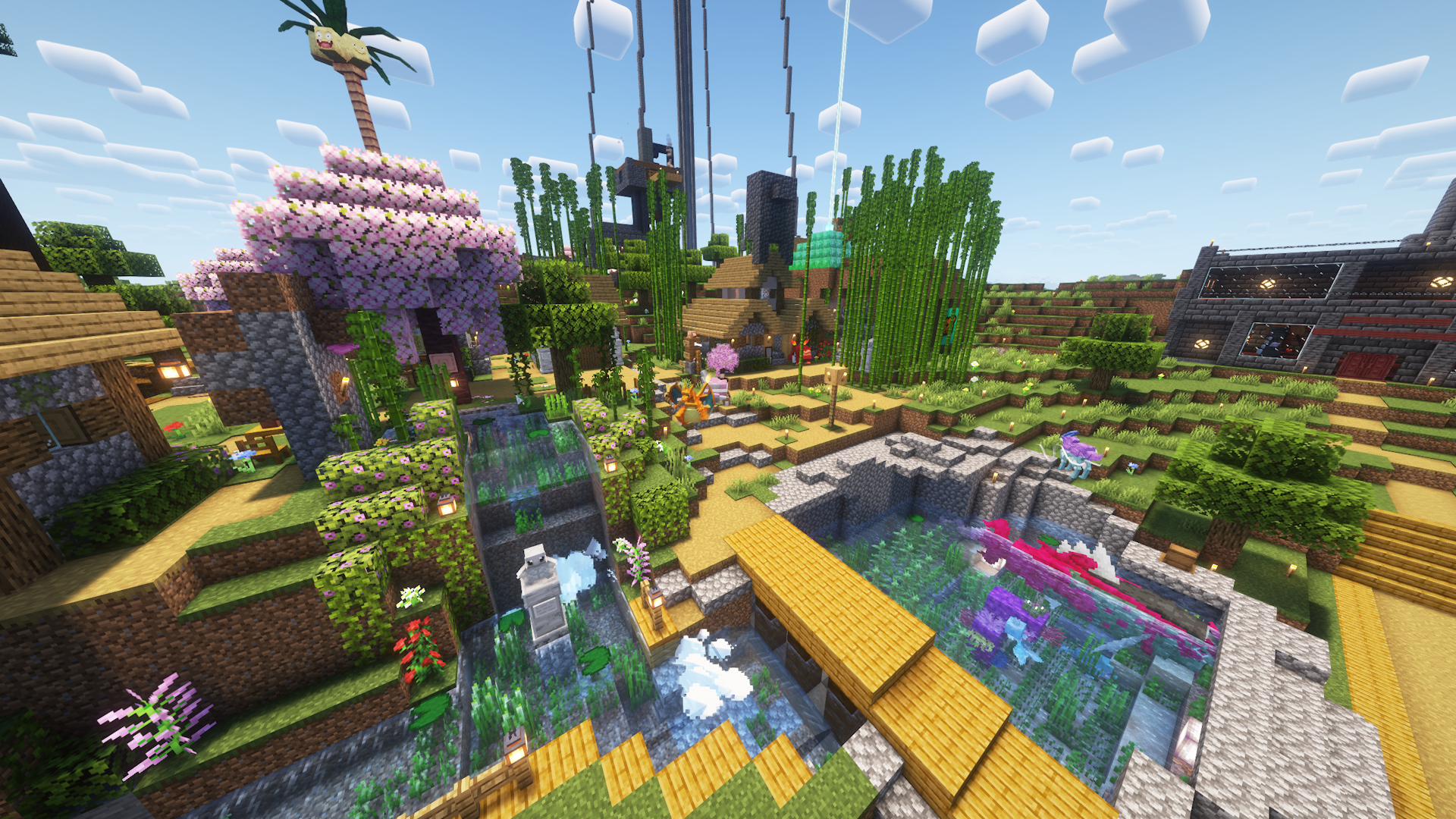
介绍

These are all of the mods used in the Clumpy Bros Cobblemon series! It includes almost all of the Pokemon thanks to AllTheMons x Mega Showdown, various addons such as Bloo’s Gacha Machine and Cobbleworkers, QoL additions such as LambDynamicLights – Dynamic Lights and Quick Shulker Boxes, and much more!
This pack will continue to be updated as more episodes are released. You can choose between Fabric or NeoForge. NeoForge was included starting with Version 1.7.1e. Our series is made using a fabric modpack so you will see different mods in NeoForge. We recommend a minimum memory allocation of 4GB (4096MB). Enjoy!
Seen in Videos but Not Included in This Pack
Mods/Packs
_NOTE: The following mods/packs may appear in videos, but are currently not included as they are used for video creation, may not be wanted by the average user, or are in development by us. This list does not include removed mods from old versions of this modpack. See the changlogs for that information:_
- Carpet
- Chunk loaders
- Cobblepastas [Cobblemon]
- Kilt (Used for adding NeoForge mods to Fabric)
- Pehkui
- ReplayMod
- Silence Mobs
- SlimyFloor (Only on Curseforge)
- Our mods in development (Space, Mega Lechonk, and a few others)
- Yes Steve Model
Pokémon
_NOTE: The following Pokémon are not included in this modpack as of version 1.7.3e. They appear in videos due to these packs:_
- Complete Cobblemon Collection Myths and Legends Compat – (Seismitoad, Tympole, Palpitoad, and Ting-Lu)
- Planeta Cobblemon’s Pokémon Pack – (Iron Boulder, Iron Jugulis, and Celesteela)
- E19 Cobblemon ONLY Minimap Icons – (Not on Modrinth)
FPS Drops or Hardware Limitations Click Here
- Try increasing your ram in settings. Click the gear icon located in the bottom left of your modrinth app. It is under the Synced settings tab. Scroll down and you will see a section labeled Memory allocation. Here you can input whatever ram your system can afford to use on the game.
Disabled by default for performance reasons
- Complementary Shaders – Reimagined (Disabled by Default as of update 1.6.0)
- Distant Horizons (Disabled by Default as of update 1.0.3)
- Concurrent Chunk Management Engine (Fabric) (Disabled by Default as of update 1.0.3)
- NoisiumForked (Disabled by Default as of update 1.0.3 and removed as of 1.8.1)
Installation Instructions Click Here
Singleplayer (Only needed if you have a version that is before update 1.0.3. This is not needed if you have 1.0.3+):
- Once the modpack is installed on the Modrinth app click the ⋮ symbol in the top right of the screen on your installation of the modpack.
- There should be two options that show up. Click on Open Folder.
- Once the folder is open, double click on the folder labeled datapacks.
- The contents in the datapacks folder need to be copied and pasted into the save folder of your world.
- Copy and paste the datapacks into the /saves/[WORLDNAME]/datapacks ([WORLDNAME] will not be your world’s name, this is an example).
Server:
- If you are hosting a server most mods and all datapacks need to be on the server.
- If you are not sure how to do this we suggest looking up a tutorial.
- If you are using a public hosting site follow their instructions on how to install a modpack.
Having Issues? Click Here
Worlds crashing:
“Errors in currently selected datapacks prevented the world from loading”
If your world if from our 1.7.3d modpack or prior and you have updated to a 1.7.3e or newer modpack version there is a good chance it is nothing datapack related. The issue is likely due to the Biome Replacer mod. This mod had an issue prior to their 3.0 version that messed up entries in the level.dat file. Luckily there is a fix and they provided a step by step guide to fix the issue. The link below will take you to their github. Follow their steps and your world should be fine. Make sure to make a backup so there is no chance of losing your world if you make a mistake.
https://github.com/WerDei/Biome-Replacer/blob/master/docs/RECOVERY-26.1.md
Legendary Spawning Myths and Legends
_NOTE: This mod is only on the 1.0.0-1.6.0 versions of the modpack Starting at 1.7.1 this mod is not installed._
The items and spawns are a part of the Myths and Legends mod/datapack. For more information visit 0Skill Wiki.
Legendaries will not spawn when right clicking with the item: Ensure you are in the proper biome. If you are unsure of the biome it would spawn in when using the item go to the 0Skill Wiki.
Other Issues
If you experience other issues feel free to report them in our discords issue reporting section or help and support section.



包含的模组 202 个
 3D Skin Layers
 [EMF] Entity Model Features
 [ETF] Entity Texture Features
 Accessories
 Accessories Compatibility Layer
 Advanced Core Info (ACI)
 Advanced Loot Info (ALI)
 Advanced Shulkerboxes
 Advancement Plaques
 AllTheMons x Mega Showdown
 Almanac
 Ambient Environment
 Another Furniture
 Anvil Never Too Expensive
 苹果皮
 Architectury API
 Athena
 Bad Wither No Cookie - Reloaded
 Balm
 Better Advancements
 Better Beds
 Better Boat Movement
 Better Nether Map
 Better Ping Display [Fabric]
 Better Third Person
 BetterF3
 Bloo's Gacha Machine v.2
 Bookshelf
 Borderless Fullscreen
 Cardinal Components API
 Carry On
 Catch Indicator [Cobblemon Addon]
 Cherished Worlds
 Chipped
 CICADA
 CIT Resewn
 ClickThrough Plus
 Cloth Config API
 Clumps
 Clumpy Bros: Burgers R Cool
展开全部 202 个
 Clumpy Bros: Poop
 Clumpy Bros: Warden Gear
 CobbledGacha v.3 [Cobblemon 1.7] [Fabric/NeoForge 1.21.1]
 CobbleDollars [Cobblemon Addon]
 CobbleFurnies
 Cobblemon
 Cobblemon - Cartoon / Anime Character Pack
 Cobblemon - Family Guy Character Pack
 Cobblemon - MC Swords for Honedge Line
 Cobblemon - Trunkified
 Cobblemon additions
 Cobblemon Armors
 Cobblemon Battle Extras
 Cobblemon Capture XP
 Cobblemon Distortion World
 Cobblemon Environment Interactions
 Cobblemon Fence
 Cobblemon Fight or Flight Reborn
 Cobblemon Integrations
 Cobblemon Launchers
 Cobblemon Minimons
 Cobblemon Pokemon Badges
 Cobblemon PokeNav
 Cobblemon Raid Dens
 Cobblemon Repel
 Cobblemon Spawn Notification
 Cobblemon Tim Core
 Cobblemon: Armory
 Cobblemon: Ball Swap Minigame
 Cobblemon: Legendary Monuments (CB 1.8 Version Out)
 Cobblemon: Lost Lore
 Cobblemon: Mega Showdown
 Cobblemon: Parting Gifts
 Cobblemon: PlayerXP
 Cobblemon: Research Tasks
 Cobblemon: SafePastures
 Cobblemon: Trainers Backpack
 Cobbleworkers
 Cobbreeding
 Collective
 Colorful Crayons
 Complementary Shaders - Reimagined
 Concurrent Chunk Management Engine (Fabric)
 Crafting Tweaks
 CraftPresence
 遥远的地平线
 Dynamic Crosshair
 Dynamic FPS
 Elytra Slot
 Elytra Trims
 EMI
 EMI Enchanting
 EMI Ores
 EMI professions (EMIP)
 Enchantment Descriptions
 Enhanced Attack Indicator
 Entity Barrier
 实体剔除
 Explorer's Compass
 Fabric API
 Fabric Custom Names
 Fabric Language Kotlin
 Falling Leaves
 FancyMenu
 Fast Item Frames
 Fast Noise
 FerriteCore
 Forge Config API Port
 Friends&Foes (Fabric/Quilt)
 Fusion (Connected Textures)
 Fzzy Config
 Geckolib
 Glass Breaker
 Global Trades
 Hide Experimental Warning
 Highlight
 HyperLeash
 Iceberg
 ImmediatelyFast
 InvMove
 InvMoveCompats
 Iris Shaders
 Just Enough Effect Descriptions (JEED)
 JEI物品管理器
 Kiwi 🥝
 Konkrete
 Krypton
 LambDynamicLights - Dynamic Lights
 Language Reload
Lava Clear View
 Let Me Despawn
 锂
 Lithostitched
 Longer Chat History
 Lucky's Cozy Home: Refurnished
 Make Bubbles Pop
 Melody
 MezzConfig
 模组菜单
 Monsters in the Closet
 Moonlight Lib
 MoreCobblemonTweaks
 Music Delay Remover (Infinite Music)
 自然指南针
 Navas ZA Megas
 Nemo's Inventory Sorting
 Not Enough Animations
 Nyf's Quivers
 Open Loader
 oωo (owo-lib)
 Paginated Advancements & Custom Frames
 Particle Rain
 Particular ✨
 Ping Wheel
 Pokeblocks
 Polymer
 Presence Footsteps
 Prickle
 Puzzles Lib
 Rad Gyms [Cobblemon]
 Radical Cobblemon Trainers
 Radical Cobblemon Trainers API
 RCT Badges - Cobblemon Pokemon Badges
 Rechiseled
 Rechiseled: Cobblemon
 Reese's Sodium Options
 Resourceful Lib
 Rotten Flesh Leather
 Satin Free Wakes
 Shulker Box Tooltip
 Sniffer Archaeology (Cobblemon)
 钠
 Sodium Extra
 Sodium Shadowy Path Blocks (SSPB)
 精妙背包
 Sophisticated Core (Unofficial Fabric port)
 Sophisticated Storage (Unofficial Fabric port)
 Sophisticated Storage in Motion (Unofficial Fabric port)
 Stendhal
 Superflat World No Slimes
 SuperMartijn642's Config Lib
 SuperMartijn642's Core Lib
 SwingThrough
 Terralith
 Text Placeholder API
 Title Fixer
 Toni's Immersive Lanterns
 ToolTipFix
 Tree Harvester
 Trinkets
 TxniLib
 UniLib
 Universal Graves
 Villager Barrier
 Visuality
 传送石碑
 Xaero的小地图
 Xaero的世界地图
 YetAnotherConfigLib (YACL)
 Your Options Shall Be Respected (YOSBR)
 ZConfig
 Zoomify (Zoom)
绿色边框的模组本站有收录,点进去看中文介绍;其余跳转到 Modrinth。
评论
登录后评论和评分