
截图


介绍
DISCONTINUED
The new Project is EinsEinundzwanzigElf for MC 1.21.11 (Fabric). There is “Create Fly” which ports Create to the newest Minecraft version.
This is old:
RoadWeaver mod added in 1.6.3
World generation takes longer. And world joining after the generation even takes more longer then. To a point where you think the game has crashed. As other road constructing mods I’ve tested this one does not consume FPS after the roads are layed. Your world just makes sense now. Consider adding modded villages and structures you like to the road config in the road map. A fresh installation only has the vanilla villages in it.
Memory needed = 4GB
It is possible to play the Overworld with only 2GB (2048MB) of RAM. However, as soon as you enter the Nether due to the enhanced world height the game will start lagging and finally freeze.
With 4096MB (4GB) the Nether runs smoothly.
1.5.2 Create Up and Downs
About a week after the modpack was stable again Create was updated. Promising to be more stable and having fixed many issues. So Create 6.0.7 was packed in and BWG was back again. But – The new Create is not stable. We lost our server world when Bohzo made an elevator.
The next issue was giving a straw to a blaze burner.
Create is now back to 6.0.6 but BWG is updated and sends a lot of error messages to the server console. Petrol_s Parts are back.
Big storage mods are not needed as Create and Tom’s get everything done.
1.4.1 Big Cut (about 100 mods gone)
After the server not starting up anymore I decided to give it a fresh start. I learned that Create could replace AE2 in it’s own way. So I decided to stuck with Create and Tom’s Simple Storage as the main mods.
Version 1.3.1 fixed invulnerability bug
With a shield, you were invulnerable due to the config setting of negating 100% from incoming damage. Bohzo and I decided to allow the passive shield to destroy only 50% of the damage. This lets the shield still be an important piece of armor. We are already having more fun and more death notes with the new setting.
Version 1.3.0 is online
New testserver setup will follow soon. Powah is still there as it proved stable when the optimization mods are gone. The only optimization mod now in the modpack is “I’m Fast” which shall switch off “moved too quickly” and “moved wrongly” errors.
It is recommended to start a new world as the world generation has totally changed. Energized Power was in the pack during testing, now it is not any more. We have Pneumatic Craft instead.
How to set up a server (not required for single player)
If you have a MineCraft Server:
Keep in mind that there are mods which are Single Player only and only belong to the client side. This explains why after uploading the mods and configs folder to your server you will start to delete mods from the mods folder.
- Install your server with the newest NeoForge version.
- Upload mods and config folder contents from your single player installation to the server’s correct folders
- Delete some jar files from the mods folder:
- AdvancedBackup
- better-clouds
- BuildGuide
- journemap-webmap-neoforge
- lighty-neoforge
And that was it.
Hello
I do not like grinding. I do not want to do strip mining. I want to be able to craft my resources. But it shall not be too easy. Then I’ll lose interest. And build some cool contraptions.
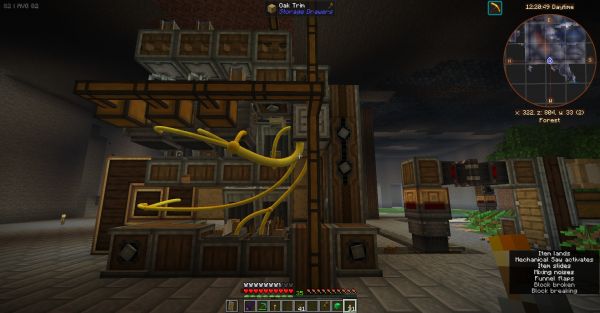
This modpack is centered around two main mods:
Create and Tom’s Simple Storage
New to the Create mod?
Official Create Mod teaser video from the mod website:
Here’s an intro which helped me a lot. It is not made by me. I am not to blame for it.
But I like it.
https://www.youtube.com/watch?v=bf4viR2cF1A (direct link)
And some quality-of-life mods
For example:
- 1024 Extended: World height and depth changed to 1024
- Accessories: More slots
- Multiple structure mods to borrow resources from
- Backup
- Anvil mods (cost, restauration, enchantment transfer)
- Automatic doors
- Bank & Tank storage
- Better Clouds
- Bibliocraft furniture
- Curvy Pipes
- Distracting Trims
- Emi & Jei (Recipes lookup mods)
- Enchanting Infuser, Enchantment Descriptions
- Everlasting Abilities
- Farmers Delight, Farming for Blockheads
- Storage Drawers, Functional Storage, Tom’s simple Storage
- Geophilic
- Rotten flesh converting to leather in a furnace
- Iron Jetpacks (there are some more flight – mods inside for gliders and airplanes)
- Journeymap (Waypoint teleporting), Journeymap Webmap (A use for your 2nd monitor)
- Mineral Chance
- Modern Fix
- Modular Routers
… I’m out of ink here. There’s more.
There are many Create-themed buildings all over the map w
here you can “borrow” your first create-related resources from. With the “Mineral Chance” mod we avoid mining and get first iron, redstone and even diamonds from digging out the base.
Explore, build and prosper with the Create mod and some Create-related mods. Fly, glide or teleport through the world. Build the early game storage system with Tom’s simple storage system. It is the backbone to everything and motiviation to go to the Nether very early. Don’t forget to wear a shield.
You may allow map teleporting in the admin settings of Journeymap. On a server, you have to OP yourself before you try to alter admin settings in Journeymap.
However, gameplay is better without map teleporting! It is just more fun and gives some use cases for trains and horses when there is no map teleporting.
There are no ore-growing mods. Most of the ores are to be generated by Create contraptions. Some have to be collected mid-game by Create-Trains from Ore-Excavation-Mines.
No more test server
My test server carries now the modpack EinsEinundzwanzigElf (Fabric) which is my newest modpack.
The reasons for migrating to 1.21.11 and Fabric were the Voxy mod and the Create Fly project.
A very annoying Minecraft bug is fixed in that modpack:
The new terrain now quickly generates far away and not immediatley before your next step forcing you to wait.
Have Fun!
Konitor
Quickstart
- Aim:
The base will be 3×3 and chunkloaded with a brass chunkloader. It shall provide all resources.
- Steps:
Setting up keys
First is to set up key configs. The key configs do not need to be 100% atm. In the video options I set the gui to “2” and view bobbing off. Did you set a waypoint to the world spawn point?
Get logs and and a set of stone tools
Kill some trees with your bare fist and veinmining “shapeless”. The mousewheel can change the veinmining shape when the veinmining key is held. But for trees there is the “shapeless” setting just the right one. Make a crafting table and a pickaxe. Mine down with your bare fist until you find stone and then veinmine this with your wooden pick. The wooden pick is gone and you have 64 stone blocks. Make 2 stone picks, a stone sword, a stone axe.
A bed and an iron ingot
Now search for a tower on the map and climb to top of the tower. Do not take to much from the chests as your inventory is too small for everything. Search some more towers to get iron for the shield and your first iron pick. Kill 3 sheep for the wool for your first bed.
A shield
The next priority is the shield. There is a mod installed which makes the shield extra useful. Before suiting up the shield is the most important thing to not get killed too often in this world.
The backpack
With the shield equipped the next thing is to find 4 strings (cobwebs) and 4 leather (cows or zombies) to make a backpack. This is the next prority: Get a backpack.
Waypoint grouping
While searching all this you certainly stumble over some create-buildings. Make a groups in the journeymap and collect your waypoints there.
I have some groups like “On the road” where I put interesting non-Create locations and “Lava lakes” where I put them. Lava is a most precious resource for the Create mod and I tend to destroy at least one lake totally with water for my first obsidian armor , tools and nether portal.
Pouring a water bucket and then veinming all the obsidian shapeless (and shamelessly) with the first diamond pick is very satisfying.
The “Bank”
Before digging out the base we need to craft a “bank”. It should be upgraded to copper, at least. Waxed copper blocks and copper blocks will be parts of some create-buildings on the map. You can uncraft waxed copper to normal copper with the uncrafting table.
The bank has to be set to “void overflow”. As mineral chance is spoiling your inventory constantly with nuggets and dust and gems I suggest to put them into the bank so that your main inventory is just cluttered with everything you added. And not with extra minerals.
Everlasting Abilities
While searching towers and buildings you certainly stumble over some golden “Everlating Abilities” items. Great, but do not install everything you find. The ones you want are:
- Fire Resistance
- Conduit Power or Wather Breathing (only one of them)
- Entity Reach (up to ten)
- Block Reach (3 is enough)
- Luck
- Strength
You can always craft 3 in a standard crafting table to a new one. I put 2 totems into the table and shift-click a new one in and out until the crafting result shows something interesting. When all totems are tested then I take one out of the crafting table and put it aside. It will not be tested again this time. I put another 2 in the crafting table and beging shift-clicking one in and out again. I repeat that until all is tested. The main focus is to get fire resistance first for the first nether trip. But really, with the shield in place and some armor it is not needed so very urgently. You’re fine without fire resistance in the nether. But finer with.
The magnet
Build a magnet from 5 iron ingots, an enderpearl and a redstone dust and a lapiz dust. Do never use Everlasting Ability for the magnetize ability. The magnet can be improved to its advanced version but this is not necessary just now. Keep in mind that you can craft demagnetizers which will disable magnets in a certain range. This is useful for any contraption where items are falling down. These items would end up in your inventory instead of being processed.
The Nether
You have dried out a lava lake? Now you’re ready for the Nether. Believe me. You will most likely not die. Put on an obsidian armor suit. Get a diamond sword. Maybe decide to wear one armor piece made of gold just for the piglins.
Search the nether for:
- soul sand
- nether quartz (this is very rare now compared to older MC versions)
- glow stone (this is very rare now compared to older MC versions)
If you feel brave you may even raid a “bastion remnants” structure which can hold netherite upgrade smithing templates and even netherite ingots. I am not so brave and only raid bastions with fire resistance in place. There are some much more less dangerous structures which will give alot of templates and netherite like the obsidian temple. Mining netherrack will “Mineral Chance” allow to give you quartz, gold and netherite scrap. You can get netherite just by mining netherrack in the nether! That is cute.
Tom’s simple storage
You were in the nether? You now have some glowstone and quartz? Yay! Build a storage connector and a crafting terminal to connect all of your chests. If chests do not connect you can put some barrels as connectors between or under them. Bingo! Your first early game storage with crafting.
包含的模组 166 个,另有 2 个其他文件
 Accelerated Decay
 饰品
 Accessorify
 Advanced Backups
 Advancements Reloaded (AdvancementInfo)
 Alternate Current
 Amber
 Anvil Restoration
 苹果皮
 Architectury API
 Automatic Doors
BadOptimizations
 Balm
 Bank Storage
 Better Villages
 BiomeSpy
 Building Wands
 Chat Heads
 Cloth Config API
 Clumps
 Collective
 Compat API
 Compat Structure
 Controlling
 CorgiLib
 机械动力
 Create Contraption Terminals
 Create Crafts & Additions
 Create Ore Excavation
 Create Stuff 'N Additions
 Create: Bells & Whistles
 Create: Better Villagers
 Create: Connected
 Create: Creator Sword
 Create: Dimension, Steamworks Realm
 Create: Dragons Plus
 Create: Dreams & Desires
 Create: Easy Stone Generators
 Create: Easy Structures
展开全部 166 个
 机械动力:附魔工业
 Create: Ender Link
 Create: Escalated
 Create: Hypertubes
 Create: Let The Adventure Begin
 Create: New Beginnings
 Create: Power Loader
 Create: Structures Arise
 Create: Trading floor
 Create: Ultimate Factory
 Cucumber Library
 Curios API
 Curvy Pipes
 Custom Item Despawn Duration
 Cyclops Core
 Disconnect Packet Fix
 Dungeons and Taverns
 Easy Auto Cycler
 Easy Disenchanting
 Emmys Armor and Tools
 Everlasting Abilities
 Explorer's Compass
 农夫乐事
 Farming for Blockheads
 Fast IP Ping
 Fast Paintings
 FerriteCore
 Fixed Anvil Repair Cost
 Flerovium
 Forge Config API Port
 Fzzy Config
 Geckolib
 Gilded Armor
 GPUBooster
 GravelMiner
 GraveStone Mod
 Guard Villagers
 GuideME
 Healing Campfire
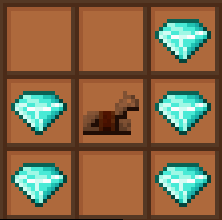 Horse Armor Craft
 I'm Fast
 ImmediatelyFast
 沉浸式飞机
 沉浸式盔甲
 Immersive Furniture
 Inventory Essentials
 Iron Jetpacks
 Jade 🔍
 JamLib
 旅行地图
 JEI物品管理器
 Just Hammers
 Just Zoom
 Kiwi 🥝
 Konkrete
 Kotlin for Forge
 Ksyxis
Lava Clear View
 Library Ferret
 Lighty
 Liteminer
 Macaw's Bridges
 Macaw's Windows
 Macro Keybinds
 Mineral Chance
 ModernFix
 Moonlight Lib
 More Concrete
 自然指南针
 No Chat Reports
 No Hostiles Around Campfire
 Noisium
 Obsidian Gear
 Obsidian Tools by CalculusEyesight
 我们走过的生物群系
 Oh The Trees You'll Grow
 OverpoweredMending
 oωo (owo-lib)
 Passive Shield
 Petrol's Parts
 Petrolpark's Library
 Player Plates (Obsidian Plates)
 Polymorph
 Potion Rings - Reforged
 Powah!
 Quicksand (NeoForge)
 Reinforced Obsidian
 Reliquary Reincarnations
 RoadWeaver
 ScalableLux
 Seamless Loading Screen
 Searchables
 Server Sleep
 Simple Magnets
 Slime Buckets
 Small Ships
 钠
 精妙背包
 Sophisticated Backpacks Create Integration
 Sophisticated Core
 Sophisticated Sorter
 Sophisticated Storage
 Sophisticated Storage Create Integration
 Stack Refill
 储物抽屉
 SuperMartijn642's Config Lib
 SuperMartijn642's Core Lib
 Tank Storage
 TerraBlender
 There Were A Number Of Signs
 Thief
 汤姆的简易存储
 Too Expensive Extractor
 Torch Toss
 Trade Cycling
 Trash Cans
 TxniLib
 Uncraft Everything
 Unseaworthy
 Vary Me
 Villager Death Messages
 Waystone Towers
 传送石碑
 WITS (What Is This Structure?)
 YetAnotherConfigLib (YACL)
 红石辅助RedstoneAuxiliary
左侧绿标的模组本站有收录,点进去看中文介绍;其余跳转到 Modrinth。
常见问题
EinsEinundzwanzigEins 支持哪些 Minecraft 版本?
EinsEinundzwanzigEins 基于 Minecraft Java 版 1.21.1,使用 NeoForge 加载器。
EinsEinundzwanzigEins 怎么安装?
点本页「前往下载」拿到整合包文件(Modrinth 的是 .mrpack,CurseForge 的是 .zip),在 PCL2 或 HMCL 启动器里选择「导入整合包」,启动器会自动装好 Minecraft、加载器和全部模组。这个整合包有 166 个模组,建议在启动器里给游戏分配 6–8 GB 内存。
EinsEinundzwanzigEins 开服需要多大内存?
推荐服务器内存 12 GB。在线人数多、或者建了大量机器和区块加载器时,可以再加 2–4 GB。
怎么和朋友一起玩 EinsEinundzwanzigEins?
点本页的「一键开服」,选好配置后会自动安装 EinsEinundzwanzigEins 的服务端,几分钟就能开好。把服务器地址发给朋友,大家用同一个版本的整合包连进去就行。
Konitor 的其他作品
查看全部 →
Create: Nerfad
补全 Create Fly 中大部分缺失的配方。

EinsZwanzigEins
面向探险家和建筑师的机械动力整合包。包含许多QoL模组。需要Java内存略大于4GB。 1.20.1是支持机械动力模组的最新MC版本。此整合包包含机械动力及一些附属模组。 该整合包可以安装在服务器上。

Einseinundzwanzig
Early modpack for 1.21. Many structures to explore, ore generation and low tech storage systems are available. Vein mining gives ores and building blocks. CC turtles.

VeinDigging Global Blacklist
A datapack to introduce a global blacklist which may help in preventing one-click-base-destroying if the VeinDigging mod is installed.
评论
登录后评论和评分