
截图

介绍
Triton
Triton is a modern, opinionated QOL & optimization focused modpack, mainly meant for survival gameplay.
Why “opinionated”?
Triton is meant to be a plug&play experience, with as little further configuration as possible required after installation to get to a good Minecraft experience.
This is why lots of features are included out-of-the-box. If you’re looking for a minimal modpack purely focused on performance, try Fabulously Optimized.
Features
⚡ General optimization
Thanks to performance mods like Sodium and Lithium, Triton may improve performance both in clients and servers.
In the same world and on the same system with default settings in both scenarios, Triton provides a ~150 fps increase compared to vanilla Minecraft.
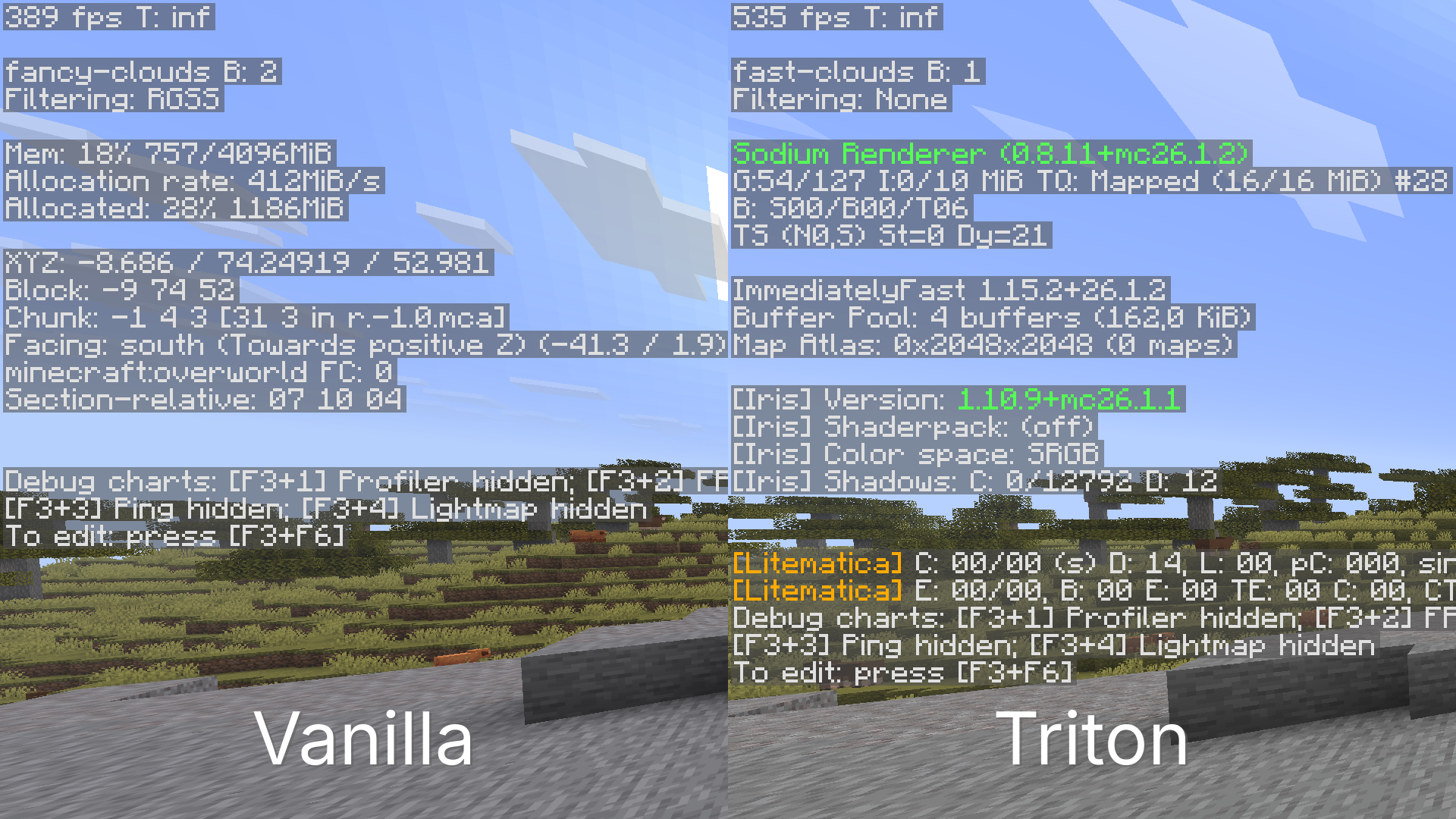
🧭 OptiFine parity
Most OptiFine features, such as Better Grass, Dynamic Lighting, capes, custom resource pack features, shaders and more are available on Triton.
🎤 Voice Chat
Voice chat through Simple Voice Chat is included. When joining a world or server for the first time, you will get prompted through chat to configure your audio settings.
🗺️ World & mini maps
A minimap and a world map are included thanks to Xaero’s mods. Please note that the Cave Mode and Entity Radar features are disabled by default for fairer play, but they can be re-enabled in singleplayer or if the server allows it.
✨ UI Improvements
This list is non-exhaustive.
- Smoother scrolling, item, and player animations.
- Dark mode by default
- The XP bar shows both the experience level and Locator Bar at the same time at all times, also replacing colored dots with the players’ skins.
- The armor bar changes textures based on the armor you’re wearing.
- The hunger bar shows saturation, and each food item shows how much hunger points it recovers in its tooltips.
- You can see your own name in third person and in the inventory.
- View bobbing and hand bobbing are separated, so you can keep your screen still while still seeing the hand bobbing animation.
🔨 Utility mods
This list is non-exhaustive. Keep server rules in mind when playing multiplayer to avoid getting banned.
- Included auto-clicker: You can set up the in-game autoclicker to AFK at farms. The advantage of having it in-game is that you can do other things on your computer while it is running, and you can set it up to respect the attack cooldown.
- Freecam: You can freely move your player camera to view builds from a higher angle.
- Tweakeroo and Fullbright: The fullbright tweak in Tweakeroo is bound by default to Ctrl + G.
- MiniHUD: By default, you can see your coordinates and IGT in the bottom-left corner, but MiniHUD can be configured to do much more. Check its page for more info.
- Litematica: Litematica is installed by default, and the tool item is disabled.
- In-game calculator: A calculator can be accessed through the
/calccommand in chat, and it also has some handy tools for Minecraft, like/calc itemtostack.
Keybinds
| Action | Key |
|———————-|———-|
| VC settings | Ctrl + V |
| Mute VC | Ctrl + M |
| Autoclicker config | Ctrl + O |
| Toggle autoclicker | Ctrl + I |
| Toggle Freecam | F4 |
| Zoom | C |
| HD screenshot | F9 |
| Toggle Fullbright | Ctrl + G |
| New Waypoint | B |
Set up a Triton server
While Triton works perfectly fine client-side only, creating a server with it can unlock features such as Voice Chat for your players, and optimize it as well. Even after installing Triton on your server, Vanilla players will be able to join as well.
Option 1 (recommended)
If your hosting platform or panel has a way to install Modrinth modpacks directly, use that for the best experience.
Likewise, if it has a way to install Packwiz modpacks, use that for the best experience. The pack.toml URL follows: https://raw.githubusercontent.com/Alexciao/triton/master/pack.toml
Option 2
If you’re self-hosting or your hosting platform doesn’t support Modrinth modpack installs directly, the next best option is using packwiz-installer-bootstrap. Keep in mind that this option can only install the latest version of the modpack.
After you’ve set up your Fabric server, follow this guide to install Triton:
- Make sure you have a supported version of Java 25+ installed.
- Download the latest release of
packwiz-installer-bootstrapfrom here and place it in the root of your server folder. - Run this command in any terminal, not your MC server console:
java -jar packwiz-installer-bootstrap.jar -g -s server https://raw.githubusercontent.com/Alexciao/triton/master/pack.toml - Optional, but helpful to always keep the modpack up-to-date: If your server panel or software supports it, set that same command to run every time before you start the server (e.g. by editing the launch command or running a pre-launch hook).
- Run your server as normal.
包含的模组 105 个
 3D皮肤层
 [EMF] Entity Model Features
 [ETF] Entity Texture Features
 Advancement Plaques
 Amecs
 Animatica Refabricated
 苹果皮
 Architectury API
 AudioPlayer
 Auto Clicker
 Better Block Entities
 Better Clouds
 Better Mount HUD
 Better Statistics Screen
 BetterGrassify
 BetterHandBobbing
 CalcMod
 Cape Provider
 Chat Reporting Helper
 Cherished Worlds
 Chunky
 Cloth Config API
 Collective
 Config Manager
 Continuity
 Cubes Without Borders
 Debugify
 Default Dark Mode
 Detail Armor Bar Reconstructed
 双开门
 Dynamic FPS
 EclipseUI
 实体剔除
 Fabric API
 Fabric Language Kotlin
 Falling Leaves
 FastQuit
 FerriteCore
 Flashback
 Forge Config API Port
展开全部 105 个
 Freecam
 FrozenLib
 Highlight
 Iceberg
 ImmediatelyFast
 Inventory Blur
 Iris Shaders
 Ixeris
 LambDynamicLights - Dynamic Lights
 Language Reload
 Ledger
 Litematica
 锂
 Locator Heads
 Main Menu Credits
 Make Bubbles Pop
 MaLiLib
 MiniHUD
 模组菜单
 More Chat History
 More Culling
 鼠标微调
 NBT Autocomplete
 No Chat Reports
 No Chat Restrictions
 No Double Sneak
 Not Enough Animations
 One Click Join
 OptiGUI
 Paginated Advancements & Custom Frames
 Particle Tweaks
 Peek
 Ping View
 Puzzle
 quick pack
 Raised
 Reconnect
 Remove Reloading Screen
 Resourcify
 REI物品管理器
 Server Pinger Fixer
 Servux
 Simple Modpack Update Checker
 Simple Voice Chat
 Simple Voice Chat Enhanced Groups
 Sit
 Skyboxify
 Slumber
 Smooth Scrolling
 Smooth Swapping
 钠
 Sodium Extra
 Sodium Shadowy Path Blocks (SSPB)
 Status Effect Bars
 TCDCommons API
 Text Placeholder API
 Third Person Nametags
 Translations for Sodium
 Tweakeroo
 View Distance Fix
 Wavey Capes
 Xaero的小地图
 Xaero的世界地图
 YetAnotherConfigLib (YACL)
 Zoomify (Zoom)
绿色边框的模组本站有收录,点进去看中文介绍;其余跳转到 Modrinth。
常见问题
Triton 支持哪些 Minecraft 版本?
Triton 基于 Minecraft Java 版 26.2、26.1.2,使用 Fabric 加载器。
Triton 怎么安装?
点本页「前往下载」拿到整合包文件(Modrinth 的是 .mrpack,CurseForge 的是 .zip),在 PCL2 或 HMCL 启动器里选择「导入整合包」,启动器会自动装好 Minecraft、加载器和全部模组。这个整合包有 105 个模组,建议在启动器里给游戏分配 4–6 GB 内存。
Triton 开服需要多大内存?
推荐服务器内存 12 GB。在线人数多、或者建了大量机器和区块加载器时,可以再加 2–4 GB。
怎么和朋友一起玩 Triton?
点本页的「一键开服」,选好配置后会自动安装 Triton 的服务端,几分钟就能开好。把服务器地址发给朋友,大家用同一个版本的整合包连进去就行。
评论
登录后评论和评分