
截图
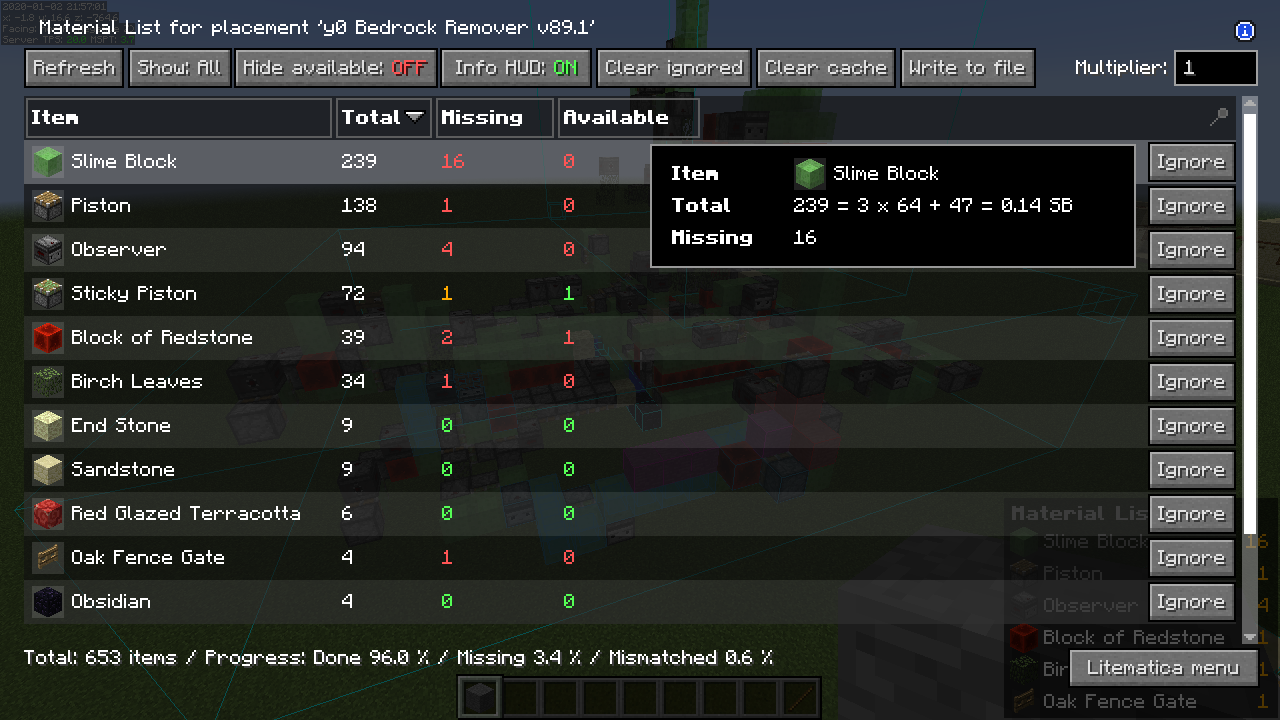
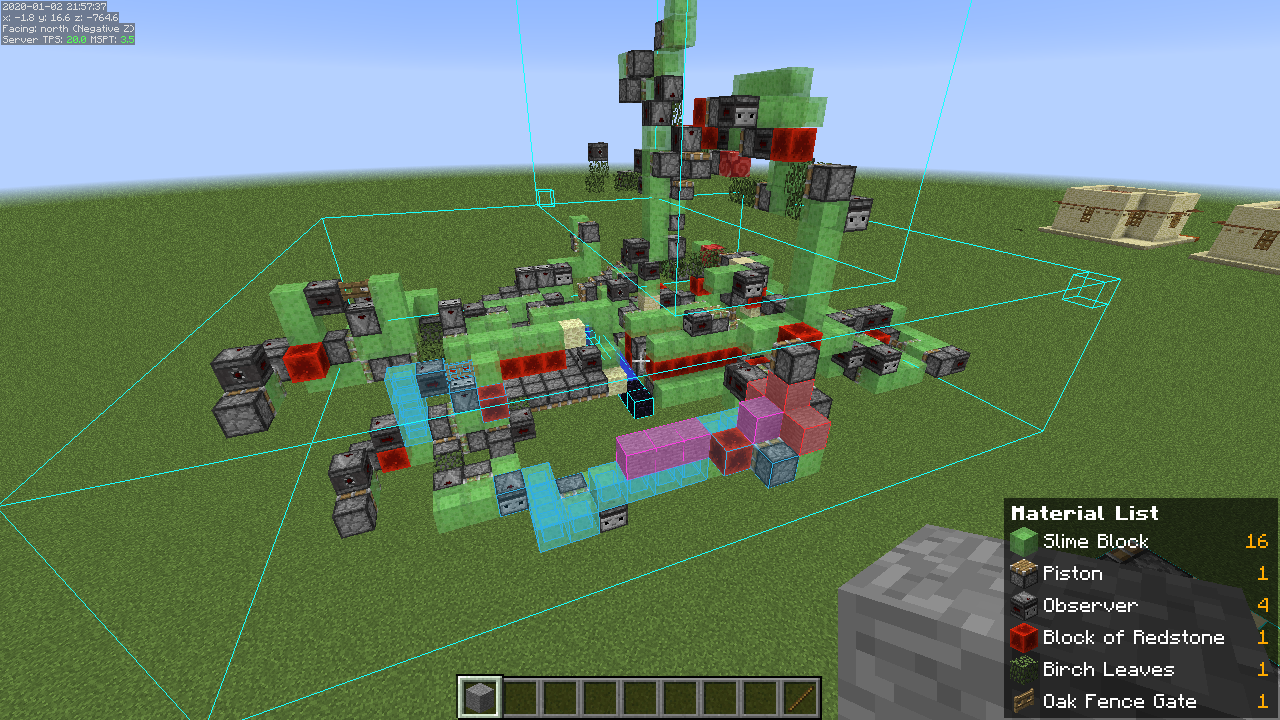
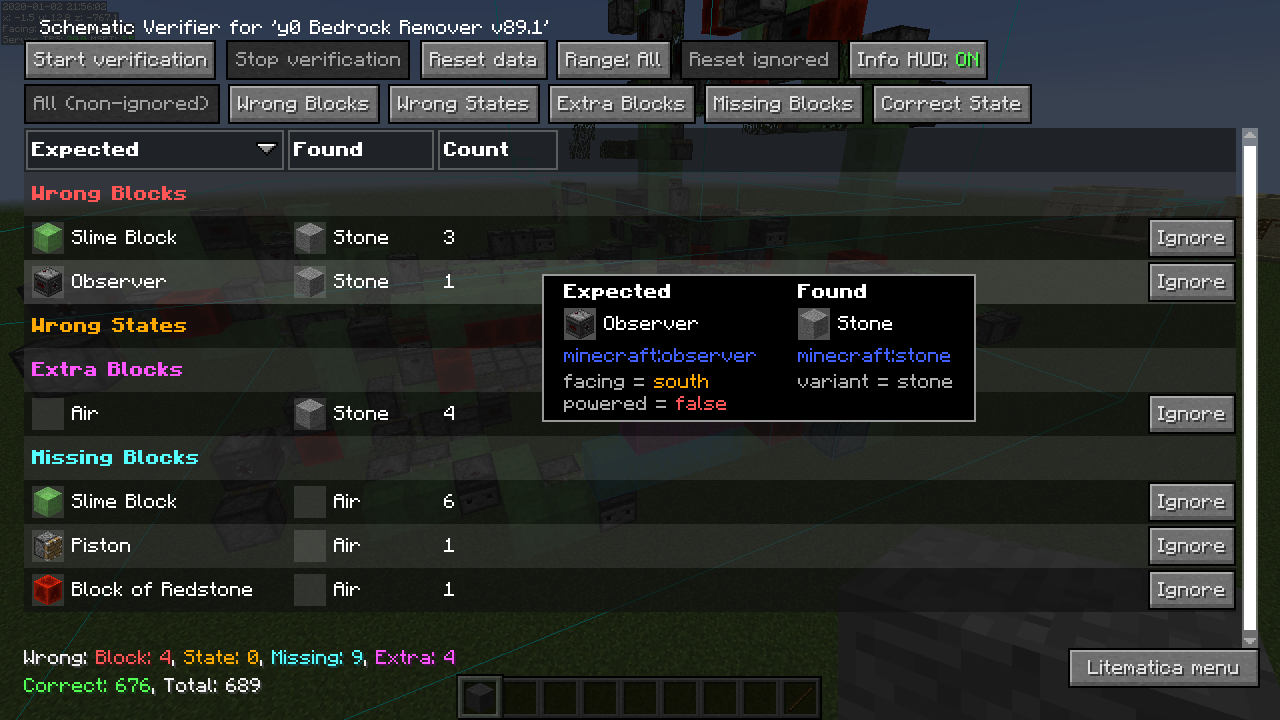
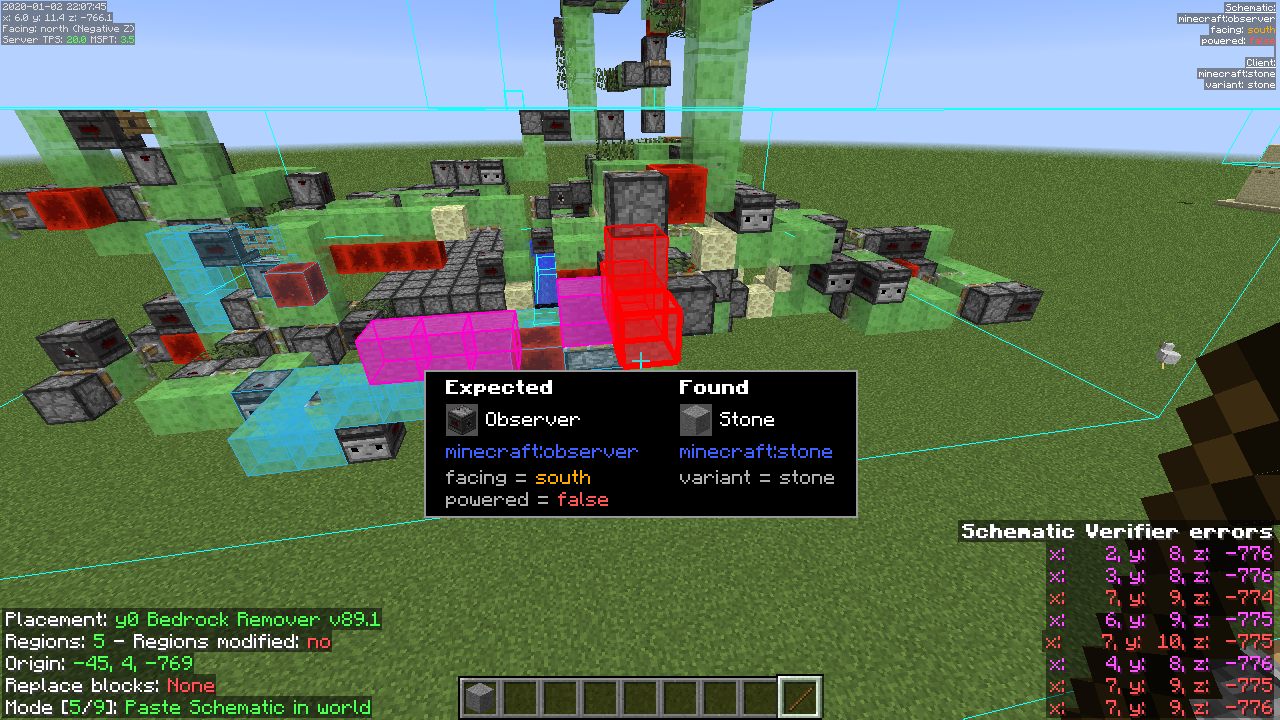
介绍
描述
Litematica 是一个现代蓝图模组,主要面向轻量级模组加载器,例如 MC 1.12.x 上的 LiteLoader、MC 1.13.x 上的 Rift 以及 MC 1.14+ 上的 Fabric。
也有一个 Forge 版本,但目前仅适用于 MC 1.12.2。对于之后的 MC 版本,目前只有第三方移植版本,例如 Forgematica。
Litematica 拥有旧版 Schematica 模组的所有主要功能(外加更多功能),但不包括打印机,打印机并不打算由 Litematica 本身提供,而是留给扩展模组(参见:aria1th printer 或 the other printer)。
与光影的兼容性
在 1.21.3+ 中,Litematica 的渲染目前无法与光影(即使使用 Iris)正常工作。因此当你需要使用 Litematica(蓝图渲染)时,请禁用光影。
在较旧的 MC 版本中,渲染与光影配合得更好,至少在使用 Iris 时是这样,但也取决于光影包。有些光影包会严重破坏渲染,但有些过去运行得相当不错。Optifine 总体上问题要多得多,基本上如果你使用 Litematica,就完全无法使用光影。一般建议使用 Sodium(和 Iris)而不是 Optifine。
快捷键
打开 Litematica 主菜单的默认快捷键是 M。
注意:如果你使用非 QWERTY 键盘布局,那么按键可能会有所不同,例如在 AZERTY 布局上 M 会变成 ,。
其他常见默认快捷键:
M + C– 直接打开配置菜单的快捷键M + R– 切换开启/关闭 Litematica 的全部渲染M + G– 仅切换开启/关闭蓝图渲染(“幽灵方块”——例如所有 HUD 仍会渲染)M + T– 切换开启/关闭“工具物品”(默认是一根木棍)功能M + P– 直接打开蓝图放置菜单/列表M + V– 打开蓝图验证器菜单小键盘减号– 打开当前选中放置的放置配置菜单小键盘乘号– 打开区域编辑器菜单Page Up/Down– 在渲染层设置中更改选中的层M + Page Up/Down– 更改渲染层模式Ctrl + 滚轮(手持工具时)- 循环切换“工具模式”(主菜单左下角也有对应按钮)Alt + 滚轮(手持工具时)- 将选中的放置或区域选择框或角点(取决于工具模式)朝玩家所看的方向微调/移动Ctrl + M– 切换或循环某些“工具模式”的“子模式”或主要设置,例如粘贴模式中的pasteReplaceBehavior、区域选择模式中的Corners与Expand行为,或删除模式的Area与Placement行为
多人游戏警告
简易放置模式功能可能会让你在某些服务器上被封禁!
轻松放置功能将始终点击目标位置空气方块,这很容易被反作弊系统检测到。因此,这至少可能导致两种情况:方块放置会被直接拒绝,你只会看到客户端侧的幽灵方块;或者某些反作弊系统将其标记为作弊并自动将你从服务器封禁。所以,在使用轻松放置之前,请先确认服务器是否允许!
如果你安装了Optifine…
一般来说,我不推荐使用Optifine(无论是配合Litematica还是其他情况),因为它会导致各种渲染问题。相反,如果你想要光影,我推荐使用Sodium和/或Iris。
如果你安装了Optifine,那么你很可能需要在Optifine中禁用一些选项,否则会破坏蓝图渲染:
- 如果你遇到奇怪的故障三角形,那么在1.16+中首先尝试更新到最新的Litematica版本。如果那不起作用,则将光影设置为
OFF(不是Internal)并重启游戏。 Render Regions可能需要禁用,以防止奇怪的渲染问题(蓝图部分在奇怪的位置渲染)- 如果仍然有一些奇怪的HUD/GUI渲染问题,
Fast Render可能也需要禁用
文档
有一个wiki。该wiki仍在建设中,并且可能在某个时候会有新地址(或者更确切地说,将有一个位于新位置的新wiki,覆盖更多内容)。
其他/较旧的文档和说明,一些常见问题解答
这里有一个Reddit帖子解释了该模组的基本知识:
- https://old.reddit.com/r/Minecraft/comments/cqdmkk/anyone_can_help_me_how_do_i_make_schematics_with/exeug78/
Litematica – 服务器上的轻松放置支持
- https://old.reddit.com/r/litematica/comments/1c7j79l/easy_place_on_server/l0hzmkt/
Reddit或我的Discord服务器上的杂项说明
蓝图格式转换:
- https://old.reddit.com/r/Minecraft/comments/oabwea/schem_files_work_in_litematica_but_schematic/h3ju3sy/
Litematica普通选择模式与子区域:
- https://old.reddit.com/r/feedthebeast/comments/r9n9mi/litematicas_addselectionbox_keybind_wont_work/
- https://old.reddit.com/r/feedthebeast/comments/r9n9mi/litematicas_addselectionbox_keybind_wont_work/hnpe9yg/
Litematica – 隐藏区域选择:
- https://github.com/maruohon/litematica/discussions/755#discussioncomment-6772682
- https://old.reddit.com/r/fabricmc/comments/yw9r5y/litematica_1192_issues/ixr7l5h/
Litematica – 无法创建新的选择子区域(在简单模式下):
- https://www.curseforge.com/minecraft/mc-mods/litematica?comment=2694
Litematica – 普通/多区域选择教程:
- https://github.com/maruohon/litematica/issues/716#issuecomment-1596121219
Litematica – 在装有FabricCarpet但没有CarpetExtra的服务器上使用轻松放置:
- https://discord.com/channels/169369095538606080/566649314001158165/1235158483792433214
- https://discord.com/channels/169369095538606080/566649314001158165/1221223833889935420
Litematica – 轻松/快速选择教程:
- https://discord.com/channels/169369095538606080/566649314001158165/1187372903377936435
Litematica – 蓝图格式:
- https://discord.com/channels/169369095538606080/183172448919748608/1180841121845354516
- https://discord.com/channels/169369095538606080/566649314001158165/1176569283271213098
- https://discord.com/channels/169369095538606080/566649314001158165/1097540707931127938
- https://discord.com/channels/169369095538606080/169369095538606080/1081089742944337941
- https://discord.com/channels/169369095538606080/566649314001158165/1097564948999184394
- https://github.com/maruohon/litematica/issues/812#issuecomment-1924300257
Litematica – 保存和粘贴方块实体数据:
- https://discord.com/channels/169369095538606080/566649314001158165/1193304174838960200
Litematica – 材料列表变体:
- https://www.reddit.com/r/litematica/comments/15yz2bo/material_list_not_showing_up/jxfiwvh/
Litematica – 手动原点问题:
- https://github.com/maruohon/litematica/issues/751#issuecomment-1671611897
Litematica – 正确放置楼梯:
- https://github.com/maruohon/litematica/issues/797#issuecomment-1848386879
Litematica – 大型投影的性能提示:
- https://discord.com/channels/169369095538606080/566649314001158165/1186744945399320647
Litematica – 大型投影、性能差或崩溃,该怎么办:
- https://discord.com/channels/169369095538606080/566649314001158165/1122755969651318894
Litematica – 如何一次只显示一种方块类型:
- https://discord.com/channels/169369095538606080/566649314001158165/1133702185121755258
Litematica 不工作/按键不工作:
- https://discord.com/channels/169369095538606080/566649314001158165/1196124302634922075
Litematica “只渲染一个方块”:
- https://discord.com/channels/169369095538606080/566649314001158165/1061881509579075684
Litematica – 查找投影目录/游戏目录:
- https://old.reddit.com/r/litematica/comments/1co6vh4/downloading_schematics_on_different_versions_of/l3c21l9/
- https://old.reddit.com/r/litematica/comments/13es48n/how_to_import_schematics_on_mac/kb8bu5d/
Litematica – 使用子区域:
- https://github.com/maruohon/litematica/discussions/647
Litematica – 在服务器上粘贴红石:
- https://discord.com/channels/169369095538606080/566649314001158165/1063578995347685446
- https://legacy.curseforge.com/minecraft/mc-mods/litematica?comment=2838
- https://discord.com/channels/169369095538606080/566649314001158165/1227276878830764183
Litematica – 在服务器上粘贴物品栏内容,使用 Litemoretica:
- https://old.reddit.com/r/litematica/comments/1cg186f/items_wont_transfer/
Litematica – 粘贴任务未运行 + 较为全面的 mspt 和性能分析快速指南:
- https://github.com/maruohon/litematica/issues/656
Litematica – 投影放置说明:
- https://github.com/maruohon/litematica/issues/703#issuecomment-1553132401
Litematica – 材料列表:
- https://discord.com/channels/169369095538606080/566649314001158165/1071408321417973780
Litematica – 大型投影的性能提示:
- https://discord.com/channels/169369095538606080/566649314001158165/1198321606536200324
Litematica – .minecraft 目录中没有投影目录:
- https://www.reddit.com/r/fabricmc/comments/jn8u5d/how_do_i_add_a_schematic_for_litematic_to_load/jhk6941/
Litematica “不工作”(不在控制中)-> F3、malilib 按键、模组菜单:
- https://discord.com/channels/169369095538606080/169369095538606080/1197972330958295110
World Edit 粘贴:
- https://old.reddit.com/r/technicalminecraft/comments/j9ipu1/how_can_i_load_a_schem_file_that_i_downloaded/g8k49xj/
- https://discord.com/channels/169369095538606080/1135325334565298237/1186539038572822618
</
MacOS 如何返回上一级目录:
Youtube 教程
以下是我遇到过的一些比较好的 Youtube 教程视频。
Youtube 教程
sakura-ryoko 的其他作品
查看全部 →
MaLiLib
一个客户端模组的前置库。包含 masa 客户端模组的大部分通用/共享代码,并为依赖模组之间添加了一些互操作支持。

Tweakeroo
各类客户端微调,如自动补货、快捷栏切换/循环、灵活/快速放置方块等。

MiniHUD
一个“迷你F3”HUD模组,还带有光照等级、出生点区块、史莱姆区块等各种叠加显示。

Item Scroller
一款客户端模组,在物品栏界面中添加快捷操作,让物品移动更轻松、合成更快速
评论
登录后评论和评分