
Simply Everything
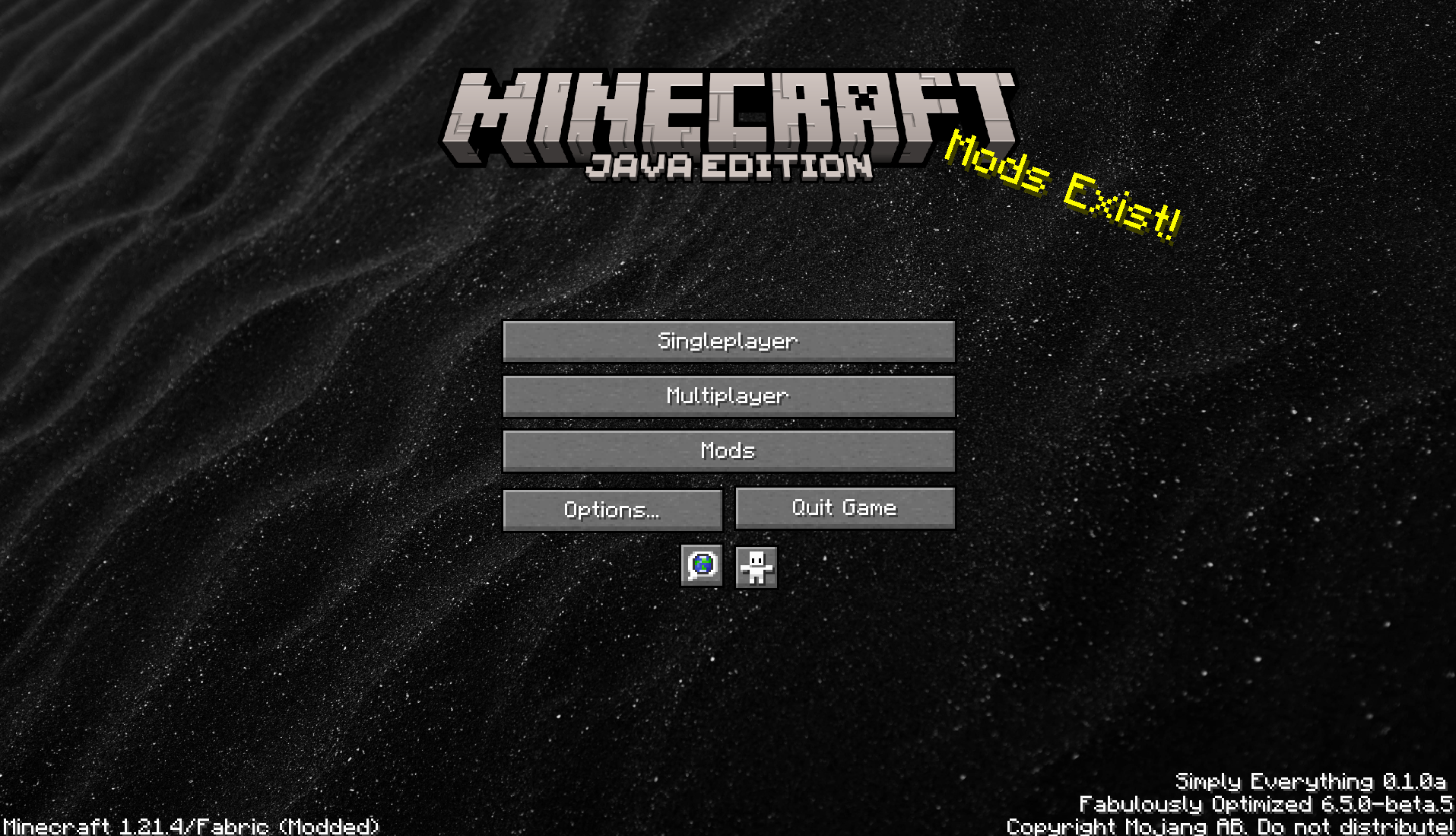
A modpack designed to improve the vanilla experience with quality of life mods. With a base of Fabulously Optimized, your game will feel as smooth as ever!
截图
介绍
Simply Everything
🛠 A Quality-of-Life Overhaul Modpack for Minecraft 1.21-1.21.5
Simply Everything is a hand-tuned modpack focused on refining and enhancing the vanilla Minecraft experience. With smoother menus, smarter inventory handling, immersive visuals and audio, and tools that just make sense, this pack streamlines the game without losing its charm.
No bloated tech trees. No grindy progression. Just clean, beautiful, optimized gameplay.
✅ Features at a Glance
🖥️ Enhanced Interface
- Reimagined menus, detailed HUD, and modern tooltips
- Dynamic F3 screen, control helpers, and menu customization
🎒 Better Inventory & Crafting
- Smarter inventory logic
- Tooltip previews for shulker boxes
- Simplified crafting and visual organization
🎧 Visual & Audio Immersion
- 3D skin layers and entity improvements
- Realistic ambient sounds and falling leaves
- Shader support with Iris (preconfigured for Complementary Shaders – Low)
📢 Communication Tools
- Expanded chat history and cleaner message formatting
- Built-in Simple Voice Chat support
⚙️ Customization & Control
- Tweak HUDs, keybinds, mod configs, and even the main menu credits
- All mods are carefully chosen to work together seamlessly
🖥️ System Requirements
Minimum:
- CPU: Intel Core i3-12100 or AMD Ryzen 5 3400G
- GPU: GTX 1650 Super or RX 580 8GB
- RAM: 16GB
- Storage: SSD with 250MB/s read speed (HDDs not supported)
Recommended:
- CPU: Ryzen 5 4500 or better
- GPU: RX 6600 or RTX 3060+
- RAM: 32GB+
- Storage: NVMe SSD recommended
☕ Installation Instructions
- Install Java 24 from Oracle: Java 24 Download
- Open the Minecraft Launcher and click the ⚙️ Settings icon beside the “Play” button.
- Select Custom Java Installation.
- In the file path field, paste: C:\Program Files\Java\jdk-24\bin
- Scroll down to find
javaw.exe, click on it, then press Open. - Under “Memory”, allocate 6–8 GB of RAM.
- That’s it! Click Play and enjoy the modpack.
📦 Mod + Shader + Resource Pack List
Click to view the full list of included projects
- [EMF] Entity Model Features by Traben (v2.4.1)
- [ETF] Entity Texture Features by Traben (v6.2.10)
- 3D Skin Layers by tr7zw (v1.7.4)
- AmbientSounds by creativemd (v6.1.3)
- AppleSkin by squeek502 (v3.0.6+mc1.21.3)
- Better Mount HUD by Lortseam (v1.2.5)
- BetterF3 by TreyRuffy (v13.0.0)
- BetterGrassify by UltimatChamp (v1.4.4+fabric.1.21.4)
- Capes by caelthecolher (v1.5.4+1.21.4)
- Chat Reporting Helper by Fabulously Optimized (v4.26)
- Clumps by jaredlll08 (v22.0.0.1)
- Controlify by isxander (v2.0.2+1.21.4-fabric)
- Cubes Without Borders by Kir_Antipov (v3.0.0+1.21.3)
- Fabrishot by ramidzkh (v1.14.3)
- Falling Leaves by randommcsomethin (v1.16.7+1.21.4)
- FancyMenu by keksuccino (v3.4.4)
- FastQuit by contaria (v3.0.0+1.21.4)
- Iris Shaders by coderbot (v1.8.5+1.21.4)
- Konkrete by keksuccino (v1.9.9)
- LambDynamicLights by LambdAurora (v4.0.1+1.21.4)
- Language Reload by Jerozgen (v1.7.2+1.21.4)
- Main Menu Credits by isxander (v1.2.0)
- Melody by keksuccino (v1.0.10-1.21-fabric)
- Mod Menu by Terraformers (v13.0.2)
- Model Gap Fix by MehVahdJukaar (v1.21.3-1.10)
- ModernFix by embeddedt (v5.20.3+mc1.21.4)
- More Chat History by JackFred (v1.3.1)
- No Chat Reports by Aizistral (v2.11.0)
- Not Enough Animations by tr7zw (v1.9.2)
- OptiGUI by opekope2 (v2.3.0-beta.7+1.21.2)
- Paginated Advancements by DaFuqs (v2.6.1+1.21.4)
- Polytone by MehVahdJukaar (v3.2.11)
- Puzzle by Motschen (v2.0.4)
- Remove Reloading Screen by dima_dencep (v5.1.0)
- Roughly Enough Items (REI) by shedaniel (v18.0.798)
- Shulker Box Tooltip by MisterPeModder (v5.2.4+1.21.4)
- Simple Voice Chat by henkelmax (v2.5.27)
- Sound Physics Remastered by henkelmax (v1.4.8)
- Visuality by PinkGoosik (v0.7.9+1.21.4)
- Xaero’s Minimap by thexaero (v25.1.0)
- Xaero’s World Map by thexaero (v1.39.4)
- YOSBR by shedaniel (v0.1.2)
- Zoomify by isxander (v2.14.2)
🎯 Why Choose Simply Everything?
- ✅ Seamless Compatibility: Every mod is tested and tuned for synergy—no bugs, no bloat.
- 🧩 Highly Customizable: Tweak your experience to match your playstyle, from visuals to controls.
- 🎮 Instant Quality-of-Life: Get all the modern conveniences without changing the spirit of Minecraft.
- 🔧 Performance-Aware: Carefully curated with optimization mods like ModernFix and FastQuit.
📝 Notes from the Creator
- I will only update the pack to a new Minecraft or mod version if all included mods support it.
- New mods will only be added if there is significant community interest or if the mod becomes popular enough to appear prominently on the mods page.
- If you think something should be added, feel free to add it yourself! I don’t have a direct contact method, so collaboration is community-driven.
Experience Minecraft the way it should feel—snappy, immersive, and effortlessly fun.
包含的模组 111 个
 3D皮肤层
 Advanced Netherite
 苹果皮
 Architectury API
BadOptimizations
 Balm
 BetterF3
 BetterGrassify
 Blur+
 Bobby
 Boids
 BSL Shaders
 Camera Overhaul
 Camera Utils
 Cardinal Components API
 Carpet
 Chat Animation [Smooth Chat]
 Chat Heads
 Chat Patches
 Chunky
 Client Tweaks
 Cloth Config API
 Collective
 Complementary Shaders - Reimagined
 Complementary Shaders - Unbound
 Concurrent Chunk Management Engine (Fabric)
 CreativeCore
 Cristel Lib
 Cubes Without Borders
 Cull Leaves
 Dark Loading Screen
 Double Doors
 Dynamic FPS
 实体剔除
 Euphoria Patches
 Explorify
 Fabric API
 Fabric Language Kotlin
 Fadeless
 Faithful 64x
展开全部 111 个
 Falling Leaves
 砍树
 FancyMenu
 Fast IP Ping
 FastQuit
 FerriteCore
 Forge Config API Port
 Freecam
 Geckolib
 ImmediatelyFast
 ImmersiveThunder
 Iris Shaders
 旅行地图
 kennytvs-epic-force-close-loading-screen-mod-for-fabric
 Konkrete
 Krypton
 Ksyxis
 LambDynamicLights - Dynamic Lights
 Language Reload
 Leaves Be Gone
 Litematica
 锂
 Load My F***ing Tags
 MakeUp - Ultra Fast
 MaLiLib
 Melody
 MidnightLib
 MiniHUD
 模组菜单
 Model Gap Fix
 ModernArch
ModMenu Badges Lib
 More Chat History
 More Culling
 鼠标微调
 No Chat Reports
 No Resource Pack Warnings
 No Telemetry
 Noisium
 Not Enough Animations
 Packet Fixer
 Paxi
 Puzzles Lib
 Raise Sound Limit Simplified
 Reese's Sodium Options
 Resourceful Config
 Resourceful Lib
 Resourcify
 Rethinking Voxels
 Shulker Box Tooltip
 Simple Voice Chat
 钠
 Sodium Extra
 Sodium Shadowy Path Blocks (SSPB)
 Solas Shader
 Sound Physics Remastered
 spark
 Spawn Animations
 Terralith
 Text Placeholder API
 Towns and Towers
 Very Many Players (Fabric)
 Villager Names
 Wavey Capes
 WorldEdit
 Xaero Zoomout
 Xaero的小地图
 Xaero的世界地图
 YetAnotherConfigLib (YACL)
 YUNG's API
 Zoomify (Zoom)
绿色边框的模组本站有收录,点进去看中文介绍;其余跳转到 Modrinth。
常见问题
Simply Everything 支持哪些 Minecraft 版本?
Simply Everything 支持 Minecraft Java 版 1.21–1.21.6,共 5 个版本,可用的加载器:Fabric。下载时注意选择和你游戏版本一致的文件。
Simply Everything 怎么安装?
点本页「前往下载」拿到整合包文件(Modrinth 的是 .mrpack,CurseForge 的是 .zip),在 PCL2 或 HMCL 启动器里选择「导入整合包」,启动器会自动装好 Minecraft、加载器和全部模组。这个整合包有 111 个模组,建议在启动器里给游戏分配 4–6 GB 内存。
Simply Everything 开服需要多大内存?
推荐服务器内存 12 GB。在线人数多、或者建了大量机器和区块加载器时,可以再加 2–4 GB。
怎么和朋友一起玩 Simply Everything?
点本页的「一键开服」,选好配置后会自动安装 Simply Everything 的服务端,几分钟就能开好。把服务器地址发给朋友,大家用同一个版本的整合包连进去就行。
评论
登录后评论和评分