
the Art
Build a Japanese structures in a visually pleasing world with over 2000 blocks, custom menu and ambiance.
截图


介绍
the Art Modpack for Minecraft 1.20.4

What is this modpack about?

A Modpack for Architectures, Building, and Imagination.
the Art is a creative-focused modpack built for designers & creative visionaries inspired by the elegance of Japanese design—from timeless traditions to cutting-edge minimalism.
Whether you’re crafting serene temples, cozy countryside homes, or sleek urban spaces, The Art gives you the tools to build with precision and flair. With a carefully curated collection of building-focused mods and a peaceful atmosphere, this is your blank canvas for visual storytelling.
Designed primarily for creative mode, this modpack is ideal for dedicated builders—but it also supports survival mode for casual exploration and chill gameplay.
_Express your vision. Build your masterpiece. Welcome to The Art._
Socials

<a title="the Art Official Modrinth Page"
href=”(https://modrinth.com/modpack/theart)”>



Key Features
🧊 2,000+ Custom Blocks & Furniture
A massive selection of detailed building blocks and furnishings—from shoji doors and tatami mats to sleek panels and designer lighting.
🦌 Wildlife & Aquatic Life
Populate your builds with adorable land animals and ambient sea creatures to create dynamic, living environments.
🛠️ Advanced Building Tools
World-editing & block-editing tools built for creators: rotate, move, resize, copy-paste, and perfect your world with ease.
🖼️ Custom Image Placement
Insert your own images and artwork into the game using signs and display blocks. Great for city posters, art galleries, or personal touches.
💡 Custom Lighting Controls
Fine-tune the atmosphere with adjustable lighting settings, from cozy interiors to cinematic nightscapes.
🌅 Distant Horizons & Built-In Shaders
Explore vast draw distances and enjoy stunning visual effects with pre-configured shaders for a photo-realistic touch.
🧩 Great Optimization
Smooth performance even in large, detailed builds thanks to performance-focused mod selections and tweaks.
📚 Custom Main Menu
A fully redesigned main menu with high-quality visuals, animated elements, and an eye-pleasing UI that matches the tone and beauty of the pack.
✳️ Creative Mode First, Survival Compatible
While made for builders and designers, the pack still supports survival play for those who enjoy relaxed exploration and storytelling.
🌐 Multiplayer Friendly
Build together, host architecture showcases, or collaborate on themed villages in peaceful online sessions.

🖥️ RAM Allocation:
- Recommended Allocated Memory: 8192
- Minimum Allocated Memory: 4096
- Possibly Lowest Allocated Memory: 2048 (not recommended)
How to use Yuushya Modelling Mod
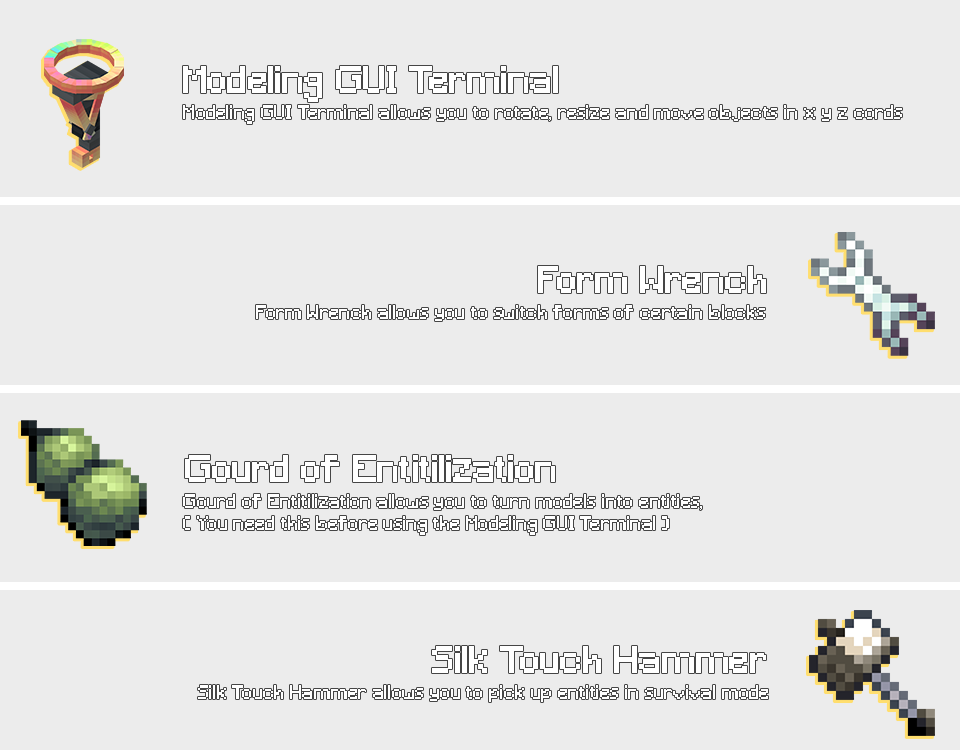


Quick Disclaimer
I do not own any of the mods in this pack
all credit goes to the original creators.
This modpack is non-commercial,
and I’m not making any money from this.
If any mod author wants their mod removed,
I’ll do so immediately.
Big thanks to all the amazing mod developers
this project wouldn’t exist without you!

Mod & Resource Packs highly recommended in this modpack:
- cocricot for 1.20.4 v1.1
- cocricot for MOD 1.20.4 snapshot1.1.1
- cocricotMOD for 1.20.4 Fabric snapshot1.1.0
- Yuushya Foliage Addon 0.11.0

Download links for copyrighted content from their original sources:
- Yuushya Foliage Addon 0.11.0
- Cocricot Resource Pack for 1.20.4 v1.1
- Cocricot for MOD Resource Pack 1.20.4 snapshot1.1.1
- Cocricot MOD for 1.20.4 Fabric snapshot1.1.0

Credits for the Mods & Resource Pack Creators!
- Credits to Cocricot Mod & Resource Packs: https://cocricot.pics/
- Credits to Yuushya Mod & Resource Packs: https://yuushya.com/t

包含的模组 76 个,另有 1 个其他文件
 [EMF] Entity Model Features
 [ETF] Entity Texture Features
 苹果皮
 Architectury API
 Birds | Boids Addon
 Bliss Shaders
 BlueMap
 Boids
 Camera Overhaul
 Celestial
 Chat Animation [Smooth Chat]
 Chat Heads
 Cloth Config API
 Complementary Shaders - Unbound
 Concurrent Chunk Management Engine (Fabric)
 Connectible Chains [Fabric]
 Continuity
 CoroUtil
 ctLib
 Cull Less Leaves
 遥远的地平线
 Domix's Creatures
 Drippy Loading Screen
 Dynamic FPS
 Emojiful
 实体剔除
 Fabric API
 Fabric Language Kotlin
 Falling Leaves
 砍树
 FancyMenu
 Fantasy Armor (Medieval Series)
 Female Gender Mod
 FerriteCore
 Fetzi's Asian Decoration
 Fresh Animations
 Geckolib
 Head Index
 Hybrid Aquatic
 ImmediatelyFast
展开全部 76 个
 Indium
 Iris Shaders
 JEI物品管理器
 Konkrete
 LambDynamicLights - Dynamic Lights
 锂
 Melody
 模组菜单
 More Axolotl Variants API
 More Axolotl Variants Mod
 Noisium
 Not Enough Animations
 Nuit
 Photon Shaders
 Plasmo Voice
playerAnimator
 Polytone
 Remove Mouseover Highlight
 Signed Paintings
 Sitting+
 Smooth Gui
 钠
 Sound Physics Remastered
 Spawned Eggs
 Starlight (Fabric)
 Styled Chat
 Talking Heads
 Text Placeholder API
 TrafficCraft
 Uncontrolled Grass
 What Are They Up To (Watut)
 创世神
 YetAnotherConfigLib (YACL)
 Yuushya 16x
 Yuushya Modelling
 Yuushya Townscape
绿色边框的模组本站有收录,点进去看中文介绍;其余跳转到 Modrinth。
常见问题
the Art 支持哪些 Minecraft 版本?
the Art 基于 Minecraft Java 版 1.20.4,使用 Fabric 加载器。
the Art 怎么安装?
点本页「前往下载」拿到整合包文件(Modrinth 的是 .mrpack,CurseForge 的是 .zip),在 PCL2 或 HMCL 启动器里选择「导入整合包」,启动器会自动装好 Minecraft、加载器和全部模组。这个整合包有 76 个模组,建议在启动器里给游戏分配 4–6 GB 内存。
the Art 开服需要多大内存?
推荐服务器内存 12 GB。在线人数多、或者建了大量机器和区块加载器时,可以再加 2–4 GB。
怎么和朋友一起玩 the Art?
点本页的「一键开服」,选好配置后会自动安装 the Art 的服务端,几分钟就能开好。把服务器地址发给朋友,大家用同一个版本的整合包连进去就行。
评论
登录后评论和评分