Reticle
A fighter-jet style HUD for elytra flight — flight instruments, a real flight-path marker, line-of-sight target boxes, a pull-up warning, and night vision. Client-side only.
截图
介绍
Reticle is a small client-side only mod. The HUD only appears while you’re actively gliding with an elytra.
Features
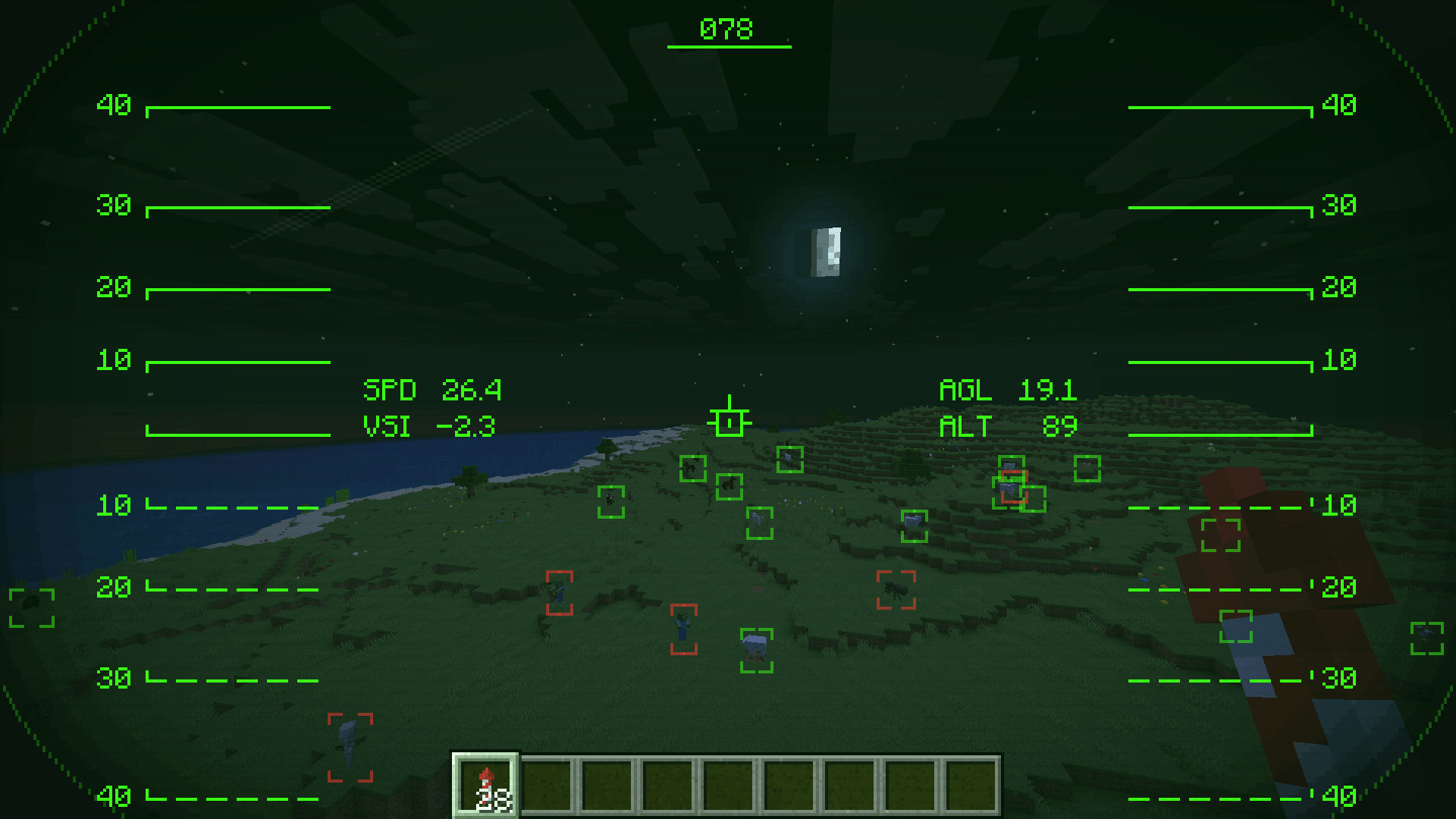
- Flight instruments — horizontal speed, vertical speed, height above ground (AGL), and altitude.
- Flight-path marker — a separate marker from the crosshair showing your actual velocity direction, projected through the camera’s real orientation and FOV. Diving, firework boosts, and strafing send you somewhere other than where you’re looking — this shows where you’re going.
- Heading tape — your compass heading across the top of the screen.
- Pitch ladder — an artificial horizon with climb/dive rungs, like a real attitude indicator.
- Helmet visor — a rounded, shaded viewport frame so the HUD reads like you’re looking out through a helmet, not a flat overlay.
- Target boxes — boxes nearby entities in your direct line of sight (no wallhacks — anything blocked by terrain is skipped), sized to each entity’s actual hitbox and color-coded hostile / passive / player.
- Gradual lock-on — hold your reticle on a target and its box builds from white to a solid red as the lock completes, with a lock-on tone once it does — not an instant snap.
- Pull-up warning — flashes and plays a “Terrain, terrain — pull up, pull up” voice warning before your descent rate and altitude would put you into fall damage. Stops the instant you’ve pulled out, and the warning lead time is configurable.
- Night vision — automatically tints the visor green and gives your brightness a temporary boost when it’s dark, so you’re not flying blind at night. Switches off again once it’s bright enough.
- Cockpit sounds — HUD on/off, lock-on, and pull-up warning, all toggleable.
- Fully recolorable — the primary HUD color is adjustable via RGBA sliders; classic HUD green by default, with separate colors for hostile / passive / player target boxes.
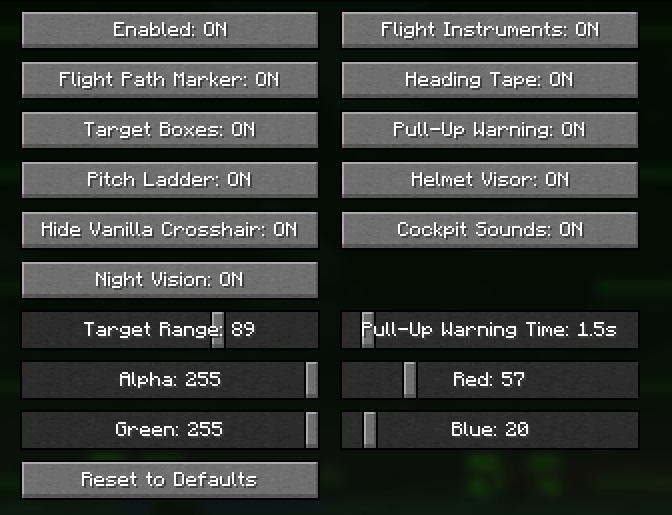
- Configurable — every element (instruments, flight-path marker, heading tape, target boxes, pitch ladder, visor, night vision, pull-up warning, sounds) can be toggled independently, plus sliders for target range and pull-up warning time.
Configuration
Install Mod Menu for an in-game settings screen: Mods > Reticle > Configure. Without Mod Menu, settings still persist to config/reticle.json and can be edited by hand.
Install
- Install Fabric Loader for your version of Minecraft.
- Put Fabric API and the matching Reticle jar for your version in your
modsfolder. - Start the game. The HUD appears automatically the moment you start gliding with an elytra.
Optional: add Mod Menu for the in-game settings screen above.
Supported versions
26.1.2, 26.2, and 26.3 on Fabric and NeoForge. Requires Fabric API. Java 25.
Notes
- Client-side only — no server installation, safe on vanilla and modded servers alike.
- The projection accounts for the camera’s field of view but not camera roll, since vanilla Minecraft doesn’t have any.
- Night vision’s brightness boost is capped at vanilla’s own maximum brightness setting — it’s a real boost, not a “fullbright” hack.
Links
- Source / issues: https://github.com/comedy01/Reticle
- License: MIT
常见问题
Reticle 支持哪些 Minecraft 版本?
Reticle 支持 Minecraft Java 版 26.1–26.3,共 5 个版本,可用的加载器:Fabric。下载时注意选择和你游戏版本一致的文件。
Reticle 怎么安装?
先用 PCL2 或 HMCL 启动器安装对应版本的 Fabric,再把下载的 .jar 文件放进游戏目录的 mods 文件夹,重新启动游戏即可。开启了版本隔离的,mods 文件夹在 versions/版本名 下面。
comedy 的其他作品
查看全部 →
Starlit – Better Sky, Stars, Auroras, Galaxies, Shooting Stars, Planets.
打造更出色的夜空:数千颗彩色闪烁的星星、银河、星云、星系、流星、流星雨、彗星和极光;白天还有日落、光晕和彩虹。仅限客户端,支持 Fabric、NeoForge 和 Forge。兼容光影!
Heartline – Health Bars & Damage Numbers
在所有生物头顶显示血条,显示伤害数字、金色暴击和连击数;目标面板还会显示击杀还需命中几次。提供 11 种血条样式、宠物提醒,支持完全自定义。客户端模组,支持 Fabric、NeoForge 和 Forge。

Identify – What Am I Looking At?
指向任意目标即可查看其信息,包括方块、生物、作物,以及 25 个模组中的机器信息。客户端模组。
Limn – Colored Block Outlines
重新为你注视的方块外框上色:可选任意纯色,或让彩虹沿着边缘流动。还可调整不透明度和线条粗细。仅限客户端,兼容 Mod Menu。
评论
登录后评论和评分