
截图


介绍
BloxFox makes your experience a way better by using optimization mods, adding features from OptiFine and some extras like downloading resource packs from Vanilla Tweaks, adding controller, heck, EVEN VR support!
🚀 Launch your FPS to the moon!
–
Everybody in the FPS community knows Optifine, maybe Sodium, Phosphor. We said goodbye to the mods (except Sodium, eh…)! We use completely new lightning engine which is WAY faster than Phosphor and vanilla engine combined! RAM is also very important, so we made sure it doesn’t take as much RAM as it should. Yeah, and your game launches at the speed of light.*
🎮 Better than Bedrock edition!
–
Yes, we may not support Switch, Xbox and lot of those consoles, but with BloxFox you can imitate this feeling by plugging your controller in your PC. Yes, we support controllers. Not only that, VR players are also welcome!
🔎 Optifine 2.0
–
I think we all remember Optifine. But it has a one, BIG disadvantage. It’s one mod, thus all of those features are enabled and cannot be disabled, so it partially slows your game. But in BloxFox you can disable certain features that you don’t like** and even if you have all of it enabled, you can get a TON of FPS.
➕ Everyone likes extra things!
–
It’s not just performance modpack, it’s a client, it has TON of useful tweaks. Literally, tweaks. You can download resource packs from vanilla tweaks. Also to be realistic (if you accidentally play on VR) we added a new sound physics! Are you sailor looking for treasure, but you NEED to look at that map? No more stopping, No more problems! Now you can just sail and look, and look and sail, and sail…
❓ Any questions?
–
Feel free to ask me anything on my Discord server! Did you find a bug? You can report it on the issues Github page. All of those links are in the sidebar.
*= Your game doesn’t launch at the speed of light. It’s just advertising, that’s how the world works.
**= Only if you use Prism Launcher or MultiMC, disabling in Vanilla launcher is not supported.
包含的模组 54 个
 [EMF] Entity Model Features
 [ETF] Entity Texture Features
 Advancements Reloaded (AdvancementInfo)
 苹果皮
 Architectury API
 Auth Me
 Better Mount HUD
 Better Statistics Screen
 BetterGrassify
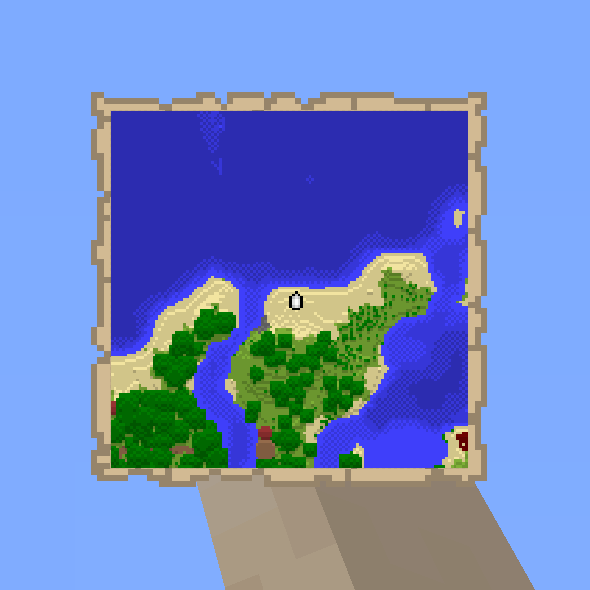 Boat Item View
 Bobby
 Borderless Fullscreen
 Capes
 Chat Heads
 Cloth Config API
 Concurrent Chunk Management Engine (Fabric)
 Continuity
 Controlify (Controller support)
 Dark Loading Screen
 Debugify
 Dynamic FPS
 实体剔除
 Exordium
 Fabric API
 Fabric Language Kotlin
 FastQuit
 FerriteCore
 Gamma Utils (Fullbright)
 Hold That Chunk
 ImmediatelyFast
 Iris Shaders
 Krypton
 LambDynamicLights - Dynamic Lights
 锂
 模组菜单
 More Chat History
 More Culling
 No Chat Reports
 No Fog
 No Telemetry
展开全部 54 个








绿色边框的模组本站有收录,点进去看中文介绍;其余跳转到 Modrinth。
常见问题
BloxFox Client 支持哪些 Minecraft 版本?
BloxFox Client 基于 Minecraft Java 版 1.21.4、1.19.4,使用 Fabric / Quilt 加载器。
BloxFox Client 怎么安装?
点本页「前往下载」拿到整合包文件(Modrinth 的是 .mrpack,CurseForge 的是 .zip),在 PCL2 或 HMCL 启动器里选择「导入整合包」,启动器会自动装好 Minecraft、加载器和全部模组。这个整合包有 54 个模组,建议在启动器里给游戏分配 4–6 GB 内存。
BloxFox Client 开服需要多大内存?
推荐服务器内存 12 GB。在线人数多、或者建了大量机器和区块加载器时,可以再加 2–4 GB。
怎么和朋友一起玩 BloxFox Client?
点本页的「一键开服」,选好配置后会自动安装 BloxFox Client 的服务端,几分钟就能开好。把服务器地址发给朋友,大家用同一个版本的整合包连进去就行。
评论
登录后评论和评分