
Lidless – Chest Peek, Search & Sort
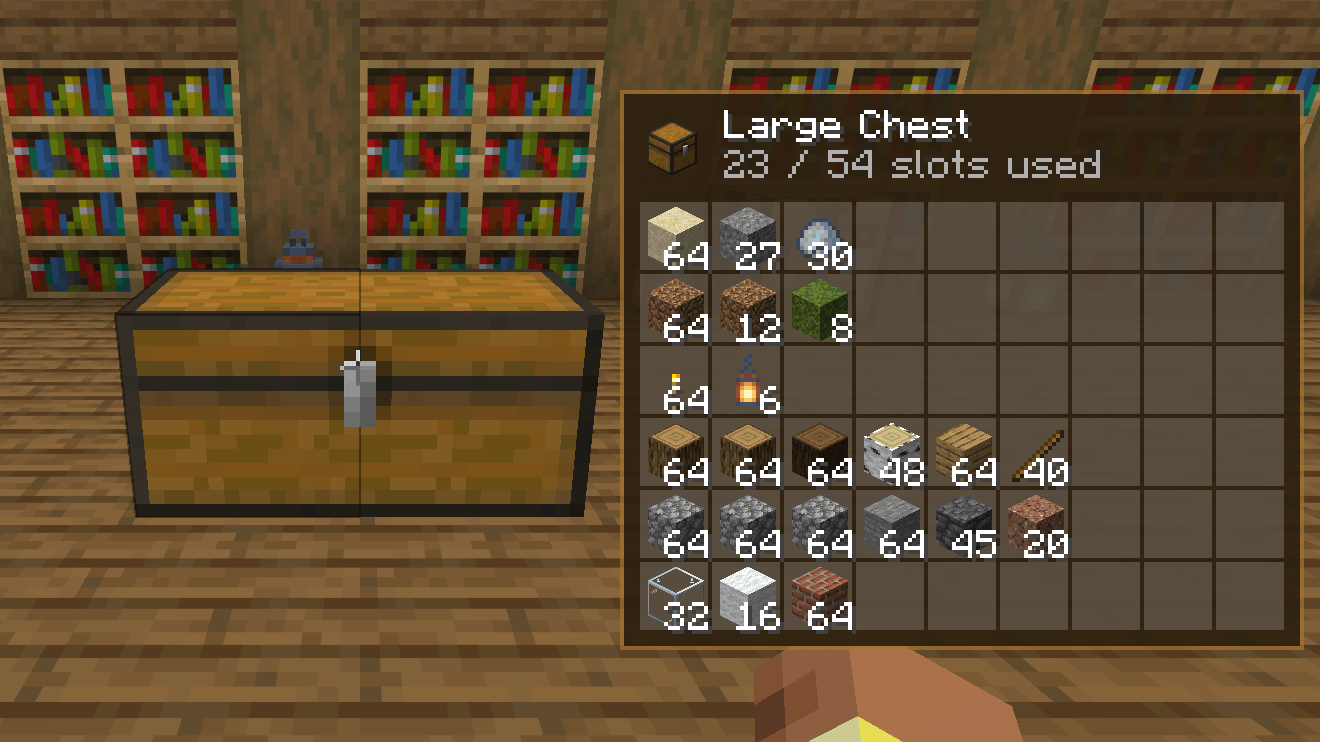
See inside all chests, barrels and shulker boxes just by looking at them. Also adds search and sorting to storage screens and shulker box previews in tooltips. Client-side, works on any server.
截图
介绍
Lidless is a small client-side mod for Minecraft on Fabric or NeoForge, compatible with Mod Menu (Fabric) / the built-in config screen (NeoForge).
Supported versions: 26.1 to 26.3.
Features
- Peek panel – look at a chest, double chest, barrel, shulker box, hopper, dispenser or ender chest to see its contents. It also works on donkeys, mules and llamas carrying chests, and on chest boats and chest minecarts.
- Compact mode – groups identical items and shows totals instead of the exact slot layout.
- Loot chests – chests that still hold unrolled loot are marked as unopened loot.
- Tooltip previews – shulker boxes show their contents as a grid tinted in the box’s colour, and the ender chest item shows your ender chest.
- Search – a search box on storage screens. Ctrl+F focuses it,
@namesearches by mod, and it also finds items inside shulker boxes and bundles. - Sorting – a sort button for the container and one for your inventory, with four orders: category, name, count and mod. Middle-click a slot to sort that part of the screen.
- Deposit and take all – move the items the container already holds out of your inventory, or take everything out in one click. Your hotbar is left alone.
- Placement – two sliders move the panel anywhere on screen, and the panel can be limited to while you sneak.
- Client-side only – there is nothing to install on a server.
Some information depends on where you play:
- In singleplayer and on a LAN host the panel reads the contents live.
- Servers do not send container contents until you open them, so on a server the panel shows what was inside the last time you opened that container, and how long ago that was. The ender chest tooltip works the same way.
- Middle-click sorting is off in creative mode, where middle-click copies items.
Install
Fabric
- Install Fabric Loader for your version of Minecraft.
- Put Fabric API and the Fabric Lidless jar for your version in your
modsfolder. - Start the game.
Optional: add Mod Menu to get a settings screen (Mods > Lidless > Configure).
NeoForge
- Install NeoForge for your version of Minecraft.
- Put the NeoForge Lidless jar for your version in your
modsfolder. - Start the game. The settings screen is available from the mod list (Mods > Lidless > Config).
常见问题
Lidless – Chest Peek, Search & Sort 支持哪些 Minecraft 版本?
Lidless – Chest Peek, Search & Sort 支持 Minecraft Java 版 1.16.5–26.3,共 27 个版本,可用的加载器:Fabric / Forge / NeoForge。下载时注意选择和你游戏版本一致的文件。
Lidless – Chest Peek, Search & Sort 怎么安装?
先用 PCL2 或 HMCL 启动器安装对应版本的 Fabric / Forge / NeoForge,再把下载的 .jar 文件放进游戏目录的 mods 文件夹,重新启动游戏即可。开启了版本隔离的,mods 文件夹在 versions/版本名 下面。
comedy 的其他作品
查看全部 →
Starlit – Better Sky, Stars, Auroras, Galaxies, Shooting Stars, Planets.
A better night sky: thousands of colored twinkling stars, the Milky Way, nebulae, galaxies, shooting stars, meteor showers, comets and northern lights, plus sunsets, halos and rainbows by day. Client-side, for Fabric, NeoForge and Forge. Shader Compatible!
Heartline – Health Bars & Damage Numbers
Health bars above every mob, damage numbers with gold crits and combo stacking, and a target panel that shows how many hits are left. 11 bar styles, pet alerts, fully configurable. Client-side, Fabric, NeoForge and Forge.

Identify – What Am I Looking At?
Point at anything to see what it is, from blocks, mobs and crops to machine info from 25 mods. Client-side.
Limn – Colored Block Outlines
Recolor the box drawn around the block you're looking at: any solid color you like, or a Rainbow that flows along the edges. Adjust opacity and line thickness . Client-side only, works with Mod Menu.
评论
登录后评论和评分