
Quark Pack
A Fabric-based modpack that includes various sound modes and additional modes(e.g. Iris Shaders) for optimization and enhanced immersion.
截图
介绍
Introduction
The Quark Pack modpack is designed for Minecraft players who prioritize optimization and immersion, all while using client-side mods only. This pack includes carefully selected utility and immersion-focused mods like Iris Shaders, enhancing the Minecraft experience without impacting performance. With each mod chosen meticulously, Quark Pack aims to maintain smooth gameplay, ensuring that only mods with minimal frame impact make it into the pack.
Quark Pack provides a robust foundation of client-side optimizations, focusing on maximizing both performance and enjoyment. While you can expect improved visuals and utility without sacrificing framerate, the modpack remains simple and streamlined, with little to no gameplay alterations outside of what boosts immersion. This makes it easy to add any additional mods for customization without concerns about compatibility or performance degradation.
Keeping the pack lightweight and performance-focused also means that updates can be quickly rolled out whenever new improvements or Minecraft versions become available. I’m committed to making sure Quark Pack stays relevant with the latest mod updates and performance enhancements.
Get Started
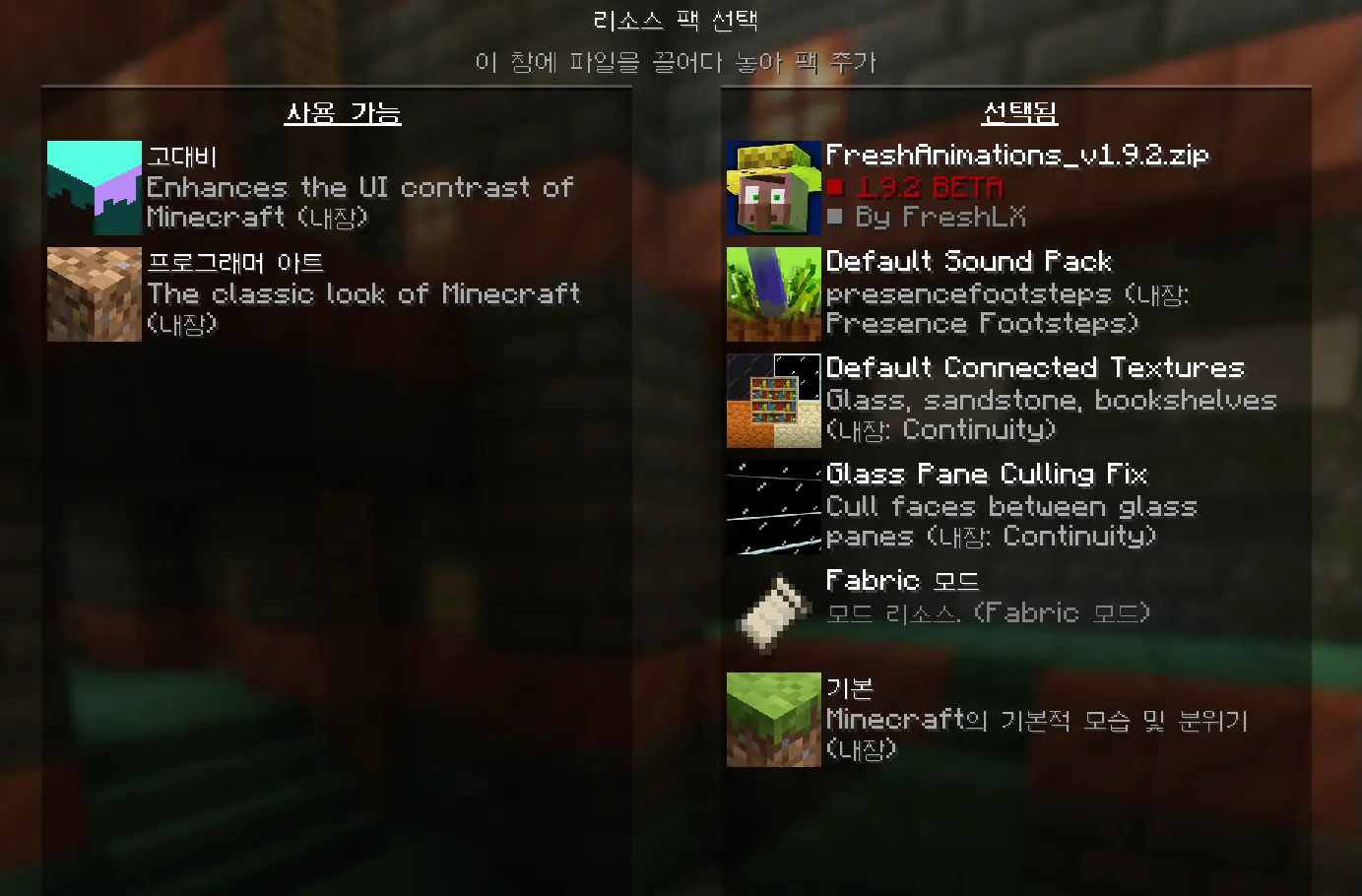
You need to apply all built-in resource packs by the mods. (e.g. Default Sound Pack, Default Connected Textures, Glass Pane Culling Fix)
The FreshAnimations resource pack is optional. Please note that applying this resource pack may cause significant frame drops, especially in scenarios where many mobs need to be displayed on screen.
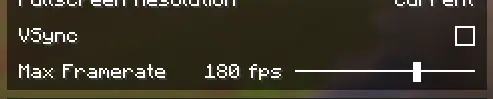
You need to turn off the VSync and on the Max Framerate in the Video Settings.
In your game settings, disable the V-sync option and set a frame rate limit that matches your monitor’s refresh rate (e.g., 60fps, 144fps, 240fps). This will help reduce in-game latency to a minimal level. If you rely on V-sync by default, the GPU may become idle and underutilized, resulting in a significantly lower load rate. Consequently, this can cause stuttering and increased latency within the game.
Settings about the memory size and Java arguments
After adjusting the memory size as needed, copy and paste the Java arguments below into the Java arguments field.
-XX:+UnlockExperimentalVMOptions -XX:+UnlockDiagnosticVMOptions -XX:+AlwaysActAsServerClassMachine -XX:+AlwaysPreTouch -XX:+DisableExplicitGC -XX:+UseNUMA -XX:NmethodSweepActivity=1 -XX:ReservedCodeCacheSize=400M -XX:NonNMethodCodeHeapSize=12M -XX:ProfiledCodeHeapSize=194M -XX:NonProfiledCodeHeapSize=194M -XX:-DontCompileHugeMethods -XX:MaxNodeLimit=240000 -XX:NodeLimitFudgeFactor=8000 -XX:+UseVectorCmov -XX:+PerfDisableSharedMem -XX:+UseFastUnorderedTimeStamps -XX:+UseCriticalJavaThreadPriority -XX:ThreadPriorityPolicy=1 -XX:+UseZGC -XX:AllocatePrefetchStyle=1 -XX:-ZProactive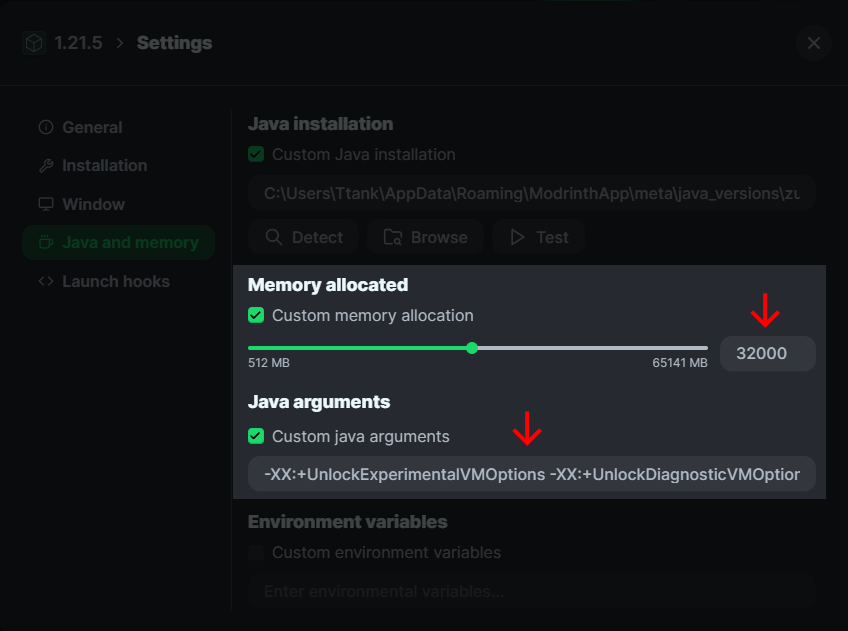
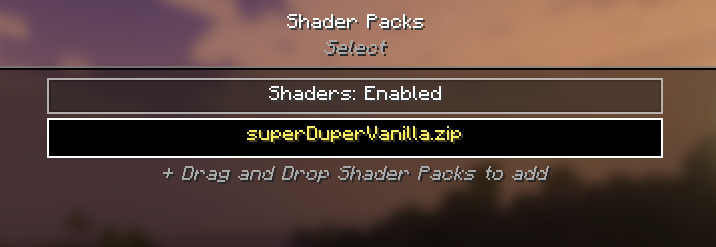
It’s recommended to use the Super Duper Vanilla Shader when you want the shader.
My personal recommendation for a shader is the Super Duper Vanilla Shader, which is included in this mod pack (though optional and requires manual activation). This shader enhances the game’s graphics and atmosphere in an ideal way without compromising the original vanilla look. It also provides stable performance with minimal frame drops or stuttering. Notably, it outperforms BSL, offering both excellent visuals and high performance.
Who should use it?
The modpack includes dependencies like Sodium/Indium for optimization, utilizing a new rendering engine that can deliver performance improvements of up to two to three times over vanilla Minecraft, especially for users with Radeon GPUs.
包含的模组 40 个
 [EMF] Entity Model Features
 [ETF] Entity Texture Features
 Accurate Block Placement Reborn
 苹果皮
 Better Command Block UI
 Chat Heads
 Cloth Config API
 Concurrent Chunk Management Engine (Fabric)
 Continuity
 实体剔除
 Explosive Enhancement
 Fabric API
 Fast Better Grass
 FerriteCore
 Fresh Animations
 Fresh Moves
 ImmediatelyFast
 Inventory Management
 InvMove
 Iris Shaders
 LambDynamicLights - Dynamic Lights
 锂
 Low Fire
 Low Shield
 模组菜单
 Model Gap Fix
 MRU
 No Resource Pack Warnings
 Not Enough Animations
 Particle Rain
 Raise Sound Limit Simplified
 Shulker Box Tooltip
 钠
 Sound Physics Remastered
 Sounds
 Status Effect Bars
 Super Duper Vanilla
 Text Placeholder API
 Visuality
 YetAnotherConfigLib (YACL)
绿色边框的模组本站有收录,点进去看中文介绍;其余跳转到 Modrinth。
常见问题
Quark Pack 支持哪些 Minecraft 版本?
Quark Pack 支持 Minecraft Java 版 1.21.1–1.21.10,共 7 个版本,可用的加载器:Fabric。下载时注意选择和你游戏版本一致的文件。
Quark Pack 怎么安装?
点本页「前往下载」拿到整合包文件(Modrinth 的是 .mrpack,CurseForge 的是 .zip),在 PCL2 或 HMCL 启动器里选择「导入整合包」,启动器会自动装好 Minecraft、加载器和全部模组。这个整合包有 40 个模组,建议在启动器里给游戏分配 4–6 GB 内存。
Quark Pack 开服需要多大内存?
推荐服务器内存 12 GB。在线人数多、或者建了大量机器和区块加载器时,可以再加 2–4 GB。
怎么和朋友一起玩 Quark Pack?
点本页的「一键开服」,选好配置后会自动安装 Quark Pack 的服务端,几分钟就能开好。把服务器地址发给朋友,大家用同一个版本的整合包连进去就行。

评论
登录后评论和评分