
截图
介绍

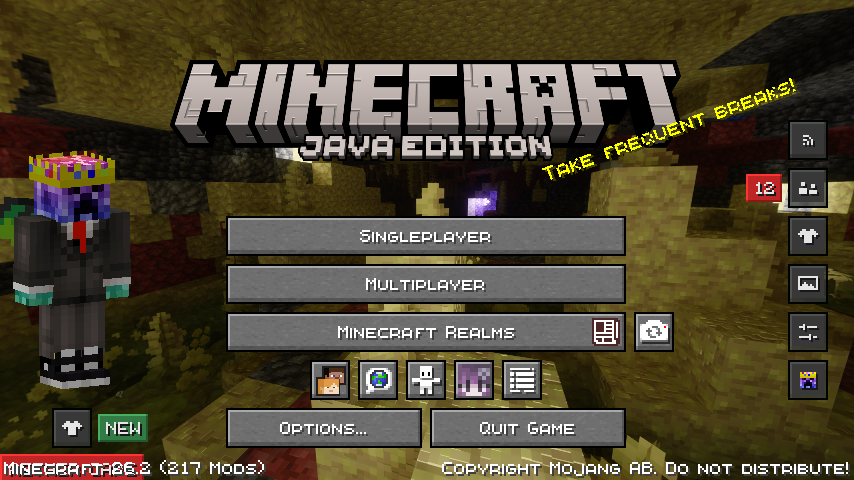
Xtrror’s Modpack
A all-in-one Minecraft experience built for every type of player — whether you’re here to chill, explore, or dominate in PvP. This modpack bundles performance optimizations, visual upgrades, and quality-of-life improvements so you can jump straight into the game without the setup hassle.
What’s Included?
Performance & Optimization
The pack is tuned to run smoothly on a wide range of hardware, giving you better FPS and faster load times out of the box.
Chill / Survival Gameplay
A curated set of resource packs that make the vanilla experience look and feel better without straying too far from the original art style:
- Fancy Crops — More detailed crop visuals
- Better Busy Leaves — Improved leaf animations
- Even Better Enchants — Clearer enchantment glints
- Fresh Animations — Smoother mob animations
- Fresh Animations Extensions — Extra mob animation support
- In-Game Brewing Guide — Never forget a potion recipe again
- Low on Fire — Less obstructive fire overlay
- New Glowing Ores — Ore highlights for easier mining
- Powdered Snow+ — Enhanced snow textures
- SPBR — PBR-ready surface textures
- Vanilla Mashup PBR — Physical-based rendering for vanilla blocks
Who Is This For?
Anyone who wants a ready-to-go Minecraft setup — for casual survival players. Instead of spending hours hunting down mods and resource packs, everything is already here and tested together.
Custom keybinds
Xtrrors Modpack has custom keybinds so all of the diffrent mods dont have the same keybind.
Function Keys
F1 – Toggle Ui
F2 – Take Screenshot
F3 – Toggle Debug Text
F4 – Toggle Freecam
F5 – Toggle Camera
F6 – No Binds
F7 – No Binds
F8 – No Binds
F9 – No Binds
F10 – No Binds
F11 – Fullscreen Game Window
F12 – No Binds
First Row
TAB – Show Playerlist
Q – Drop Item
W – Move Forward
E – Open Inventory
R – Open Litematica
T – Open Chat
Y – No Binds
U – Open Xareo Waypoints
I – No Binds
O – No Binds
P – No Binds
Second Row
A – Move Left
S – Move Backwards
D – Move Right
F – Offhand
G – Toggle Litematica Rendering
H – Create Xareo Waypoint
J – Open Wwaypoints Waypoints
K – Execute Command Litematica
L – Open Advancements
Third Row
Z – Chat Previev, Enlarge Map
X – No Binds
C – Zoom
V – Open Voice Chat
B – Emote Wheel
N – Create Wwaypoints Waypoint
M – Open Map
DASH – Command Line
Furth Row
SPACE – Jump
ARROW KEY LEFT – Change Litematica Layer
ARROW KEY UP – Change Gamma
ARROW KEY DOWN – Change Gamma
ARROW KEY RIGHT – Change Litematica Layer
包含的模组 76 个
 (Bee's) Fancy Crops
 3D Skin Layers
 AL's Dungeons Boss Bars
 苹果皮
 Architectury API
 Auth Me
 Axiom
 Better Advancements
 Better Block Entities
 Chat Heads
 Cloth Config API
 dronko's alternative Bushy Leaves
 Dynamic FPS
 Enchantment Outlines
 实体剔除
 Essential Mod
 Even Better Enchants
 ExploitPreventer
 Extreme sound muffler
 Fabric API
 Fabric Language Kotlin
 facebar
 Fadeless
 FerriteCore
 Flashback
 Freecam
 Fresh Animations
 Fresh Animations: Extensions
 Gamma Utils (Fullbright)
 Hypixel Reward Claim
 ImmediatelyFast
 In-Game Brewing Guide
 Inventory Search
 InventoryHUD+
 Iris Shaders
 Jade 🔍
 JEI物品管理器
 kennytvs-epic-force-close-loading-screen-mod-for-fabric
 LambDynamicLights - Dynamic Lights
 Litematica
展开全部 76 个
 锂
 Low On Fire
 MaLiLib
 MidnightLib
 MiniHUD
 模组菜单
 鼠标微调
 No Fog
 No Pumpkin Blur
 Not Enough Animations
 Powdered Snow+
 qrafty's Capitalized Font
 qrafty's Subtle Crosshair
 Reese's Sodium Options
 SchematicPreview
 Server Pinger Fixer
 Shulker Box Tooltip
 Simple Voice Chat
 Smooth Gui
 钠
 Sodium Extra
 SPBR
 SPBR-GlowingOre
 Status Effect Bars
 Text Placeholder API
 uku's Armor HUD
 ukulib
 Vanilla Mashup (PBR)
 ViaBackwards
 ViaFabricPlus
 ViaVersion
 Voice Chat Interaction
 wWaypoints
 Xaero的小地图
 Xaero的世界地图
 YetAnotherConfigLib (YACL)
绿色边框的模组本站有收录,点进去看中文介绍;其余跳转到 Modrinth。
常见问题
Xtrrors Modpack 支持哪些 Minecraft 版本?
Xtrrors Modpack 基于 Minecraft Java 版 26.3、26.2、26.1.2,使用 Fabric 加载器。
Xtrrors Modpack 怎么安装?
点本页「前往下载」拿到整合包文件(Modrinth 的是 .mrpack,CurseForge 的是 .zip),在 PCL2 或 HMCL 启动器里选择「导入整合包」,启动器会自动装好 Minecraft、加载器和全部模组。这个整合包有 76 个模组,建议在启动器里给游戏分配 4–6 GB 内存。
Xtrrors Modpack 开服需要多大内存?
推荐服务器内存 12 GB。在线人数多、或者建了大量机器和区块加载器时,可以再加 2–4 GB。
怎么和朋友一起玩 Xtrrors Modpack?
点本页的「一键开服」,选好配置后会自动安装 Xtrrors Modpack 的服务端,几分钟就能开好。把服务器地址发给朋友,大家用同一个版本的整合包连进去就行。

评论
登录后评论和评分