
MoonCraft Modpack
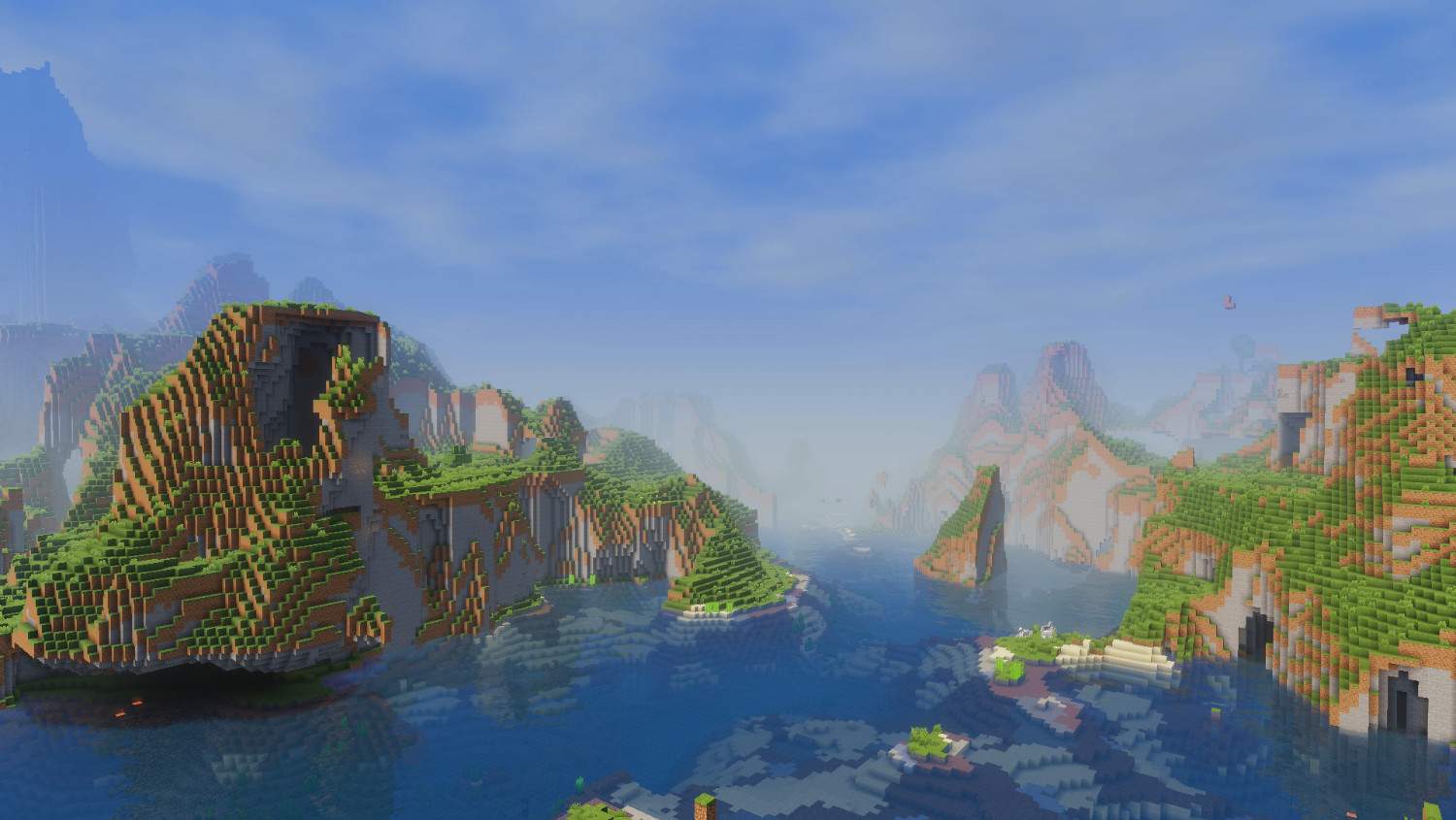
MoonCraft Modpack boosts FPS with Sodium and Lithium, adds optimized shaders for clean visuals, and keeps the original vanilla gameplay intact. Built for Fabric 1.21.8 with 60+ tested mods, ready for both singleplayer and large servers
截图





介绍
MoonCraft Modpack 😼
Keeps Minecraft the same you know.
Runs smoother.
Looks cleaner.
Does not change gameplay.
Performance 🚀
- Sodium, Lithium, FerriteCore, More Culling cut lag and raise frames.
- Entity Culling and Dynamic FPS keep gameplay steady with many players.
- Tips
- If your PC is midrange set render distance 8–12.
- Turn on FerriteCore and Lithium first.
- Use low-CPU profiles for big servers.
Visuals 🎨
- Shaders included: Complementary Reimagined, Amethyst, Miniature, Potato.
- Dynamic lighting, falling leaves, moving particles, 3D textures.
- Ashen 16x plus Bare Bones UI for a tidy HUD.
- Shader tips
- Use LITE preset if FPS drops.
- Save shader presets per world.
Quality of life ✨
- Better HUD for mounts, tools, stats.
- Cleaner menus and dark loading screen.
- Smoother animations and improved sound physics.
- Small useful tweaks: better cursor, mouse tweaks, chat animation, glowing plants.
World and tech ⚙️
- Smoother terrain gen and better biome blending.
- Faster chunk loading with fade-in to hide pop-in.
- Tools: Spark for profiling, Simple Voice Chat for in-game voice.
- Privacy: no telemetry, Resourcify speeds resource handling.
- Server notes
- Use CCME and VMP for large servers.
- Match server Fabric and mod versions exactly.
Includes and install
- Everything pre-configured.
- Textures, shaders, audio, visual FX bundled.
- Fabric 1.21.8.
- 59+ tested mods.
- Quick install
- Install Fabric 1.21.8 loader.
- Put mod files in the mods folder.
- Run Minecraft with the Fabric profile.
- If issues, delete the config folder and restart.
- Backup your world before installing.
Advanced tips
- Max FPS: close background apps, update GPU drivers, set Minecraft to high priority.
- Servers: allocate enough RAM but do not overdo it, monitor with Spark.
- Lower input lag: disable VSync and use raw mouse input.
Checklist before launch ✅
- Backup world.
- Match Fabric and mod versions.
- Use presets if GPU is weak.
- Test on a copy of your world first.
Final lines
- Try it before you judge the modpack. 😼
- If you find bugs or glitches write them in the comments and I will fix them inshallah.
MoonCraft Modpack بالعربي 😼
يحافظ على جو ماينكرافت اللي تعرفه.
يمشي أنعم.
يظهر شكله أوضح.
ما يغيّر طريقة اللعب.
الأداء 🚀
- Sodium وLithium وFerriteCore وMore Culling يقللون اللاج ويزودون الفريمات.
- Entity Culling وDynamic FPS يخلو اللعب ثابت حتى لو السيرفر مليان.
- نصايح
- لو جهازك متوسط خفف الرندر 8–12.
- شغل FerriteCore وLithium أول.
- استخدم إعدادات خفيفة للسيرفرات الكبيرة.
الشكل 🎨
- شيدرز جاهزة: Complementary Reimagined وAmethyst وMiniature وPotato.
- إضاءة متغيرة، أوراق تتساقط، جزيئات متحركة، خامات 3D.
- Ashen 16x وواجهة Bare Bones لواجهة مرتبة.
- نصايح للشيدرز
- جرب preset LITE لو الفريم ينزل.
- احفظ preset لكل عالم.
الراحة أثناء اللعب ✨
- HUD أوضح للخيل والأدوات والإحصائيات.
- قوائم مرتبة وشاشة تحميل داكنة.
- أنيميشن أنعم وصوت محيطي محسّن.
- تعديلات مفيدة: مؤشر ماوس أفضل، تحكم أسهل، أنيميشن للشات، زهور تلمع.
العالم والتقنيات ⚙️
- توليد تضاريس أنعم ودمج بايومات سلس.
- تحميل الشانكس أسرع مع fade-in يخفي البوب-إن.
- أدوات فحص مثل Spark وشات صوتي جاهز.
- خصوصية بدون تتبع وResourcify لتسريع الموارد.
التركيب والموجود
- كل شيء جاهز ومضبوط.
- Fabric 1.21.8.
- أكثر من 59 مود مدمج ومجرب.
- خطوات سريعة
- نزّل Fabric 1.21.8.
- حط ملفات المودز في مجلد mods.
- شغّل بروفايل Fabric.
- لو صار خطأ امسح config وأعد التشغيل.
- نسخ احتياطي للعالم قبل التركيب مهم.
نصايح متقدمة
- لأفضل فريمات: طفي برامج الخلفية، حدّث تعريف كرت الشاشة، عطِ Minecraft أولوية.
- للسيرفر: اعط رام كافي وراقب الأداء بـSpark.
- لتقليل input lag: طفي VSync وفعل raw mouse input.
قائمة فحص قبل التشغيل ✅
- نسخة احتياطية للعالم.
- تطابق إصدارات Fabric والمودات.
- استخدم presets لو جهازك ضعيف.
- جرّب على نسخة من العالم أول.
آخر الكلام
- جربه قبل لا تعلق عن المودباك.😼
- واذا فيه مشاكل وقلتشات اكتبوا بالتعليقات وإن شاء الله احلها.
包含的模组 74 个,另有 1 个其他文件
 3D Skin Layers
 [EMF] Entity Model Features
 [ETF] Entity Texture Features
 Am I Up To Date?
 Amethyst Shaders
 Animatica
 Ashen 16x
 AsyncParticles
BadOptimizations
 Bare Bones
 Better Biome Reblend
 Better Mount HUD
 Better Statistics Screen
 BetterF3
 BetterGrassify
 Blur+
 Bobby
 Chat Animation [Smooth Chat]
 Chunks fade in
 Cloth Config API
 Complementary Shaders - Reimagined
 Concurrent Chunk Management Engine (Fabric)
 Cubes Without Borders
 Cursors Extended
 Dark Loading Screen
 Dynamic FPS
 E-LITE shaders (MakeUp edit)
 实体剔除
 Essential Mod
 Euphoria Patches
 Fabric API
 Fabric Language Kotlin
 Falling Leaves
 FerriteCore
 Genesis
 Gentler Weather Sounds
 Glowing Torchflower
 Iris Shaders
 LambDynamicLights - Dynamic Lights
 锂
展开全部 74 个
 Make Bubbles Pop
 Mellow
 Miniature Shader
 模组菜单
 More Culling
 鼠标微调
 No Telemetry
 Not Enough Animations
 OptiGUI
 Pale Garden Effects
 Particle Interactions
 Particle Rain
 Potato Shaders
 Puzzle
 Raised
 Recolourful Containers GUI + HUD
 Resourcify
 Rethinking Voxels
 Simple Voice Chat
 钠
 Sodium Core Shader Support
 Sodium Extra
 Sound Physics Remastered
 spark
 Substrate
 TCDCommons API
 Text Placeholder API
 Very Many Players (Fabric)
 Visual Vibrance
 Visuality
 Wavey Capes
 Whimscape
 YetAnotherConfigLib (YACL)
 Zayko Shaders
绿色边框的模组本站有收录,点进去看中文介绍;其余跳转到 Modrinth。
常见问题
MoonCraft Modpack 支持哪些 Minecraft 版本?
MoonCraft Modpack 基于 Minecraft Java 版 1.21.8,使用 Fabric 加载器。
MoonCraft Modpack 怎么安装?
点本页「前往下载」拿到整合包文件(Modrinth 的是 .mrpack,CurseForge 的是 .zip),在 PCL2 或 HMCL 启动器里选择「导入整合包」,启动器会自动装好 Minecraft、加载器和全部模组。这个整合包有 74 个模组,建议在启动器里给游戏分配 4–6 GB 内存。
MoonCraft Modpack 开服需要多大内存?
推荐服务器内存 12 GB。在线人数多、或者建了大量机器和区块加载器时,可以再加 2–4 GB。
怎么和朋友一起玩 MoonCraft Modpack?
点本页的「一键开服」,选好配置后会自动安装 MoonCraft Modpack 的服务端,几分钟就能开好。把服务器地址发给朋友,大家用同一个版本的整合包连进去就行。


评论
登录后评论和评分