
Corroxin’s optimizations
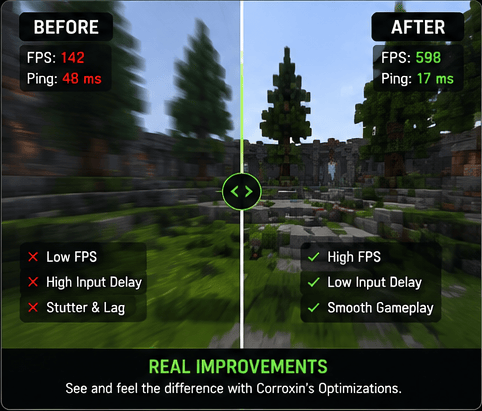
A performance-focused PvP optimization modpack designed to boost FPS, reduce input delay, and deliver smoother, move responsive gameplay.
截图



介绍
🔥What is Corroxin’s optimizations?
Corroxin’s Optimizations is a PvP-focused performance modpack built to maximize FPS, reduce input delay, and deliver the smoothest possible Minecraft experience.
It combines essential optimization and visual enhancement mods to improve overall responsiveness, reduce stuttering, and create smoother combat gameplay.
This modpack is currently in active development, which means frequent updates, ongoing improvements, and occasional fixes as new optimizations are added.
Whether you’re playing competitive PvP or simply want better performance, Corroxin’s Optimizations is designed to make Minecraft feel faster, smoother, and more responsive.
⚡Features
Here is a quick rundown of a few features.
- Animation, visual, sound and mod customizations (Edit animations, visuals, sounds how you like)
- Motion blur (To have smoother gameplay, use command /motionblur)
- Fps boost mods (Optimize your games performance with mods that reduce lag and enhance fps)
- Added ingame settings (ensuring smooth and fluid gameplay)
- HUD settings (Customize your HUD how you like)
- Render Settings (Control fog, static entities, and other miscellaneous renderings)
- Details Settings (Control sky, stars, sun/moon, weather, and much more)
- Particles Settings (Control all types of particles, including ones from other mods)
- Reduce missed inputs on high ping (Doesn’t change server rules or cooldown it only re‑sends use actions to help them register)
⚡ Key Features
- 🚀 Insane fps boost
- 💻 Works with any launcher
- 🌐 Stable in single/multiplayer
- 💡 Extra ingame settings
📥 How to install
- Download the .mrpack from Modrinth
- Convert it to .zip using: Conventer 1 or Converter 2
- Install the required loader in your launcher (Fabric)
- Open the .zip archive (which you downloaded earlier) and copy everything inside (mods and config) into your created instance folder
⭐ Recommended
Use Modrinth Launcher since its the easiest to use, highly recommended!
🚀 Recommended Versions
Fabric 1.21.11-1.21.10
❤️ Support the Project
This modpack will be allways for free, this modpack is still in early development so there still might be bugs, ill be updating and fixing this modpack everyday!
❓ FAQ
Is it allowed on servers?
Yes, it is allowed on most major servers, including PvPClub and MineMen. However, please check your specific server’s rules before joining, as some strict networks may prohibit certain optimization or PvP modifications.
Will more mods be added?
Yes. New modifications will be added over time. Conversely, some current mods may be removed in future updates to resolve incompatibilities or performance issues.
Will your modpack be only on Fabric?
Yes. Recreating the modpack for other loaders would require a significant amount of time. Since these modifications are natively built for Fabric, you will experience optimal performance. Fabric is highly recommended for this setup.
Will you develop your modpack on CurseForge or somewhere else?
Most likely, no. I will definitely never develop my modpack on CurseForge and abandoned it because of the stupid moderation system that does not allow adding mods from other sites, requires a moderator to check every action and imposes a bunch of other useless restrictions. I do not want to spend so much time reworking my modpack for CurseForge, because users end up downloading mods separately.
Are there/will there be mods that everyone needs (like iris)
Not in this specific release. This pack focuses strictly on core optimization, PvP performance, and resource pack compatibility. Features like Iris shaders can significantly lower your FPS. To provide the best experience, I will be releasing two distinct versions: one for pure game optimization, and another combining PvP enhancements with performance tweaks.
包含的模组 82 个
 Alternate Current
 Anchor Optimizer
 苹果皮
 AttributeFix
 BactroMod
BadOptimizations
 Better Biome Reblend
 Better Block Entities
 Better Hitreg
 Better Ping Display [Fabric]
 Client Side Crystals
 Cloth Config API
 Clumps
 Combat Hitboxes
 Concurrent Chunk Management Engine (Fabric)
 Config Manager
 Consumable Optimizer
 Continuity
 CrashExploitFixer
 Crosshair Addons Public
 Debugify
 Dynamic FPS
 实体剔除
 Exordium
 Fabric API
 Fabric Language Kotlin
 Fabrishot
 Fast Noise
 FastQuit
 FerriteCore
 FIX MY PINGGGGG
 Forge Config API Port
 Fzzy Config
 GPUBooster
 Hero's Anchor Optimizer
 HeroBot
 ImmediatelyFast
 Ixeris
 Jello's pvp optimizer
 Krypton
展开全部 82 个
 Ksyxis
 锂
 MaLiLib
 Marlow's Crystal Optimizer
 MixinTrace
 模组菜单
 ModernFix-mVUS
 More Chat History
 More Culling
 鼠标微调
 Natural Motion Blur
 No Chat Reports
 No Resource Pack Warnings
 OptiGUI
 Particle Core
 Prickle
 Reese's Sodium Options
 RenderScale
 ScalableLux
 Server Pinger Fixer
 ServerCore
 Shield Fixes
 Shield Statuses
 Shulker Box Tooltip
 Simple Datapacks
 Simple Voice Chat
 Skyboxify
 SnappyTappy
 钠
 Sodium Extra
 Status Effect Timer
 Stfu
 Text Placeholder API
 ToadLib
 TotemCounter
 uku's Armor HUD
 ukulib
 Very Many Players (Fabric)
 ViaFabric
 WalksyLib
 YetAnotherConfigLib (YACL)
 Zoomify (Zoom)
绿色边框的模组本站有收录,点进去看中文介绍;其余跳转到 Modrinth。
常见问题
Corroxin’s optimizations 支持哪些 Minecraft 版本?
Corroxin’s optimizations 支持 Minecraft Java 版 1.21.5–26.2,共 9 个版本,可用的加载器:Fabric。下载时注意选择和你游戏版本一致的文件。
Corroxin’s optimizations 怎么安装?
点本页「前往下载」拿到整合包文件(Modrinth 的是 .mrpack,CurseForge 的是 .zip),在 PCL2 或 HMCL 启动器里选择「导入整合包」,启动器会自动装好 Minecraft、加载器和全部模组。这个整合包有 82 个模组,建议在启动器里给游戏分配 4–6 GB 内存。
Corroxin’s optimizations 开服需要多大内存?
推荐服务器内存 12 GB。在线人数多、或者建了大量机器和区块加载器时,可以再加 2–4 GB。
怎么和朋友一起玩 Corroxin’s optimizations?
点本页的「一键开服」,选好配置后会自动安装 Corroxin’s optimizations 的服务端,几分钟就能开好。把服务器地址发给朋友,大家用同一个版本的整合包连进去就行。
评论
登录后评论和评分