
截图


介绍
I highly recommend using Prism Launcher or Modrinth App, since they have the native ARM64 build of Minecraft. The game will run _much_ better.
Are you not satisfied with the performance of Minecraft on your Mac? Well, then this modpack is for you!
Why download?
If you’ve ever played Java Edition without mods, you probably know the pain of having low FPS and stutters. Well, this modpack is made to fix that! It includes all kinds of mods, from optimization to quality of life, plus it doesn’t affect the vanilla gameplay!
Here are some of the features:
Performance
This modpack includes some _essential_ optimization mods like Sodium and Lithium.
Also, there are mods to optimize the chunk gen, like C2ME and fast noise.
Native Renderer
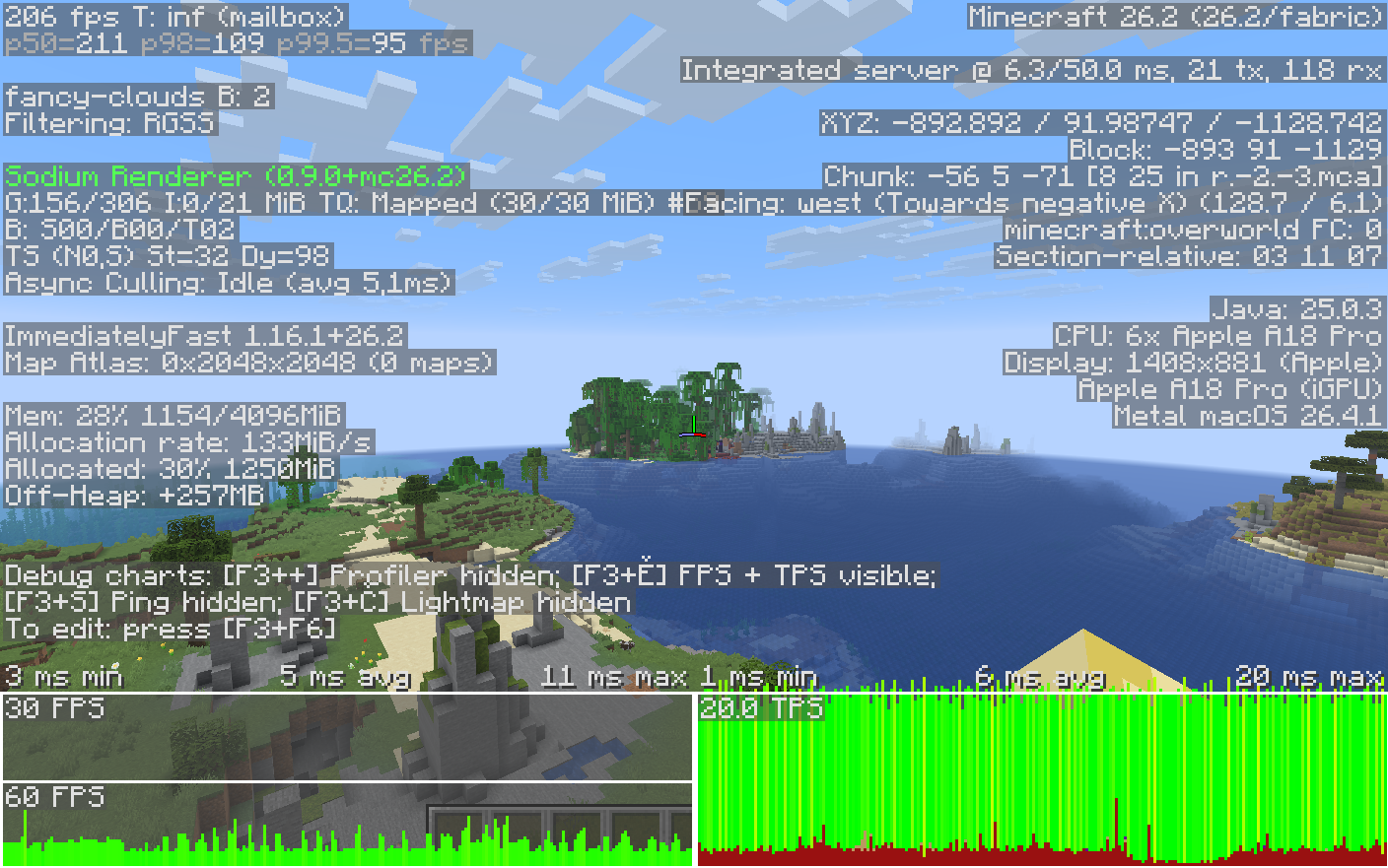
We sacrificed shaders for Metallum. This mod allows Minecraft to use Apple’s native Metal renderer, so it runs MUCH better.
Battery saving
Dynamic FPS will help you save battery when AFK or doing anything other than Minecraft.
Exploration
This modpack features Geophilic, which upgrades already existing biomes!
###Easier downloads
Instead of having to get out of your game to download resource packs and datapacks, you can now do that in-game with Resourcify! (Includes opt-out-able ads)
LAN Worlds
We assume your friends are not on the same WiFi as you, so Essential is included!
Invite your friends, emote, and unlock cool cosmetics! (Includes microtransactions)
Other Quality of Life mods
You know that mod that shows what block you’re looking at at the top of the screen?
Yeah, that’s Jade, and it’s included! Of course there are more.
Compatibility
Since version 1.0.1, this modpack is only compatible on M-Series (MacBook Neo included) Macs, because of Metallum.
包含的模组 56 个
 Almanac
 苹果皮
 Async Pack Scan
 AsyncParticles
BadOptimizations
 Better Block Entities
 BetterGrassify
 Cloth Config API
 Concurrent Chunk Management Engine (Fabric)
 Continuity
 Cubes Without Borders
 Cursors Extended
 Debugify
 Default Dark Mode
 Do I Reload?
 Dynamic FPS
 实体剔除
 Entity View Distance
 Essential Mod
 Fabric API
 Fabric Language Kotlin
 Fast Noise
 FerriteCore
 FPS Reducer
 Fzzy Config
 Geophilic
 ImmediatelyFast
 Ixeris
 Jade 🔍
 JEI物品管理器
 Krypton
 Ksyxis
 LambDynamicLights - Dynamic Lights
 Language Reload
 Let Me Despawn
 LibJF
 锂
 Metallum
 模组菜单
 Mod Menu Updater
展开全部 56 个












绿色边框的模组本站有收录,点进去看中文介绍;其余跳转到 Modrinth。
常见问题
MacOS Ready 支持哪些 Minecraft 版本?
MacOS Ready 基于 Minecraft Java 版 26.2、26.1.2,使用 Fabric 加载器。
MacOS Ready 怎么安装?
点本页「前往下载」拿到整合包文件(Modrinth 的是 .mrpack,CurseForge 的是 .zip),在 PCL2 或 HMCL 启动器里选择「导入整合包」,启动器会自动装好 Minecraft、加载器和全部模组。这个整合包有 56 个模组,建议在启动器里给游戏分配 4–6 GB 内存。
MacOS Ready 开服需要多大内存?
推荐服务器内存 12 GB。在线人数多、或者建了大量机器和区块加载器时,可以再加 2–4 GB。
怎么和朋友一起玩 MacOS Ready?
点本页的「一键开服」,选好配置后会自动安装 MacOS Ready 的服务端,几分钟就能开好。把服务器地址发给朋友,大家用同一个版本的整合包连进去就行。
评论
登录后评论和评分