
Vulkanic Optimizations
is a VulkanMod based performance modpack, carefully crafted together to achieve superior performance compared to others.
截图

介绍
Vulkanic Optimizations
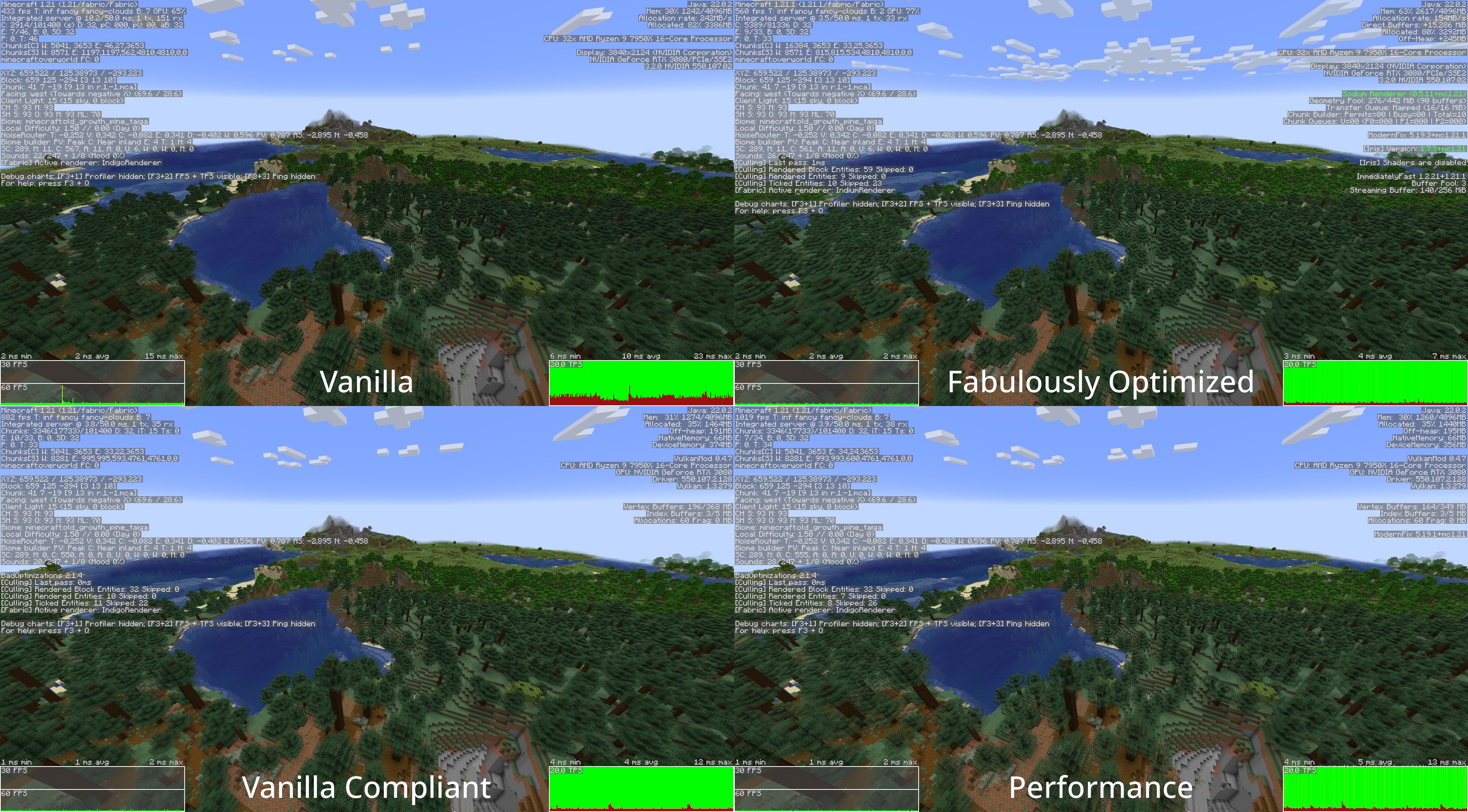
Vulkanic Optimizations is a VulkanMod based performance modpack, carefully crafted together to achieve superior performance compared to others. Effort was not only put into increasing FPS, but providing a smooth and reliable gameplay experience even on low-end systems. It improves various aspects such as, but not limited to, world loading/generation/saving, resource usage and server connectivity.
Which version to choose?
There are two versions available to download, Recommended and Base. The Base version contains only key performance mods and is useful if you want to make your own Modpack based on this. Recommended includes all the Base mods, but also some quality of life (qol) mods that I like to use and is the one I recommend for the best experience.
Files for manual installation are included in the releases itself under the ‘Files’ tab.
Requirements
To run Vulkanic Optimizations, your GPU needs to support at least Vulkan 1.2, which most already do. If you are unsure or run into issues, check for GPU support in the Vulkan Database and for driver support by running vulkaninfo --summary or vulkaninfo.exe --summary in the terminal. Make sure your GPU drivers are up-to-date if the GPU support differs from driver support.
Compatibility
This Modpack should be compatible with the vast majority of quality of life (qol) mods, but it’s still limited by VulkanMod’s abilities. You can get a good idea by looking at VulkanMod’s incompatible-mods list.
Furthermore, some included configurations might also cause compatibility issues.
Some Notes
If you see any visual changes from vanilla that you don’t like, it’s probably because of one of these mods:
- FastChest
- Blocky Bubbles
- Fast Items
If you are suddenly having issues with your farms/contraptions, this might be because of one of these mods:
- Alternate Current
- Clumps
- Get It Together, Drops!
- Immersive Optimizations
- Ksyxis
- Lithium
Feel free to remove any of them as needed.
Vulkanic Optimizations also ships with Resource Fixes made by Minecraft_hyr to reduce the number of triangles being rendered. If you run into issues loading your Resourcepack, try disabling it.
Getting more FPS
If you want to increase performance even further, I recommend the following:
- Updating VulkanMod is probably the easiest way to gain FPS, almost every new version has better compatibility and performance.
- Installing Adoptium (Temurin) JVM makes the game run smoother and can increase your FPS.
- Using Java arguments can also increase performance in certain cases, but be mindful about it and benchmark carefully, as they can decrease performance as well.
- Using an external server will reduce CPU load and can increase performance if you are CPU limited.
- Furthermore, a significant performance boost can be seen on Linux by running Minecraft in gamemode.
Credits
The credits go towards all the amazing mod developers making such performance improvements possible.
Special thanks goes to xCollateral who created VulkanMod, it does most of the heavy lifting and is absolutely awesome!
Base Version
- Achievements Optimizer – bigenergy
- Advancements Screen Optimizer – JustAlittleWolf
- Alternate Current – Space Walker
- Audition – Tasuposed
- Bad Optimizations – thosea
- Blocky Bubbles – axialeaa
- Client Side Noteblocks – DaCubeKing
- Clumps – jaredlll08
- Collision Fix – LopyMine
- Concurrent Chunk Management Engine – ishland
- Enhanced Block Entities – FoundationGames
- Entity Culling – tr7zw
- Fast Chest – Domi
- Fast IP Ping – fallen-breath
- Fast Items – Noryea
- Fast Paintings – MehVahdJukaar
- Fast Quit – contaria
- Faster Random – AnOpenSauceDev
- Faster Particle Collisions – AnOpenSauceDev
- FerriteCore – malte0811
- FPS Reducer – bre2el
- Function Compiler – EpicPix
- Get It Together, Drops! – bl4ckscor3
- Immersive Optimization – Luke100000
- Krypton – astei
- Ksyxis – VidTu
- Language Reload – Jerozgen
- Lithium – jellysquid3
- Main Menu Credits – isxander
- Mod Menu – Terraformers
- ModernFix – embeddedt
- More Culling – FX and 1Foxy2
- Noisium – Steveplays
- Rail Optimization – EasterGhost2
- Remove Reloading Screen – dima_dencep
- ScalableLux – ishland
- StutterFix – wisecase2
- Tekst – Tektonikal
- Your Options Shall Be Respected – shedaniel
Recommended Version
All Credits as in the Base version, plus:
- Accurate Block Placement Reborn – Kaddicus
- AppleSkin – squeek502
- AutoTools – zelythia
- Chat Patches – OBro1961
- ClickThrough Plus – Cassian
- Controlling – jaredlll08
- Creative Inv Extension – 02Alexis
- Equipment Compare – Grend
- Freecam – hashalite
- HotbarReplace – twokilohertz
- Idwtialsimmoedm – glisco
- InvMove – PieKing1215
- Just Enough Items – mezz
- Mouse Tweaks – YaLTeR
- No Telemetry – kb1000
- Overflowing Bars – Fuzs
- The Open Sauce Toast Killer – AnOpenSauceDev
- Peek – henkelmax
- Pick Up Notifier – Fuzs
- Simple HUD Enhanced – SoRadGaming
- Smooth Scrolling – SmajloSlovakian
- ToolTipFix – kyrptonaught
- ViaFabricPlus – FlorianMichael
- Zoomify – isxander
包含的模组 71 个,另有 1 个其他文件
 Client Side Noteblocks
"Faster" Particle Collisions
 Accurate Block Placement Reborn
 Achievements Optimizer
 Advancements Screen Optimizer
 Alternate Current
 苹果皮
 Architectury API
 Audition
 AutoTools
BadOptimizations
 Blocky Bubbles
 Chat Patches
 ClickThrough Plus
 Clumps
 Collision Fix
 Concurrent Chunk Management Engine (Fabric)
 Controlling
 Enhanced Block Entities
 实体剔除
 Equipment Compare
 Fabric API
 Fabric Language Kotlin
 Fast IP Ping
 Fast Items
 Fast Paintings
 Faster Random
 FastQuit
 FerriteCore
 Forge Config API Port
 FPS Reducer
 Freecam
 Function Compiler
 Get It Together, Drops!
 HotbarReplace
 Iceberg
 Idwtialsimmoedm
 Immersive Optimization
 InvMove
 JEI物品管理器
展开全部 71 个
 Krypton
 Ksyxis
 Language Reload
 锂
 Main Menu Credits
 模组菜单
 ModernFix
 Moonlight Lib
 More Culling
 鼠标微调
 No Telemetry
 Noisium
 Overflowing Bars
 Peek
 Pick Up Notifier
 Puzzles Lib
 Remove Reloading Screen
 Resource Fixes & Tweaks
 ScalableLux
 Searchables
 Simple HUD Enhanced
 Smooth Scrolling
 StutterFix
 Tekst
 The Open Sauce Toast Killer
 ToolTipFix
 ViaFabricPlus
 VulkanMod
 YetAnotherConfigLib (YACL)
 Your Options Shall Be Respected (YOSBR)
 Zoomify (Zoom)
绿色边框的模组本站有收录,点进去看中文介绍;其余跳转到 Modrinth。
常见问题
Vulkanic Optimizations 支持哪些 Minecraft 版本?
Vulkanic Optimizations 基于 Minecraft Java 版 1.21.1、1.21,使用 Fabric 加载器。
Vulkanic Optimizations 怎么安装?
点本页「前往下载」拿到整合包文件(Modrinth 的是 .mrpack,CurseForge 的是 .zip),在 PCL2 或 HMCL 启动器里选择「导入整合包」,启动器会自动装好 Minecraft、加载器和全部模组。这个整合包有 71 个模组,建议在启动器里给游戏分配 4–6 GB 内存。
Vulkanic Optimizations 开服需要多大内存?
推荐服务器内存 12 GB。在线人数多、或者建了大量机器和区块加载器时,可以再加 2–4 GB。
怎么和朋友一起玩 Vulkanic Optimizations?
点本页的「一键开服」,选好配置后会自动安装 Vulkanic Optimizations 的服务端,几分钟就能开好。把服务器地址发给朋友,大家用同一个版本的整合包连进去就行。
评论
登录后评论和评分