
MedieCraft – Server – Cross-Platform
Cross-Platform server-side mods for MedieCraft, a Medieval and Roguelike Minecraft experience
截图
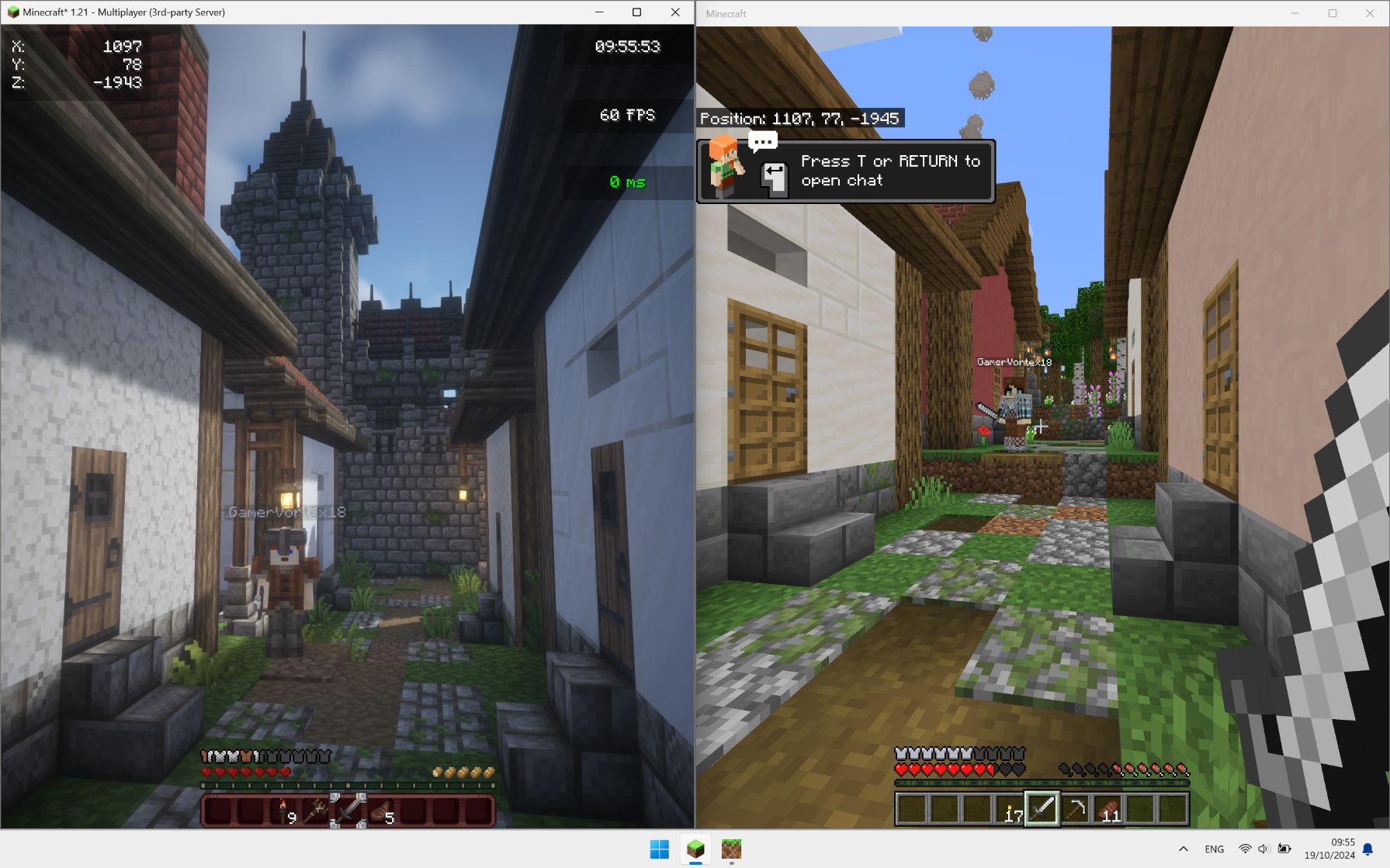
介绍
This modpack has been created with the aim of rediscovering the game through an ultra-immersive, challenging world full of new things to discover throughout your adventure.
Roam the world, traverse biomes and worlds, fight monsters on the prowl, and explore structures and dungeons to make your armor and weapons. Forget boring mining sessions and prepare yourself for an unforgettable experience with your friends.
This modpack is very challenging by setting game difficulty to normal or hard. If you want to explore the world and chill, easy difficulty is recommended. Good luck if you want to play in hardcore. 😉 (This version is a bit easier compared to the standard MedieCraft modpack)
See original modpack.
- 🐓
New mobs and mob variants(not in Cross-Platform Version of MedieCraft) - 🍅
More plants(not in Cross-Platform Version of MedieCraft) - 🏛 Enhanced structures and new ones
- 🛖 Themed villages and structures
- ⛰️ Beautiful landscapes with new and larger biomes using Terralith and Tectonic
- ⚔️ Dungeons, mobs, structures to build your stuff using battles instead of mining
- 🎑 _Ultra immersive environment sounds and songs_ (limited in Cross-Platform Version of MedieCraft)
- 🪓 Realistic trees
- 🗡
New tools and weapons(not in Cross-Platform Version of MedieCraft) - 🔦 Dynamic Lights
- 🎙
Proximity chat (with voice effects depending on the environment)(not in Cross-Platform Version of MedieCraft) - 👹
More monsters(not in Cross-Platform Version of MedieCraft) - 🌋
Better Nether(not in Cross-Platform Version of MedieCraft) - 👁
Better End(not in Cross-Platform Version of MedieCraft) - ⚡️ Hyper fast and ultra optimized
- 🔥 Very challenging
Compatibility
❌ MedieCraft
❌ MedieCraft – Lite
❌ MedieCraft – Server
✅ MedieCraft – Cross-Platform
✅ MedieCraft – Lite – Cross-Platform
✅ MedieCraft – Server – Cross-Platform
✅ MC Bedrock Clients
✅ MC Java Clients (using Fabric, ViaVersion, ViaFabric, CreativeCore and GeckoLib)
Key notes
- Cross-Platform server side modpack. Bedrock and vanilla Java players can join, even players using MedieCraft and MedieCraft – Lite can join the server.
- See instructions to get your server up and running in minutes !
- The mod list is available by clicking on ‘versions’ and then on the version number you chose to install.
- If you want to save and quit the server, just type
stopin the console. - If you can’t break anything or if want you or your friends to be able to do commands and cheats, you can type
op [player_name]directly in the server console.
System Requirements
Minimal System Requirements
- 4GB allocated to the server
- 4 Cores / 4-8 Threads CPU (AMD Ryzen 3 3100, Intel Core i5 7400)
- 8Gb RAM
- 1,5GB SSD storage
Recommended System Requirements
- 6GB allocated to the server
- 6 Cores / 12 Threads CPU (AMD Ryzen 5 5600, Intel Core i5 12400F)
- 16GB RAM
- 1,5GB SSD storage
Instructions
- Download Fabric Server and chose the version of the loader according to the version of MedieCraft – Server and MedieCraft you want. (Example: if you are playing in 1.21, download both MedieCraft and MedieCraft – Server compatible for 1.21 AND Fabric Server for 1.21)
- Launch it using the command named
Launch Commandon Fabric Server Website. NB: change the number2in-Xmx2Gcommand and put how much RAM you want to allocate to the server (Example: if you want 6GB for your server, write-Xmx6G). - Close server console by typing
stop. - Accept EULA by replacing
falsetotruein the file :eula.txt. - On Modrinth, go to your library and click on this modpack. Click on
Folderto access the modpack’s folder. - Copy the
modsfolder and paste it into the server folder (it should replace the emptymodsfolder previously created by Fabric) - Restart the server using the same command, a line mentionning that
Geyser is started. And then, close server console again by typingstop. - Enter
Floodgatefolder inconfigfolder, copy the filekey.pemand paste it into theGeyserMCfolder (also in theconfigfolder). - Restart the server using the same command and your server is up and running! (If you are running the server on your computer, you may have to forward your ports but it can be dangerous so be careful!).
NB: If you are having trouble with these instructions, you can watch this tutorial. It’s not mandatory to follow his GeyserMC settings, you can use default ones to play!
Q&A
- Is this modpack compatible with both MedieCraft – Cross-Platform and MedieCraft – Lite – Cross-Platform ?
Absolutely, using this modpack you can join servers using both MedieCraft – Cross-Platform and MedieCraft – Lite – Cross-Platform.
- How much RAM should I allocate to this modpack profile ?
4GB minimum should be fine. But 6GB is recommended if there are a lot of players or if all players are using MedieCraft – Cross-Platform with Distant Horizons.
- Can I play this modpack in older versions of Minecraft ?
Yes, to be able to play in older versions, you have to unlink the modpack at the very bottom of the modpack options. Then change the version of Minecraft and update all mods by clicking on ‘update mods’. Start the game and it should launch if all mods are compatible with the selected version of Minecraft.
- Is this modpack Cross-Platform ?
Yes, this mod pack is Cross-Platform for Java and Bedrock version. If you are running your game on console, you can follow this tutorial to join the server!
- Can I use this server modpack with a client running MedieCraft ?
No, you can only play with MedieCraft – Cross-Platform and MedieCraft – Lite – Cross-Platform modpacks only.
Credits
💙 Huge thanks to Maffhew with his Excalibur resource pack for giving me the idea of creating this resource pack. I honored him by putting his resource pack icon to my modpack ! The resource pack is in this modpack !
包含的模组 80 个
 [RETIRED] Dungeons and Taverns End Castle Standalone
 苹果皮
 Architectury API
 Awesome 3D Mace
 Better Runtime Resource Pack (BRRP)
 更好的统计信息界面
 Better Than Mending
 Calm down, dog!
 ChoiceTheorem's Overhauled Village
 Chunky
 CICADA
 Cloth Config API
 Clumps
 Collective
 Concurrent Chunk Management Engine (Fabric)
 CreativeCore
 Cristel Lib
 Do a Barrel Roll
 Dungeons and Taverns
 Dungeons and Taverns Ancient City Overhaul
 Dungeons and Taverns Desert Temple Overhaul
 Dungeons and Taverns Jungle Temple Overhaul
 Dungeons and Taverns Nether Fortress Overhaul
 Dungeons and Taverns Ocean Monument Overhaul
 Dungeons and Taverns Pillager Outpost Overhaul
 Dungeons and Taverns Stronghold Overhaul
 Dungeons and Taverns Swamp Hut Overhaul
 Dungeons and Taverns Woodland Mansion Overhaul
 Dynamic Lights
 Enchanting Commands
 Fabric API
 砍树
 FerriteCore
 Floodgate
 Forge Config API Port
 Geckolib
 Geyser
 HerdsPanic
 Hopo Better Mineshaft
 Horse Buff
展开全部 80 个
 JamLib
 锂
 Lithostitched
 Luki's Grand Capitals
 Medieval Buildings
 Medieval Buildings [End Edition]
 MidnightLib
 ModernFix
 MRU
 Nice Villagers Remastered
 Noisium
 Nyf's Spiders
 oωo (owo-lib)
playerAnimator
 PneumonoCore
 Puzzles Lib
 Quad
 RightClickHarvest
 Roguelike Dungeons
 Scorched
 ShatterLib | OctoLib
 spark
 Sparse Structures
 Structory
 Structory: Towers
 SuperMartijn642's Config Lib
 TCDCommons API
 Tectonic
 Terralith
 Text Placeholder API
 Towns and Towers
 Trade Cycling
 Universal Bone Meal
 ViaFabric
 ViaVersion
 Villager Transportation
 Villages&Pillages
 World Weaver
 WunderLib
 YUNG's API
左侧绿标的模组本站有收录,点进去看中文介绍;其余跳转到 Modrinth。
常见问题
MedieCraft – Server – Cross-Platform 支持哪些 Minecraft 版本?
MedieCraft – Server – Cross-Platform 基于 Minecraft Java 版 1.21,使用 Fabric 加载器。
MedieCraft – Server – Cross-Platform 怎么安装?
点本页「前往下载」拿到整合包文件(Modrinth 的是 .mrpack,CurseForge 的是 .zip),在 PCL2 或 HMCL 启动器里选择「导入整合包」,启动器会自动装好 Minecraft、加载器和全部模组。这个整合包有 80 个模组,建议在启动器里给游戏分配 4–6 GB 内存。
MedieCraft – Server – Cross-Platform 开服需要多大内存?
推荐服务器内存 12 GB。在线人数多、或者建了大量机器和区块加载器时,可以再加 2–4 GB。
怎么和朋友一起玩 MedieCraft – Server – Cross-Platform?
点本页的「一键开服」,选好配置后会自动安装 MedieCraft – Server – Cross-Platform 的服务端,几分钟就能开好。把服务器地址发给朋友,大家用同一个版本的整合包连进去就行。
GamerVortex 的其他作品
查看全部 →
MedieCraft – Lite
A Medieval and Roguelike Minecraft experience for low-end PCs!

MedieCraft
A Medieval and Roguelike Minecraft experience

MedieCraft – Lite – Cross-Platform
A Cross-Platform Medieval and Roguelike Minecraft experience for low-end PCs!

MedieCraft – Server
Server-side mods for MedieCraft, a Medieval and Roguelike Minecraft experience
评论
登录后评论和评分