
Window Title Bar Information
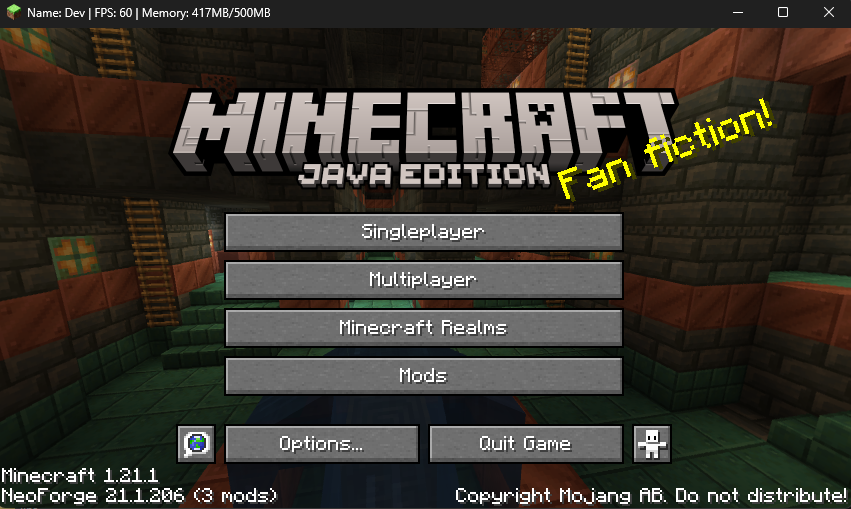
Customizable client-side window title info for NeoForge 1.21.1 with dark Windows title bar support, player name, FPS, memory, and multiplayer-only ping.
截图
介绍
Window Title Bar Information
Window Title Bar Information is a lightweight client-side NeoForge 1.21.1 mod that replaces Minecraft’s default window title with useful live client information.
Instead of the standard Minecraft title, the window can show:
Name: <player_name> | FPS: <client_fps> | Ping: <client_ping> | Memory: <current_memory_usage>/<allocated_memory>Features
- Fully configurable client-side title format
- Dark Windows title bar support
- Player name shown even from the main menu
- FPS display
- Memory usage display
- Ping display only when connected to an external multiplayer server
- Configurable update interval, defaulting to 3 seconds
- Persistent title handling to prevent Minecraft from briefly restoring the default title when changing screens or closing chat
- Client-side only, with no server installation required
Configuration
The generated config file is:
config/window_title_bar_information-client.tomlYou can configure:
- Enable or disable the custom title
- Enable or disable persistent title re-application
- Enable or disable the dark Windows title bar
- Show or hide player name
- Show or hide FPS
- Show or hide ping
- Show or hide memory usage
- Change labels such as
Name:,FPS:,Ping:, andMemory: - Change the separator between title sections
- Change the fallback title
- Change the update interval
Performance
The mod is designed with performance in mind.
Stats are recalculated only on the configured interval, which is 3 seconds by default. Persistent title handling re-applies the already-cached title instead of recalculating every value each tick.
常见问题
Window Title Bar Information 支持哪些 Minecraft 版本?
Window Title Bar Information 支持 Minecraft Java 版 1.21.1,可用的加载器:NeoForge。下载时注意选择和你游戏版本一致的文件。
Window Title Bar Information 怎么安装?
先用 PCL2 或 HMCL 启动器安装对应版本的 NeoForge,再把下载的 .jar 文件放进游戏目录的 mods 文件夹,重新启动游戏即可。开启了版本隔离的,mods 文件夹在 versions/版本名 下面。运行环境:仅客户端。
Luc1fer1o 的其他作品
查看全部 →
Way Better Leaves
Way Better Leaves is a client-side mod. It automatically gives vanilla and modded leaf blocks external X-shaped leaf panels using each block model's own leaf texture.

Crosshair Damage Indicator
Client-side NeoForge QoL mod that shows clean white damage numbers below your crosshair when your attacks, projectiles, or abilities damage nearby targets.

Accurate Fast Block Placement
Client-side NeoForge 1.21.1 mod that makes held right-click block placement faster and more accurate by timing placement attempts as your crosshair moves.
Accurate Fast Block Placement
Client-side NeoForge 1.21.1 mod that makes held right-click block placement faster and more accurate by timing placement attempts as your crosshair moves.
评论
登录后评论和评分