
Crosshair Damage Indicator
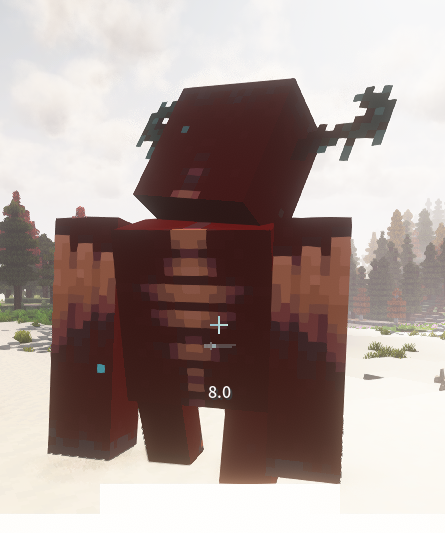
Client-side NeoForge QoL mod that shows clean white damage numbers below your crosshair when your attacks, projectiles, or abilities damage nearby targets.
截图
介绍
Crosshair Damage Indicator
Crosshair Damage Indicator is a lightweight client-side QoL mod for Minecraft NeoForge that shows damage dealt to entities near your crosshair. It is designed for combat-focused modpacks where clear feedback matters, without requiring server installation.
Features
- Shows damage numbers directly below the crosshair
- Uses clean white text for easy readability
- Supports melee attacks, ranged hits, and delayed projectile damage
- Includes support logic for fast multi-hit effects and modded ability-style damage
- Staggers rapid damage numbers so they are easier to read
- Detects final deathblow damage when an entity disappears immediately after dying
- Client-side only: servers do not need to install it
How It Works
The mod tracks visible entity health changes on the client after combat-related input such as attacks, item use, ranged weapon release, or non-movement ability key presses. When a matching target takes damage, the mod displays a compact damage popup below the crosshair.
Because it is fully client-side, it does not add networking, commands, gameplay mechanics, attributes, items, blocks, or server-side behavior.
Notes
- This mod is a visual QoL indicator only
- Damage numbers are based on health changes visible to the client
- Server-side damage formulas are not changed
- No configuration is required
常见问题
Crosshair Damage Indicator 支持哪些 Minecraft 版本?
Crosshair Damage Indicator 支持 Minecraft Java 版 1.20.1–1.21.1,共 7 个版本,可用的加载器:Fabric / Forge / NeoForge。下载时注意选择和你游戏版本一致的文件。
Crosshair Damage Indicator 怎么安装?
先用 PCL2 或 HMCL 启动器安装对应版本的 Fabric / Forge / NeoForge,再把下载的 .jar 文件放进游戏目录的 mods 文件夹,重新启动游戏即可。开启了版本隔离的,mods 文件夹在 versions/版本名 下面。运行环境:客户端和服务端都要装。
Luc1fer1o 的其他作品
查看全部 →
Way Better Leaves
Way Better Leaves 是一款客户端模组,会自动为原版和模组添加的树叶方块套上外置的 X 形叶片,并使用各方块模型自带的树叶纹理。

Accurate Fast Block Placement
Client-side NeoForge 1.21.1 mod that makes held right-click block placement faster and more accurate by timing placement attempts as your crosshair moves.
Accurate Fast Block Placement
Client-side NeoForge 1.21.1 mod that makes held right-click block placement faster and more accurate by timing placement attempts as your crosshair moves.

Hoe Scythes
Server-side NeoForge 1.21.1 mod that lets hoes clear grass-like blocks in 3x3 to 9x9 areas.
评论
登录后评论和评分