Way Better Title Bar
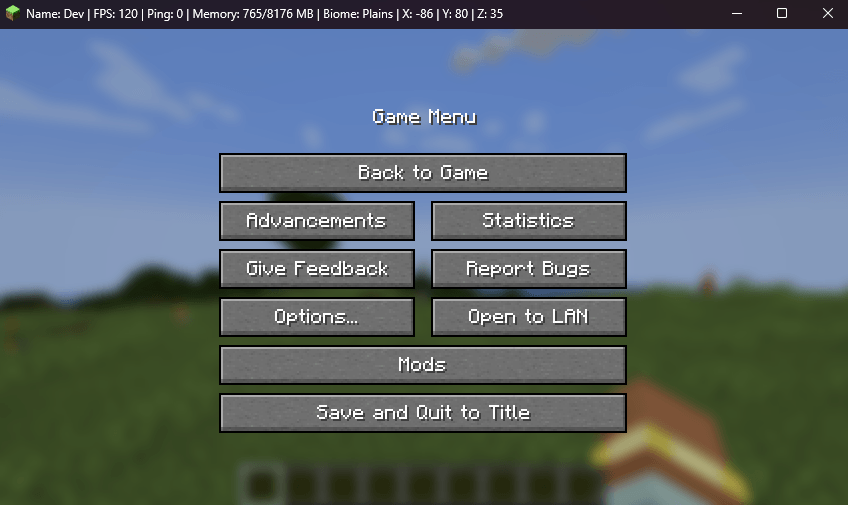
Way Better Title Bar gives the Windows title bar a dark theme and can display your name, FPS, ping, memory usage, biome, and coordinates. You can choose which details appear, set how often they update
截图
介绍
About
Way Better Title Bar gives Minecraft 1.21.1 a dark Windows title bar and replaces the window title with useful live information while you play.
Choose whether to show your player name, FPS, ping, memory usage, biome, and coordinates. The title updates at a configurable interval, and only the information you enable is collected for display.
Way Better Title Bar is completely client-side. It does not change gameplay or server behavior, and servers do not need to install it.
Features
- 🌙 Dark Title Bar: Applies Windows’ native dark style to the Minecraft window.
- 📊 Live Game Information: Shows your name, FPS, ping, memory usage, biome, and X/Y/Z coordinates.
- 🎛️ Individual Controls: Enable or disable each item independently.
- ⏱️ Adjustable Update Interval: Choose how often the title refreshes, from 1 to 60 seconds.
- ⚡ Performance-Minded: Updates periodically instead of rebuilding the title every frame.
- 🧭 Clean Biome Names: Shows readable biome names without mod namespaces.
- 🖥️ Client-Side Only: Works in singleplayer and multiplayer without a server installation.
Configuration
Open Mods → Way Better Title Bar → Config to change settings in-game. The Reset to Defaults button restores all options.
The configuration file is located at:
config/waybetter/way_better_title_bar-client.toml
常见问题
Way Better Title Bar 支持哪些 Minecraft 版本?
Way Better Title Bar 支持 Minecraft Java 版 1.21.1,可用的加载器:NeoForge。下载时注意选择和你游戏版本一致的文件。
Way Better Title Bar 怎么安装?
先用 PCL2 或 HMCL 启动器安装对应版本的 NeoForge,再把下载的 .jar 文件放进游戏目录的 mods 文件夹,重新启动游戏即可。开启了版本隔离的,mods 文件夹在 versions/版本名 下面。
Luc1fer1o 的其他作品
查看全部 →
Way Better Leaves
Way Better Leaves 是一款客户端模组,会自动为原版和模组添加的树叶方块套上外置的 X 形叶片,并使用各方块模型自带的树叶纹理。

Crosshair Damage Indicator
一款客户端 NeoForge 便利模组:当你的攻击、投射物或技能对附近目标造成伤害时,会在准星下方显示清晰的白色伤害数字。

Accurate Fast Block Placement
客户端 NeoForge 1.21.1 模组,通过在你准星移动时把握放置时机,让按住右键放置方块更快、更精准。
Accurate Fast Block Placement
客户端 NeoForge 1.21.1 模组,通过在你准星移动时对放置尝试进行计时,使按住右键放置方块更快、更精准。
评论
登录后评论和评分