
介绍
🗑️ Trash Slot 🗑️
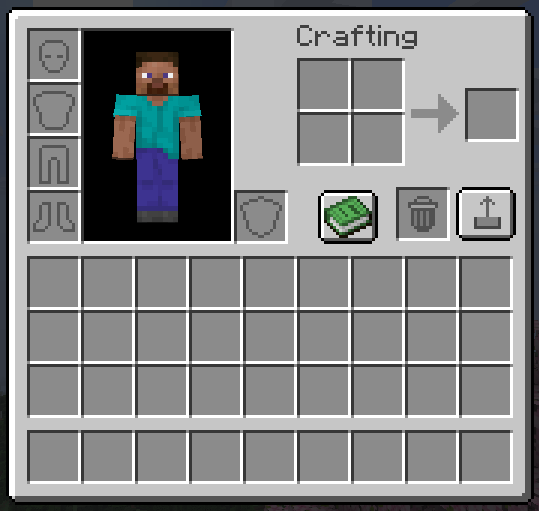
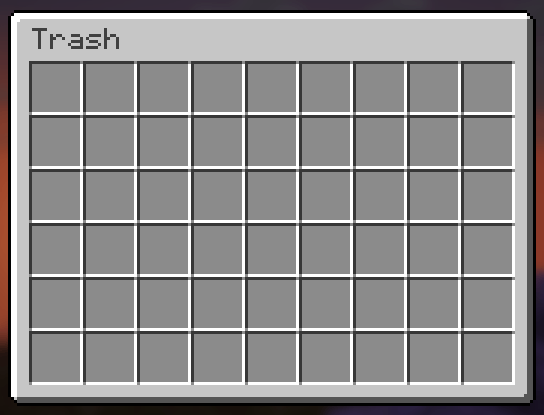
Trash Slot adds a dedicated trash slot to your inventory screen with a full 54-slot recovery chest. Drag items in to delete them, or use hotkeys for instant cleanup — and get them back anytime if you made a mistake.
✨ Features ✨
Drag-and-Drop Trash Slot
A real inventory slot right in your crafting area. Drag any item into it and it’s instantly deleted — no confirmation dialogs, no delays. Feels completely vanilla.
54-Slot Recovery Chest
Every deleted item is saved to a recovery grid styled as a vanilla large chest. Items fill left-to-right, top-to-bottom in deletion order. When the chest is full, the oldest items get overwritten first. Click any slot to recover instantly.
Delete Key Shortcuts
Press Delete while hovering any inventory item to trash it. Press Shift+Delete to trash all items of that type from your entire inventory at once.
Permanent Delete in Recovery
Press Delete while hovering an item inside the recovery chest to permanently destroy it — no recovery possible. Regular Delete from the inventory always goes to recovery first.
Vanilla Recovery Button
A pixel-perfect vanilla-style button next to the trash slot opens the recovery chest. Matches the recipe book button style exactly — proper border, highlight, and hover states.
Server-Safe
All delete and recover operations use custom network packets. The server validates everything — works correctly in multiplayer with no duplication or desync.
Configurable Position
Trash slot position is adjustable via config file (trashslot.json).
🎮 How to Use 🎮
- Open your inventory — trash slot appears next to the crafting grid
- Drag items into the trash slot — or press Delete over any item
- Click the recovery button — to open the 54-slot recovery chest
- Click items to recover — they return to your inventory instantly
📦 Installation
- Install NeoForge or Fabric for Minecraft 26.1.2
- Drop the jar into your
modsfolder - Launch the game — the trash slot appears automatically
🔧 Compatibility
Minecraft: 26.1.2
Loaders: NeoForge & Fabric
Side: Both (server + client)
Multiplayer: ✅ Fully supported
❓ FAQ ❓
Is deleted data saved between sessions?
Yes — deletion history is saved per-player and persists across logins.
What happens when the recovery chest is full?
The oldest deleted item gets overwritten. The chest holds 54 items (6×9 grid).
Does this need to be on the server?
Yes — the mod handles inventory changes server-side for safety. Install on both client and server for multiplayer.
Can I include this in my modpack?
Yes, freely — public or private, no notification needed.
Where do I report bugs?
Open an issue on the GitHub repository. Please include your loader, MC version, and a latest.log.
📄 License 📄
MIT — source available on GitHub.
Made by hooneyBadgers.
常见问题
Trash Slot 支持哪些 Minecraft 版本?
Trash Slot 支持 Minecraft Java 版 26.1.2,可用的加载器:Fabric / NeoForge。下载时注意选择和你游戏版本一致的文件。
Trash Slot 怎么安装?
先用 PCL2 或 HMCL 启动器安装对应版本的 Fabric / NeoForge,再把下载的 .jar 文件放进游戏目录的 mods 文件夹,重新启动游戏即可。开启了版本隔离的,mods 文件夹在 versions/版本名 下面。
hooneybAdgers 的其他作品
查看全部 →
Elytra Slot!
新增一个槽位,可同时穿戴鞘翅和胸甲。

Full Brightness (NIGHT VISION)
夜视切换按钮

Immersive Portal
将传送门变成连绵不断的通路。

Armor Durability HUD Display
原版风格的小组件,可显示盔甲并在耐久度较低时发出警告。
评论
登录后评论和评分