Telex / Teleport X
Very fast teleports for multiple views and work location or multiple work sites. Good for creative builds and survival navigation.
截图
介绍
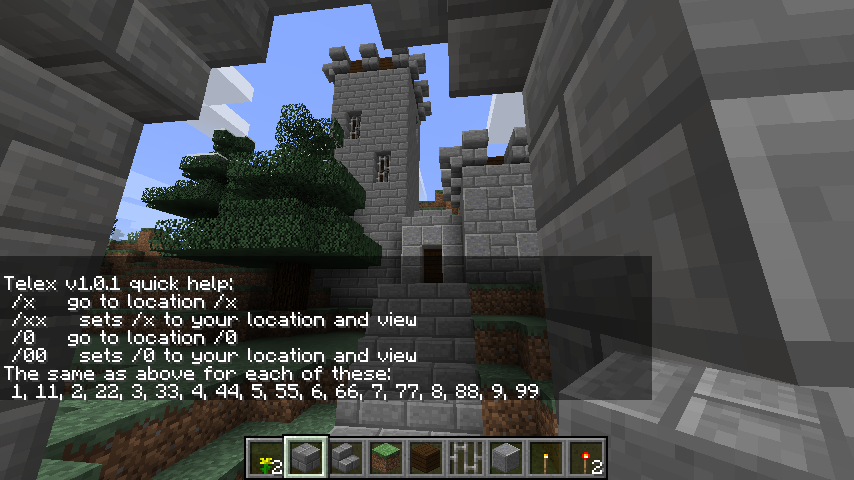
Type /telex for this quick help.
Teleport X allows very fast chat commands to teleport to 11 different positions. Intended to jump between a work location(x) and up to 10 other locations(0-9). They are user specific teleport points that also preserve your view angles. /x to go and /xx to set location.
Creative Example: I am building a small castle but I want to adjust its architecture to look good from the road coming up to it and from the river nearby. I also want the entrance gate to have a great impressive view. Where I am working now I just type /xx to mark my work spot. At each of the views I stand looking at my project then type /11 at the first spot and /22 at the second spot and finally /33 down by the gate. Now i can hop between these views to see how its coming along just by typing /1 /2 or /3 and then /x to go back to work. Its very fast.
Survival Example: I am in survival mode and I found a great ravine and cave system to go mine in. I can mark the entrance to it with /11 and the latest work area there with /22. I can hop back with just /1 or /2 at any time. oh and I marked my base with /xx so to go home after a full pack from mining, I just type /x
USAGE:
There are 11 locations: x 0 1 2 3 4 5 6 7 8 9
Type the double digit to set the location. example /55
Type the single digit to go there instantly. example /5
Thats it.
The locations are private for each player.
Your angle of view is kept from when the location was set.
There is a quick help in-game if you type /telex
Very fast to type and instant teleport.
DOWNLOAD and INSTALL
Click here for the best and official download page to select the download for your version of Minecraft.
Put the jar file in the /mods folder for your game and restart the game just like most forge mods.
NOTES:
Works in minecraft 1.9.4 through 1.12.2 at this time.
This is compatible with the mod SpawnCommands Teleport but does not require it.
It can cross dimensions.
Source code is included in the jar file.
Works in single player and in multiplayer servers.
This is a forge mod. No bukkit is needed.
Config: the digits/commands can be renamed, disabled, or even set to operator use only.
This only needs to be on the server side for multiplayer servers.
This mod may be added or removed at any time without any problem for your server.
.
When crossing to the nether for the first time after you started the game: it may crash the client side due to a Minecraft bug. Going to the Nether after using a Nether portal once clears the problem and feel free to teleport all you like after that. All other dimensions work smoothly. Give your new location a moment to load. This is not a bug in this mod but a bug in Minecraft code.
PERMISSIONS:
Yes.
You may use and or redistribute this any way you like.
Yes that includes modpacks.
REQUIREMENTS:
have fun =)
.
常见问题
Telex / Teleport X 支持哪些 Minecraft 版本?
Telex / Teleport X 支持 Minecraft Java 版 1.9.4–1.12.2,共 10 个版本,可用的加载器:Forge。下载时注意选择和你游戏版本一致的文件。
Telex / Teleport X 怎么安装?
先用 PCL2 或 HMCL 启动器安装对应版本的 Forge,再把下载的 .jar 文件放进游戏目录的 mods 文件夹,重新启动游戏即可。开启了版本隔离的,mods 文件夹在 versions/版本名 下面。
AndreNoel 的其他作品
查看全部 →
Entity LagFix / Lag Fix
通过清理过多实体来减少卡顿,例如掉落物、箭矢、爆炸等产生的实体。为管理员提供的工具,可统计或清除一定范围内的所有物品、生物、实体、方块实体或方块。兼容命令方块。

SpawnCommands / Spawn Commands Teleport
在聊天中使用传送指令,可传送至出生点、家、指定地点,也可发送传送请求。支持多项可配置功能。
OpMe Mod
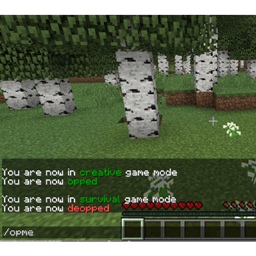
我喜欢以普通玩家的身份游玩,但需要时也能轻松获得管理员权限。这个模组可以通过命令,为你在配置文件中预先授权的玩家切换管理员权限和创造模式。出于安全考虑,无法在游戏内将任何人添加到授权列表中。

Exact Spawn Simple / exactspawnsimple.
这款模组简单至极,让主出生点始终固定在完全相同的位置,不再像 Minecraft 默认设定那样随机偏移几格,或把你生成在主建筑的屋顶上。不需要配置,没有复杂设置,装上就能用。
评论
登录后评论和评分