跳到正文

OpMe Mod

作者:AndreNoel

I like to play as a normal player but be easily opped when needed. A command to toggle operator status and creative game mode for players you preauthorize in a config file. For security, nothing can add anyone to the list from in-game.

收藏

截图

介绍

中文介绍正在准备中,下面暂时显示原文。
 
 
I prefer to play on my Minecraft servers as a regular player but from time to time I need to be opped.


in chat type…
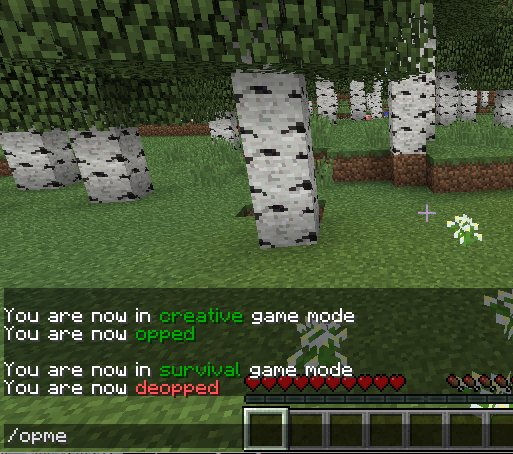
/opme


Entering /opme in chat Instantly toggles my operator status and my creative mode on or off. I can then fix or deal with any operator things I need to do, then I just enter /opme again and I am back as a normal player.


Only preauthorized player names may use /opme. The configuration file for this mod is a comma separated list of operator names. It is located in the folder “config” under your server’s main folder.  For security, the list of names cannot be added to or changed from in-game. You will need to add the names of trusted operators and/or your name to this list.  Changes take effect immediately without a server restart. It starts with an empty list.


When you do /opme the second time it returns you to the game mode you were in, such as survival or adventure. The only exception is that if you were previously in creative it sets you to the server default gamemode instead of going back to creative.


I recommend that just before you return to normal play mode, that you 1: dispose of items from creative mode that may be in your inventory or toolbar, then 2: that you move to a safe location where you won’t fall or be attacked.


I have also found this useful for modding development and testing mods.

INSTALLATION
Just drop this jar file into your mods folder with your other mods and restart your server as usual for any Forge mod.
You do need to add operator names to the config file.
This is only needed on the server side. The game clients do NOT need this to use it.

PERMISSIONS
This is under Creative Commons Attribution license. (free with credit where it is due)
YES you may use this in modpacks.
You may also redistribute this.

NOTES
Source code is included.
This is a Forge mod. No Bukkit is needed.
 

常见问题

OpMe Mod 支持哪些 Minecraft 版本?

OpMe Mod 支持 Minecraft Java 版 1.7.10–1.12.2,共 17 个版本,可用的加载器:Forge。下载时注意选择和你游戏版本一致的文件。

OpMe Mod 怎么安装?

先用 PCL2 或 HMCL 启动器安装对应版本的 Forge,再把下载的 .jar 文件放进游戏目录的 mods 文件夹,重新启动游戏即可。开启了版本隔离的,mods 文件夹在 versions/版本名 下面。

评论

登录后评论和评分

AndreNoel 的其他作品

查看全部 →