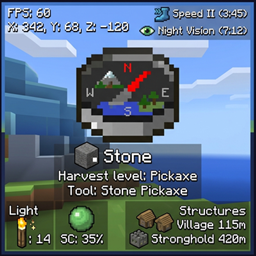
截图
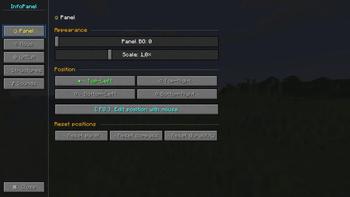
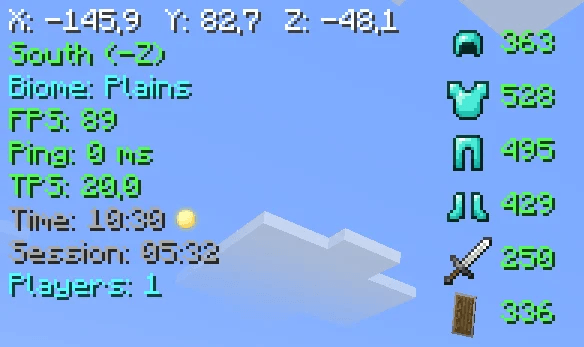
介绍
InfoPanelMod
A feature-rich HUD mod for NeoForge 1.21.1. Inspired by MiniHUD by masady.
🌟 Features
📊 Main Panel
- Coordinates (XYZ)
- Direction (compass)
- Biome
- FPS
- Ping (ms)
- TPS
- In-game time (day/night)
- Session time
- Online players count
🛡️ Item Durability
- Armor (helmet, chestplate, leggings, boots)
- Main hand weapon
- Offhand items
🧭 Compass Bar
An animated bar with 8 directions (N, NE, E, SE, S, SW, W, NW)
🧪 Effect Timers
Shows remaining duration of potion effects on their icons
🔍 WAILA (What Am I Looking At)
- Block / entity name
- Entity health (❤)
💡 Light Overlay (F7)
Highlights blocks where light level ≤ 7 (mobs can spawn)
🟢 Slime Chunks (F9)
Displays chunk boundaries where slimes can spawn
🏗️ Structure Overlay
Shows structure boundaries for:
- Villages
- Pillager Outposts
- Ocean Monuments
- Strongholds
- Desert Temples
- Nether Fortresses
- Bastions
🔧 Compatibility
- Terralith — biome name translations (Russian)
⚙️ Configuration (press Y)
Panel Tab
- Background opacity
- Scale (0.5× – 2.0×)
- Position (4 corners)
- Drag & drop layout editor (F8)
- Reset position
Lines Tab
- Toggle any line on/off
- Custom colors for each line (13 colors)
WAILA Tab
- Background opacity
- Position (4 options)
- Block name color
Structures Tab
- Master toggle for all structures
- Individual toggles for each structure
⌨️ Key Bindings
- H — toggle HUD
- Y — open settings
- F7 — light overlay
- F8 — layout editor (drag & drop)
- F9 — slime chunks
🖱️ Layout Editor (F8)
- Drag main panel, compass bar, and durability bar
- Pulsing borders (blue — panel, yellow — compass, green — durability)
- Shows current coordinates
- Labels below each element
- Esc — save and exit
🎨 Color Palette
White, light gray, gray, red, orange, yellow, green, dark green, cyan, blue, dark blue, pink, purple.
📜 License
MIT License — free to use in any modpack.
常见问题
InfoPanel 支持哪些 Minecraft 版本?
InfoPanel 支持 Minecraft Java 版 1.21.1,可用的加载器:NeoForge。下载时注意选择和你游戏版本一致的文件。
InfoPanel 怎么安装?
先用 PCL2 或 HMCL 启动器安装对应版本的 NeoForge,再把下载的 .jar 文件放进游戏目录的 mods 文件夹,重新启动游戏即可。开启了版本隔离的,mods 文件夹在 versions/版本名 下面。
PerfLite 的其他作品
查看全部 →
Create addon: Info Display
Info Display is an addon for Create that adds two information panel blocks: one for Item Vault, one for Fluid Tank

InfoPanel
Customizable HUD for NeoForge 1.21.1 coordinates, FPS, compass, WAILA, light & slime overlays, structures, effect timers.

Create addon: Info Display
Info Display is an addon for Create that adds two information panel blocks: one for Item Vault, one for Fluid Tank.

Animated health bar
replaces the vanilla health and hunger bars with smooth animated custom bars.
评论
登录后评论和评分