
介绍
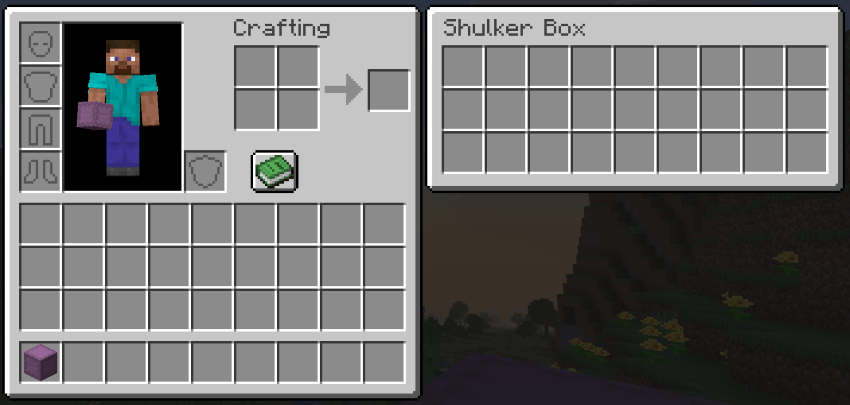
Using shulker boxes gets annoying when you have to repeatedly drag them from your inventory, to your hotbar, exit the inventory, place down the box, open it, transfer items, exit box, break box, pick up box, open inventory, transfer box from hotbar to inventory, and finally finish. Shulker View elimantes all the hassle.
✨ Features ✨
View any shulker box contents directly from your inventory
Dual-panel GUI: inventory on one side, shulker contents on the other
Works with all 16 shulker box colors
Curios integration: shows your equipped Curios slots
Compatible with Elytra Slot
Works in multiplayer
🖱️ How to Use 🖱️
Open your inventory — a panel appears automatically showing the shulker contents when you hover over a shulker box. If you have Curios API installed, your Curios slots also appear in a side panel.
❓ FAQ ❓
Does it work with modded shulker boxes?
Yes — any item using the standard shulker container.
Do I need Curios?
No — fully optional. The Curios panel only appears if Curios API is installed.
Can I add this to my modpack?
Yes — freely, no credit required.
🐛 Bugs & Support 🐛
Report issues on the GitHub issue tracker. Please include your NeoForge version and latest.log
常见问题
Shulker View 支持哪些 Minecraft 版本?
Shulker View 支持 Minecraft Java 版 1.21.11–26.3,共 4 个版本,可用的加载器:Fabric / Forge / NeoForge / Quilt。下载时注意选择和你游戏版本一致的文件。
Shulker View 怎么安装?
先用 PCL2 或 HMCL 启动器安装对应版本的 Fabric / Forge / NeoForge / Quilt,再把下载的 .jar 文件放进游戏目录的 mods 文件夹,重新启动游戏即可。开启了版本隔离的,mods 文件夹在 versions/版本名 下面。
hooneybAdgers 的其他作品
查看全部 →
Elytra Slot!
新增一个槽位,可同时穿戴鞘翅和胸甲。

Full Brightness (NIGHT VISION)
夜视切换按钮

Immersive Portal
将传送门变成连绵不断的通路。

Armor Durability HUD Display
原版风格的小组件,可显示盔甲并在耐久度较低时发出警告。
评论
登录后评论和评分