
Cobblemon Real-Time Combat: CobbleStrike!
Bring Cobblemon combat into the overworld: command attacks in real time, face reactive wild Pokémon, and train companions that learn your fighting style.
截图
介绍
⚔️ Cobble Strike
Your Pokémon. Your commands. Real-time combat.
Cobble Strike brings Pokémon combat directly into the Minecraft overworld, alongside Cobblemon’s traditional turn-based battles.
Command your Pokémon’s moves, keep enemies in your sights, and fight together as you explore. From close-range strikes to elemental projectiles, combat happens around you—with positioning, timing, and move selection shaping each encounter.
(Screenshot pendiente: imagen principal de un entrenador y su Pokémon enfrentándose a un enemigo, con un ataque claramente visible.)
🎮 Take Command
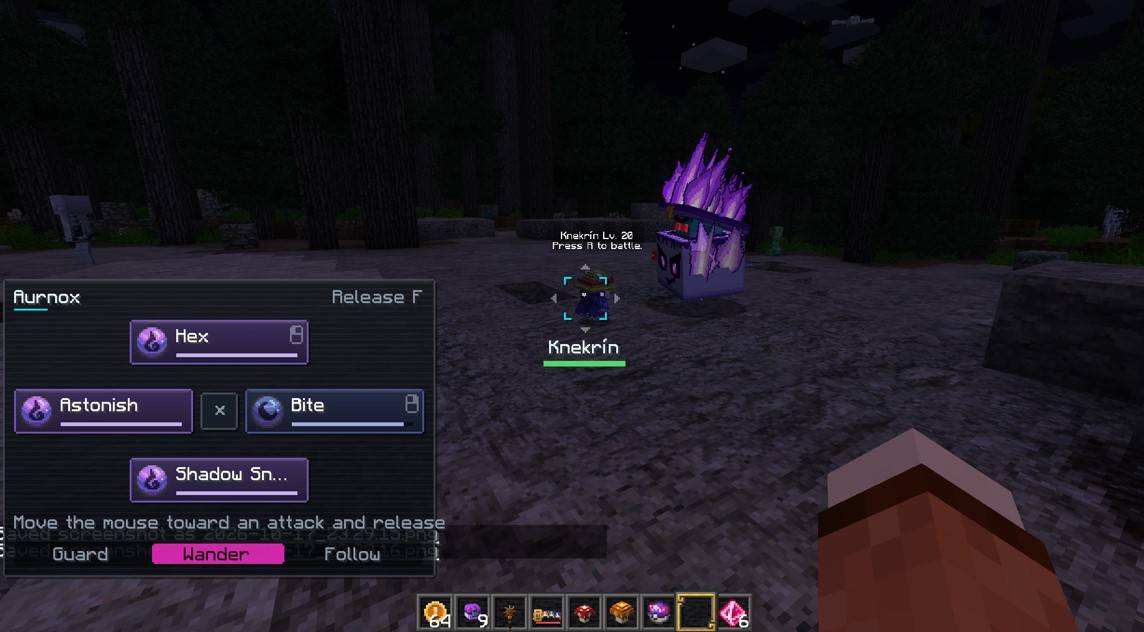
Send out your Pokémon, aim at a target, and hold G to open the attack selector. Move the mouse toward one of its four moves, then release the key to give the order.
The selector displays move types, remaining PP, and cooldowns so you can decide what to use next. You can also queue a move while your Pokémon is fighting automatically; it executes once the move is ready.
Targeted manual attacks consume PP by default, and cooldowns help pace the action.
(Screenshot pendiente: selector abierto, con los cuatro movimientos, sus tipos, PP y al menos un cooldown visibles.)
🎯 Keep Your Target in Sight
Press K while aiming at an enemy to lock on. A visual marker identifies your target, and the camera follows it as it moves.
You can also fire supported attacks toward your crosshair without selecting an enemy first. Projectiles and beams travel through the world and can hit targets along their path.
Choose your distance, find a clear line of sight, and switch between close-range pressure and ranged attacks.
(Screenshot pendiente: enemigo fijado con su marcador visible, mientras el Pokémon del jugador prepara o lanza un ataque.)
🧠 A Partner That Learns Your Fighting Style
Your Pokémon learns from the commands you give it.
The learning system tracks preferences such as which moves you use at different distances, against different type matchups, and after previous attacks. Those habits influence its choices when fighting automatically.
The selector displays affinity and highlights the move your Pokémon is predicted to choose on its own. Training becomes a matter of demonstrating how you want your partner to fight.
(Screenshot pendiente: selector mostrando afinidad y el movimiento previsto; idealmente acompañado de un aviso de preferencia aprendida.)
🐾 Give Your Pokémon a Role
Choose between three persistent orders:
- Follow: stay with the trainer, explore nearby while resting, and catch up when the trainer moves away.
- Wander: roam around a local area.
- Guard: hold a designated position.
Change orders through the selector or assign a dedicated key in Minecraft’s controls.
🌿 Wild Pokémon React
Wild Pokémon can respond to threats by fighting back or retreating. Their reactions take temperament, level, health, and morale into account.
An encounter can turn into a pursuit, a counterattack, or an escape. Server owners can also enable unprovoked aggression for suitable wild Pokémon; it is disabled by default.
Defeating Pokémon outside traditional battles can award experience, shared between participating Pokémon according to their damage contribution.
(Screenshot pendiente: reacción de un Pokémon salvaje al ser provocado, con su señal de enfado o una retirada claramente reconocible.)
💨 Movement Is Part of the Fight
Certain moves provide special combat maneuvers:
- Quick Attack: a fast approach, with movement input influencing whether your Pokémon returns or stays forward.
- Agility: evasive lateral movement.
- Protect / Counter: defensive parry mechanics.
While riding your own Pokémon with an empty hand, left click and right click activate its first and second moves. Dedicated shortcuts for all four moves can also be assigned.
(Screenshot pendiente: ataque montado o maniobra de Quick Attack, mostrando claramente al jinete, la montura y el objetivo.)
⛏️ Put Moves to Work
Your Pokémon’s moves can help outside combat, too.
Aim at a suitable block and issue a supported move:
- Dig: excavate terrain.
- Rock Smash: break rock.
- Cut: harvest trees.
- Fire moves: ignite suitable targets.
- Ice moves: freeze nearby water.
Block interactions are configurable and respect the mobGriefing gamerule by default.
(Screenshot pendiente: Pokémon ejecutando Dig, Cut o un movimiento de hielo, con el cambio en el terreno claramente visible.)
✨ Attacks With Their Own Identity
Moves use a combination of attack animations, projectiles, beams, particles, and sound effects.
Fire darts, swirling leaves, bubbles, whips, and elemental impacts give supported moves distinct appearances. When available, Cobble Strike also reads Cobblemon’s loaded move-effect timelines.
Specific animations and effects depend on the move, Pokémon model, and installed content.
(Screenshot pendiente: montaje de varios ataques visualmente distintos, por ejemplo Ember, Razor Leaf, Bubble y Vine Whip.)
⌨️ Default Controls
| Action | Control |
|---|---|
| Open attack selector | Hold G |
| Execute selected move | Release G |
| Lock / release target | K |
| Switch selected party Pokémon | Left Alt + mouse wheel |
| Mounted move 1, empty hand | Left click |
| Mounted move 2, empty hand | Right click |
| Dedicated move shortcuts | Assign in Options → Controls |
| Cycle Follow / Wander / Guard | Assign in Options → Controls |
Controls can be remapped.
📦 Installation
Requires Cobblemon and the appropriate file for your Minecraft version and mod loader.
| Minecraft | Mod loader |
|---|---|
| 1.20.1 | Forge |
| 1.21.1 | Fabric / NeoForge |
For multiplayer, install matching versions on both the server and clients. Fabric also requires Fabric API and Forge Config API Port.
Cobble Strike includes its own combat system. Fight or Flight is not required and should be removed when using Cobble Strike’s combat.
⚙️ Make It Fit Your World
Configure combat behavior, wild aggression, damage, cooldowns, learning, block interactions, and visual effects to suit your world or modpack.
常见问题
Cobblemon Real-Time Combat: CobbleStrike! 支持哪些 Minecraft 版本?
Cobblemon Real-Time Combat: CobbleStrike! 支持 Minecraft Java 版 1.20.1–1.21.1,共 2 个版本,可用的加载器:Fabric / Forge / NeoForge。下载时注意选择和你游戏版本一致的文件。
Cobblemon Real-Time Combat: CobbleStrike! 怎么安装?
先用 PCL2 或 HMCL 启动器安装对应版本的 Fabric / Forge / NeoForge,再把下载的 .jar 文件放进游戏目录的 mods 文件夹,重新启动游戏即可。开启了版本隔离的,mods 文件夹在 versions/版本名 下面。
kopperlab 的其他作品
查看全部 →
Cobblemon: Cobble Instincts!
Pokemon that truly feel alive - Natural behaviors for a richer Cobblemon experience.
Cobblemon: KN’s Cobblevolution
Cobblemon 1.5.2 addon that adds a cool evolution animation, similar to newer versions but for 1.20.1. Very configurable

KopperLib
A library for Kopper mods - Compatibilities
Cobblemon: PokeRider
Experience modern Pokémon riding in Cobblemon 1.5.2 with animation-aware movement, realistic physics, and a wide range of features
评论
登录后评论和评分