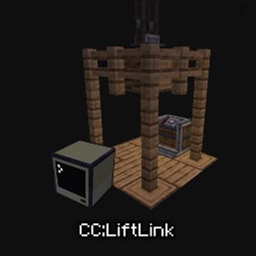
CC:LiftLink
CC:LiftLink: Create & ComputerCraft integration for elevators. Manage floor calls, track real-time movement, and query states via a simple Lua API—all through one redstone contact. No complex wiring required. Designed for Minecraft 1.20.1 and 1.21.1.
介绍
CC:LiftLink
- CC:LiftLink by Tom
- Copyright (c) 2026 Tom
- Licensed under the Mozilla Public License 2.0
ComputerCraft support for Create elevators. CC:LiftLink provides a bridge between the Create mod and CC: Tweaked, allowing for programmatic control of elevator systems. By connecting a computer to a single redstone contact within an elevator column, you gain access to the entire elevator network without complex wiring or pulley attachments. Setup Build: Assemble and test your Create elevator normally. Connect: Place a ComputerCraft computer or wired modem against any one redstone contact in the elevator column. Initialize: Wrap the peripheral in your Lua script using: Lua
local elevator = peripheral.find(“create_elevator”)
API Functions
listFloors() Returns all floors in the column.
callToFloor(name) Calls the elevator to a named floor.
callToY(y) Calls the elevator to a floor by Y level.
getState() Returns the main elevator state table.
getFloors() Returns floor names mapped to Y levels.
getCurrentLevel() Returns current elevator Y level.
getTargetLevel() Returns target Y level.
getTargetY() Returns target Y level.
isMoving() Returns true if the elevator is moving.
isActive() Returns true if the elevator is active.
getCabY() Returns cab Y position.
getSpeed() Returns current speed.
getDirection() Returns “up”, “down”, or “idle”.
getColumnInfo() Returns combined floor and state info.
getCurrentFloor() Returns the exact current floor name and Y.
getNearestFloor() Returns the nearest floor name and Y.
hasFloor(name) Checks if a floor exists.
isAtFloor(name) Checks if the elevator is at that floor.
Technical Details Requirements: Minecraft: 1.20.1 Create: 0.5.1.f (6.0.8) CC: Tweaked: 1.116.1 Platform: Forge Note: You do not need to connect to the elevator pulley. A single connection to any redstone contact in the column provides full access to the elevator’s functions.
常见问题
CC:LiftLink 支持哪些 Minecraft 版本?
CC:LiftLink 支持 Minecraft Java 版 1.20.1–1.21.1,共 2 个版本,可用的加载器:Forge / NeoForge。下载时注意选择和你游戏版本一致的文件。
CC:LiftLink 怎么安装?
先用 PCL2 或 HMCL 启动器安装对应版本的 Forge / NeoForge,再把下载的 .jar 文件放进游戏目录的 mods 文件夹,重新启动游戏即可。开启了版本隔离的,mods 文件夹在 versions/版本名 下面。
tiktop101 的其他作品
查看全部 →
CC:DirectGPU
DirectGPU is a high-resolution monitor and GUI add-on for CC: Tweaked; the Fabric and Forge versions have been discontinued due to maintenance difficulties, and development is now exclusive to NeoForge 1.21.1.
CC:DirectGPU
DirectGPU is a high-resolution monitor and GUI add-on for CC: Tweaked; the Fabric and Forge versions have been discontinued due to maintenance difficulties, and development is now exclusive to NeoForge 1.21.1.

CC:HQ Speakers
CC HQ Speakers A mod for Minecraft CC Tweaked Speaker's uses cc tweakeds speakers and adds higher quality support and most importantly mp3s

CC:LiftLink
CC:LiftLink provides ComputerCraft integration for Create elevators, allowing full control through a single redstone contact. Instead of wiring every floor or connecting to the pulley, you can manage floor calls, track real-time movement, and query elevato
评论
登录后评论和评分