
Attributes UI
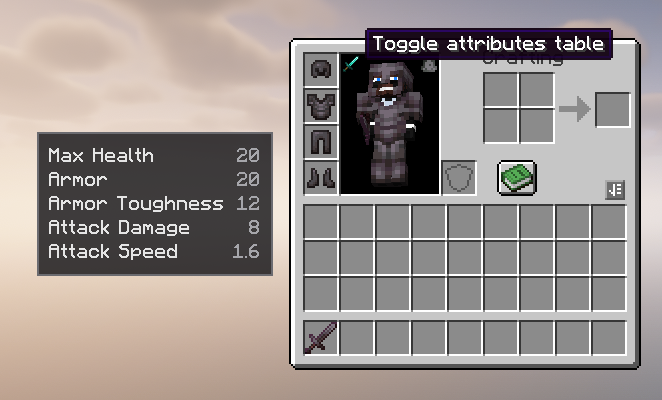
Adds a configurable attributes table to the player inventory, with custom attribute support, display transforms, separators, and an in-inventory toggle.
截图
介绍
Attributes UI
Attributes UI is a client-side NeoForge mod that adds a clean, configurable attributes table to the left side of the player inventory.
It is designed for modded setups where players need to see both vanilla and custom attributes without opening extra menus or relying on hardcoded compatibility.
Features
- Shows player attributes directly from the inventory screen
- Supports vanilla and custom modded attributes
- Configurable rows through
config/attributesui-client.toml - Toggle button inside the inventory player model area
- Toggle state persists across inventory reopens and game restarts
- Automatically hides rows when their value is not above the configured threshold
- Supports blank separator rows for grouping sections
- Supports plain numbers and percent-style display
- Supports display-only value transforms with
Deduct,Divide, andMultiply - Client-side only; it does not change actual player attributes
Default Attributes
The default generated config includes:
generic.max_healthgeneric.armorgeneric.armor_toughnessgeneric.attack_damagegeneric.attack_speed
Configuration
After launching the game once, edit:
config/attributesui-client.toml
Each attribute entry is an object:
attributes = [
  { Name = "Max Health", Attribute = "generic.max_health", Deduct = 0.0, Divide = 0.0, Multiply = 0.0, ShowAbove = 0.0, Type = "plain" },
  { Name = "Armor", Attribute = "generic.armor", Deduct = 0.0, Divide = 0.0, Multiply = 0.0, ShowAbove = 0.0, Type = "plain" }
]
Custom Attribute Example
attributes = [
  { Name = "Ability Haste", Attribute = "spell_power:haste", Deduct = 100.0, Divide = 0.0, Multiply = 0.0, ShowAbove = 100.0, Type = "percent" },
  { },
  { Name = "Arcane Spell Power", Attribute = "spell_power:arcane", Deduct = 0.0, Divide = 0.0, Multiply = 0.0, ShowAbove = 1.0, Type = "plain" },
  { Name = "Spell Critical Damage", Attribute = "spell_power:critical_damage", Deduct = 0.0, Divide = 0.0, Multiply = 100.0, ShowAbove = 150.0, Type = "percent" }
]
Config Fields
Name: Display name shown in the tableAttribute: Attribute id to read from the playerDeduct: Subtracts from the shown value onlyDivide: Divides the shown value when greater than0Multiply: Multiplies the shown value when greater than0ShowAbove: Shows the row only when the real attribute value is greater than this numberType:plainorpercent{ }: Adds a blank separator row in the UI
Display Transforms
Transforms are visual only. The mod never changes the real attribute value.
The display value is calculated as:
display = raw - Deduct
if Divide > 0: display = display / Divide
if Multiply > 0: display = display * Multiply
If Type is percent, the mod adds % after the final displayed value.
For example, if a custom attribute returns 105 and the config has Deduct = 100 and Type = "percent", the UI shows 5%.
Compatibility
Attributes UI reads attributes by id, so it can support custom attributes from other mods as long as they are registered as normal Minecraft attributes.
The mod is client-side and intended for NeoForge 1.21.1.
常见问题
Attributes UI 支持哪些 Minecraft 版本?
Attributes UI 支持 Minecraft Java 版 1.21.1,可用的加载器:NeoForge。下载时注意选择和你游戏版本一致的文件。
Attributes UI 怎么安装?
先用 PCL2 或 HMCL 启动器安装对应版本的 NeoForge,再把下载的 .jar 文件放进游戏目录的 mods 文件夹,重新启动游戏即可。开启了版本隔离的,mods 文件夹在 versions/版本名 下面。运行环境:仅客户端。
Luc1fer1o 的其他作品
查看全部 →
Way Better Leaves
Way Better Leaves is a client-side mod. It automatically gives vanilla and modded leaf blocks external X-shaped leaf panels using each block model's own leaf texture.

Crosshair Damage Indicator
Client-side NeoForge QoL mod that shows clean white damage numbers below your crosshair when your attacks, projectiles, or abilities damage nearby targets.

Accurate Fast Block Placement
Client-side NeoForge 1.21.1 mod that makes held right-click block placement faster and more accurate by timing placement attempts as your crosshair moves.
Accurate Fast Block Placement
Client-side NeoForge 1.21.1 mod that makes held right-click block placement faster and more accurate by timing placement attempts as your crosshair moves.
评论
登录后评论和评分