
OptiCore
A lightweight optimization pack for Minecraft Fabric — delivering maximum performance without compromising vanilla features or gameplay.
介绍
⚙️ OptiCore — Fabric Optimization Pack
A lightweight optimization pack for Minecraft Fabric — delivering maximum performance without compromising vanilla features or gameplay. This is an optimization pack built for players who want the best of both worlds: significant performance gains with zero compromise on the vanilla experience.
Whether you’re playing on a low-end machine, chasing higher FPS, or running a multiplayer server — OptiCore is built for you.
Features:
- Performance & FPS Boost — Significantly improved performance and higher FPS, thanks to a carefully selected set of optimization mods.
- Shader Support — Enhance your game’s visuals with beautiful shaders, included and ready to use out of the box.
- Dynamic Lighting — Light up your surroundings by holding torches and other light sources, without placing them down.
- Quality of Life — A collection of small but impactful improvements: better chat history, faster quitting, improved advancement screen, shulker box previews, zoom and more.
- Fully Vanilla Compatible — No new items, blocks, or mechanics. Play on any vanilla server without issues.
Performance Monitoring — Built-in profiling tools to track and diagnose performance in real time.
- OptiFine Parity — Enjoy features you know from OptiFine — capes, custom GUIs, custom skyboxes, connected textures, and more — all without the performance cost.
mods:
Spoiler
🚀 Performance
- Sodium + Sodium Extra — Massively improved rendering engine & extra settings
- Lithium — General-purpose game logic optimization
- ImmediatelyFast — Speeds up immediate mode rendering
- FerriteCore — Significant memory usage reduction
- BadOptimizations — Various small optimizations
- Concurrent Chunk Management Engine — Faster, async chunk loading
- Dynamic FPS — Reduces resource usage when tabbed out
- Entity Culling + More Culling — Skips rendering non-visible entities & objects
- Debugify — Fixes dozens of vanilla bugs affecting performance
- Krypton — Optimizes the networking stack, reducing latency
- ModernFix — General-purpose optimizations, complements Lithium
- Noisium — Speeds up world generation
- Packet Fixer — Fixes issues with large network packets
🎨 Visuals
- Iris Shaders — Shader support with minimal performance cost
- Complementary Shaders – Reimagined — Beautiful default shader pack (included)
- [EMF] Entity Model Features — Custom entity model support
- [ETF] Entity Texture Features — Custom entity texture support
- **LambDynamicLights **— Dynamic lighting without compromising FPS
- Cubes Without Borders — Removes borders between same-type blocks
- Zoomify — Smooth, customizable zoom
- BetterGrassify — Improved grass rendering, similar to OptiFine’s better grass
- Capes — Supports OptiFine, Minecraft, and LabyMod capes
- OptiGUI — Custom GUI textures via resource packs, like OptiFine
- Skyboxify — Custom skybox support via resource packs
- Puzzle — Adds OptiFine-like resource pack features
- Fabrishot — High-resolution screenshot support
🛠️ Quality of Life
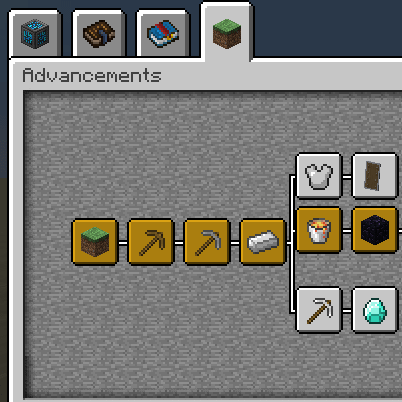
- Better Advancements + Paginated Advancements — Improved advancement screen
- Better Mount HUD — Shows mount health & jump bar clearly
- Mod Menu — In-game mod list & config access
- Reese’s Sodium Options — Better UI for Sodium settings
- More Chat History — Longer chat history
- Emoji Type — Type emojis directly in chat
- Language Reload — Reload language without restarting
- FastQuit — Quit to menu instantly without waiting
- Remove Reloading Screen — Skip the resource pack reload screen
- Shulker Box Tooltip — Preview shulker box contents on hover
- CalcMod — In-game calculator
- Crash Assistant — Helpful crash diagnostics
🔒 Privacy & Security
- No Chat Reports — Removes chat reporting system
- Chat Reporting Helper — Clarifies reporting status in chat
✅ What OptiCore does NOT change
No new items, blocks, or mechanics
100% vanilla-compatible worlds and servers
No gameplay modifications — pure performance & QoL
⚠️ Note for version 26.2: Due to major technical changes introduced in Minecraft 26.2, several mods have not yet been updated for this version. The following mods are temporarily unavailable in this release:
- Chat Emojis — no compatible version for 26.2 yet; removed temporarily
- Better Advancements — no compatible version for 26.2 yet; removed temporarily
- OptiGUI — no compatible version for 26.2 yet; removed temporarily
- FastQuit — no compatible version for 26.2 yet; removed temporarily
- Paginated Advancements & Custom Frames — no compatible version for 26.2 yet; removed temporarily
- No Chat Reports — no compatible version for 26.2 yet; removed temporarily
- Krypton — no compatible version for 26.2 yet; removed temporarily
- Fabrishot — no compatible version for 26.2 yet; removed temporarily
These mods will be re-added as soon as compatible versions are released.
Thanks for downloading OptiCore ❤️
Thanks for creabit for all of the small help with the project
包含的模组 49 个
 [EMF] Entity Model Features
 [ETF] Entity Texture Features
BadOptimizations
 Better Advancements
 Better Mount HUD
 BetterGrassify
 CalcMod
 Capes
 Chat Reporting Helper
 Cloth Config API
 Complementary Shaders - Reimagined
 Concurrent Chunk Management Engine (Fabric)
 Crash Assistant
 Cubes Without Borders
 Debugify
 Dynamic FPS
 Emoji Chat
 实体剔除
 Fabric API
 Fabric Language Kotlin
 FerriteCore
 Forge Config API Port
 ImmediatelyFast
 Iris Shaders
 LambDynamicLights - Dynamic Lights
 Language Reload
 锂
 MidnightLib
 模组菜单
 ModernFix-mVUS
 More Chat History
 More Culling
 No Chat Reports
 NoisiumForked
 OptiGUI
 Packet Fixer
 Paginated Advancements & Custom Frames
 Puzzle
 Reese's Sodium Options
 Remove Reloading Screen
展开全部 49 个





绿色边框的模组本站有收录,点进去看中文介绍;其余跳转到 Modrinth。
常见问题
OptiCore 支持哪些 Minecraft 版本?
OptiCore 支持 Minecraft Java 版 1.21.11–26.2,共 4 个版本,可用的加载器:Fabric。下载时注意选择和你游戏版本一致的文件。
OptiCore 怎么安装?
点本页「前往下载」拿到整合包文件(Modrinth 的是 .mrpack,CurseForge 的是 .zip),在 PCL2 或 HMCL 启动器里选择「导入整合包」,启动器会自动装好 Minecraft、加载器和全部模组。这个整合包有 49 个模组,建议在启动器里给游戏分配 4–6 GB 内存。
OptiCore 开服需要多大内存?
推荐服务器内存 12 GB。在线人数多、或者建了大量机器和区块加载器时,可以再加 2–4 GB。
怎么和朋友一起玩 OptiCore?
点本页的「一键开服」,选好配置后会自动安装 OptiCore 的服务端,几分钟就能开好。把服务器地址发给朋友,大家用同一个版本的整合包连进去就行。
评论
登录后评论和评分