Better Ping Display Renewed
Modern version of the mod that adds a numerical ping display to the player list
介绍
Better Ping Display
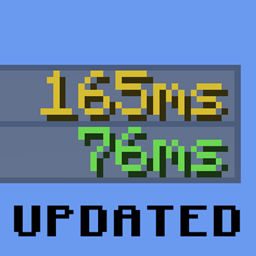
Replace generic network icons with precise, numerical latency values right in your multiplayer tab list.
Overview
Tired of guessing connection stability using default signal bars? Better Ping Display upgrades your Minecraft player roster by outputting exact millisecond (ms) measurements for every player on the server.
- Client-Side Only: Operates entirely on your end. No server-side installations or permissions required—works seamlessly on vanilla servers.
- Looking for Forge? A dedicated Forge/NeoForge version is also available separately.
Key Features
- Dynamic Color Coding: Latency colors auto-adjust based on performance (e.g., green for smooth low latency, red for high lag).
- Customizable Text Formats: Modify how ping values are rendered to fit your preferred aesthetic.
- Optional Stock Icons: Choose whether to display the classic Minecraft signal bars alongside the text numbers or hide them entirely.
- In-Game Menu Integration: Supports graphical configuration in-game when paired with Mod Menu and Yet Another Config Lib (YACL).
Configuration Settings
Settings can be adjusted directly via the betterpingdisplay.json config file or through an in-game GUI.
| Setting | Default | Function |
|---|---|---|
autoColorPingText |
true |
Dynamically changes text color from green (low latency) to red (high latency). |
renderPingBars |
false |
Toggles the visibility of the original vanilla signal strength bars. |
pingTextColor |
#A0A0A0 |
Defines a static hex color for the ping text (active only if autoColorPingText is set to false). |
pingTextFormatString |
%dms |
Sets the visual layout for latency numbers. The %d placeholder is replaced by the actual millisecond value. |
Original Project: https://www.curseforge.com/minecraft/mc-mods/better-ping-display-fabric
常见问题
Better Ping Display Renewed 支持哪些 Minecraft 版本?
Better Ping Display Renewed 支持 Minecraft Java 版 26.2,可用的加载器:Fabric / Forge / NeoForge / Quilt。下载时注意选择和你游戏版本一致的文件。
Better Ping Display Renewed 怎么安装?
先用 PCL2 或 HMCL 启动器安装对应版本的 Fabric / Forge / NeoForge / Quilt,再把下载的 .jar 文件放进游戏目录的 mods 文件夹,重新启动游戏即可。开启了版本隔离的,mods 文件夹在 versions/版本名 下面。
hooneybAdgers 的其他作品
查看全部 →
Elytra Slot!
新增一个槽位,可同时穿戴鞘翅和胸甲。

Full Brightness (NIGHT VISION)
夜视切换按钮

Immersive Portal
将传送门变成连绵不断的通路。

Armor Durability HUD Display
原版风格的小组件,可显示盔甲并在耐久度较低时发出警告。
评论
登录后评论和评分