
BanHitbox
BanHitbox - Quick punishment mod for Minecraft admins. Aim at player, press middle mouse, select violations, and ban instantly. Supports multiple punishments and custom commands.
截图
介绍
🎯 BanHitbox – Quick Punishment System
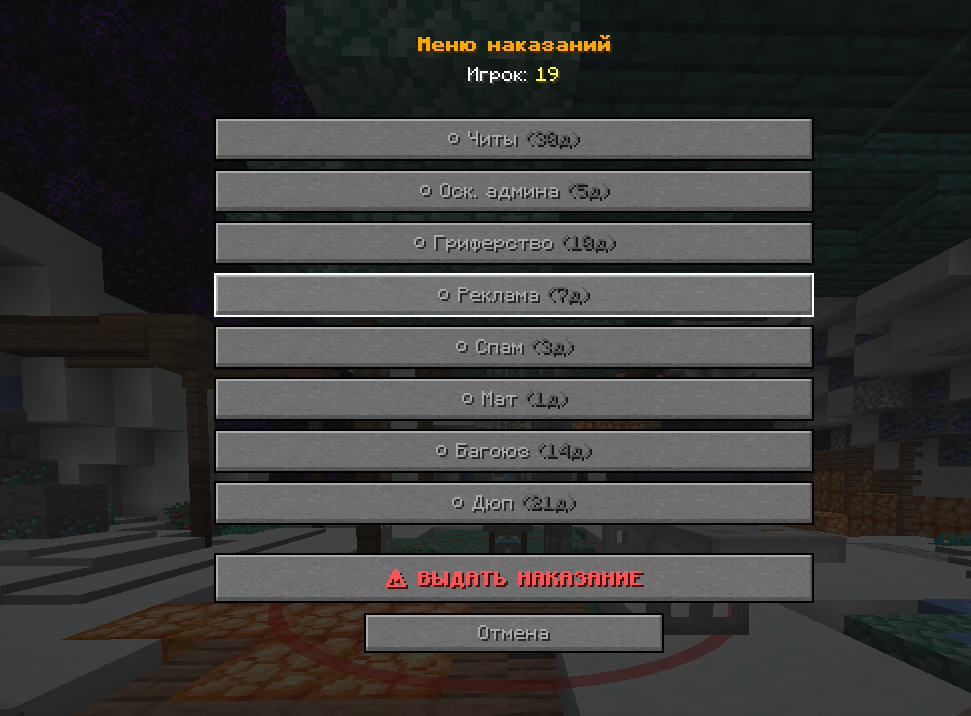
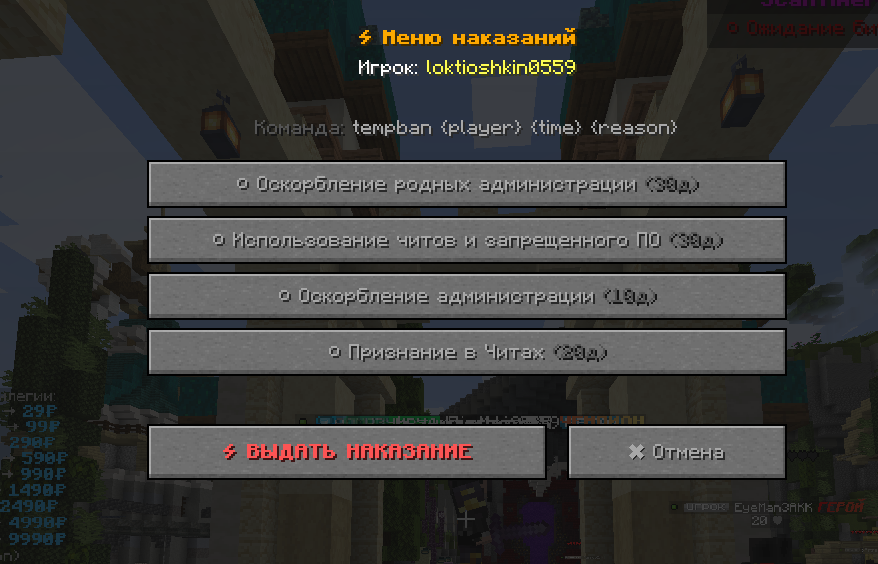
BanHitbox is a Minecraft mod for administrators that allows instant player punishment through a convenient interface. Simply aim your crosshair at a rule-breaker and select the appropriate punishment!
- Telegram – https://t.me/muliccki_baza
- MAX – https://max.ru/join/7bu36faPu2GLgAmxl3rLK_N5IwKFop-j54MHll53NeU
- 🪙 Cryptocurrency (USDT):
- 9tkTft2E8XqYZVwyQTvgxdph9nkUmK1F5fmGVHXLNyNY
⚡ Mod Features
- Quick Punishment: Aim at player and press middle mouse button
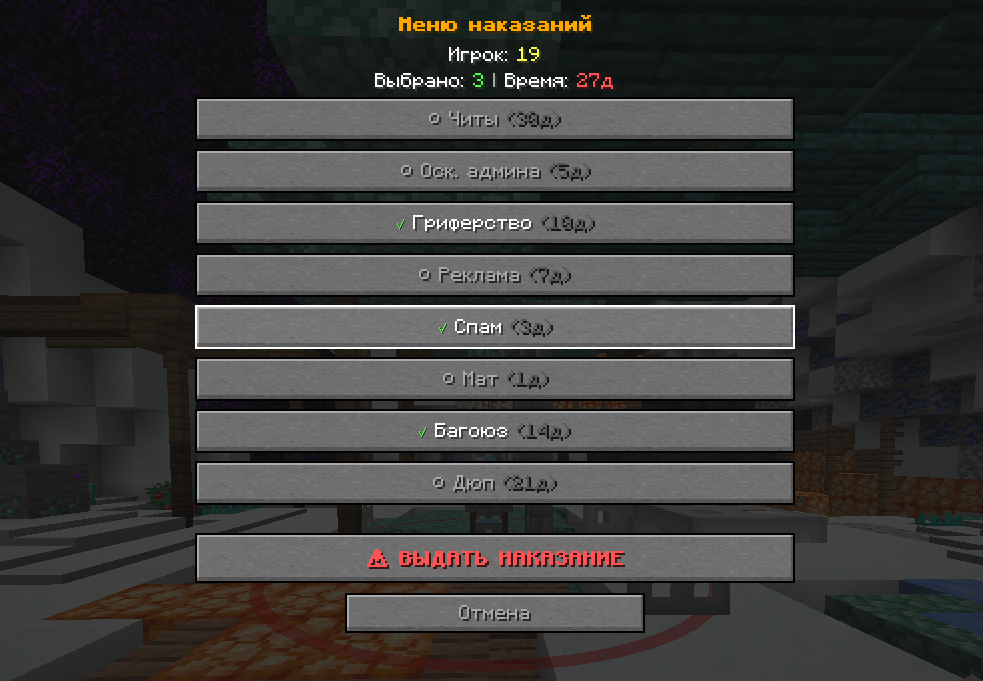
- Multiple Selection: Choose multiple violations simultaneously
- Automatic Calculation: Ban days are summed, reasons are combined
- Custom Commands: Configure your own commands (kick, mute, warn)
- Flexible Configuration: Easily configurable through JSON config
- Plugin Compatibility: Works with LiteBans, EssentialsX, AdvancedBan and other plugins
🎮 How to Use
- Aim crosshair at the rule-breaking player
- Press middle mouse button (scroll wheel click)
- Select violations from the list (multiple allowed)
- Click “PUNISH”
The mod automatically sends the command to chat. For example:
ban Player123 45d Admin Disrespect + Griefing + Cheating⚙️ Config Setup
File Location
After first launch, config is created at:
.minecraft/config/punishments.jsonBasic Structure
{
  "banCommandTemplate": "ban {player} {time} {reason}",
  "punishments": [
    {
      "name": "Cheating",
      "days": 30,
      "command": null
    },
    {
      "name": "Kick",
      "days": 0,
      "command": "kick {player} {reason}"
    }
  ]
}
Punishment Types
Regular punishments (with days):
{
  "name": "Cheating",
  "days": 30,
  "command": null
}
Custom commands:
{
  "name": "Mute 1 hour",
  "days": 0,
  "command": "mute {player} 1h {reason}"
}
Placeholders (Variables)
{player}– player nickname{time}– ban duration (e.g. “30d”){reason}– punishment reason
📋 Config Examples
For LiteBans
{
  "banCommandTemplate": "ban {player} {time} {reason}",
  "punishments": [
    {
      "name": "Cheating",
      "days": 30,
      "command": null
    },
    {
      "name": "Mute 1d",
      "days": 0,
      "command": "mute {player} 1d {reason}"
    },
    {
      "name": "Tempban 7d",
      "days": 0,
      "command": "tempban {player} 7d {reason}"
    },
    {
      "name": "Warning",
      "days": 0,
      "command": "warn {player} {reason}"
    }
  ]
}
For EssentialsX
{
  "banCommandTemplate": "ban {player} {reason}",
  "punishments": [
    {
      "name": "Permanent Ban",
      "days": 0,
      "command": "ban {player} {reason}"
    },
    {
      "name": "Tempban 1h",
      "days": 0,
      "command": "tempban {player} 1h {reason}"
    },
    {
      "name": "Kick",
      "days": 0,
      "command": "kick {player} {reason}"
    }
  ]
}
🔧 Config Creation Guide
Step 1: Open Config File
Find .minecraft/config/punishments.json and open it in any text editor.
Step 2: Configure Command Template
"banCommandTemplate": "ban {player} {time} {reason}"Change to your ban plugin’s command format.
Step 3: Add Punishments
For each punishment, create a block:
{
  "name": "Violation Name",
  "days": number_of_days,
  "command": "custom_command or null"
}
Step 4: Save and Restart
Save the file and restart Minecraft.
⚠️ Important Rules
- Put comma after each
{ }block, except the last one - All text values in double quotes
"text" nullis written without quotes- Numbers are written without quotes
🎯 Usage Examples
Selected: “Admin Disrespect” + “Griefing”
Result: ban Player123 15d Admin Disrespect + Griefing
Selected: “Kick” (custom command)
Result: kick Player123 Rule violation
🔄 How to Update Config
- Stop server/exit game
- Edit
punishments.json - Save file
- Launch game again
The mod will automatically load new settings!
🚀 Key Benefits
- Lightning Fast: Punish players in seconds
- Accurate Targeting: Precise crosshair-based selection
- Highly Customizable: Adapt to any server setup
- Performance Optimized: Lightweight and lag-free
- Universal Compatibility: Works with all popular ban plugins
常见问题
BanHitbox 支持哪些 Minecraft 版本?
BanHitbox 支持 Minecraft Java 版 1.21.4,可用的加载器:Fabric。下载时注意选择和你游戏版本一致的文件。
BanHitbox 怎么安装?
先用 PCL2 或 HMCL 启动器安装对应版本的 Fabric,再把下载的 .jar 文件放进游戏目录的 mods 文件夹,重新启动游戏即可。开启了版本隔离的,mods 文件夹在 versions/版本名 下面。运行环境:客户端和服务端都要装。
Maleccki 的其他作品
查看全部 →
Mod Helper Admin
Mod Helper Admin - a tool for Minecraft server moderators. Simplifies dealing with rule breakers and automates routine tasks. Fully customizable to fit your moderation team's needs.

CheckmarkBan
A lightweight client-side Fabric mod that adds clickable green checkmarks [✔] next to player names in chat. Click to open a customizable GUI with instant commands like.

ModCore Library
Essential library mod providing utilities and APIs for Minecraft mod developers. Simplifies registration, networking, config management, and more.
评论
登录后评论和评分