
Mod Helper Admin
Mod Helper Admin - a tool for Minecraft server moderators. Simplifies dealing with rule breakers and automates routine tasks. Fully customizable to fit your moderation team's needs.
截图


介绍
🎯 Player Actions – Clickable Nicknames & Player Management
Powerful mod for server administrators, helpers, and trainees!
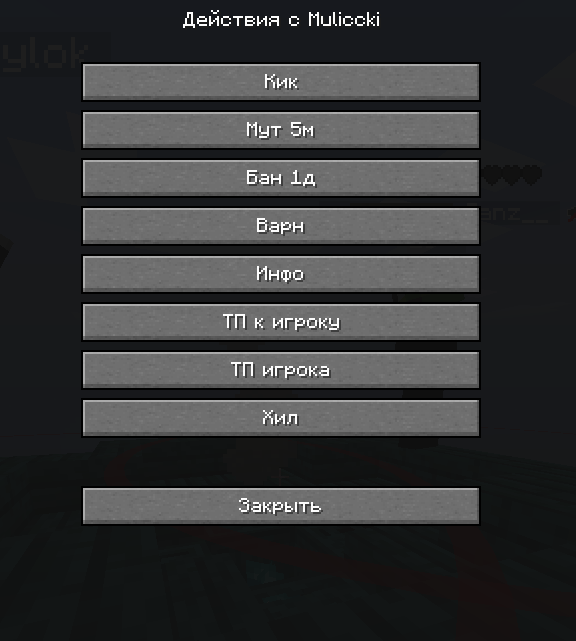
Automatically makes all nicknames in chat clickable and provides quick access to administrative commands.
✨ Key Features
🖱️ Clickable Nicknames
- All nicknames in chat are automatically highlighted in green
- Shift + Left Click – insert nickname into chat field
- Regular Left Click – open player action menu
- Support for nicknames starting with numbers (
2Player,24Admin)
⚙️ Player Action Menu
- Kick –
/kick {player} - Ban –
/ban {player} - Mute –
/mute {player} - Teleport to Player –
/tp {player} - Teleport Player –
/tp {player} spawn - Player Info –
/whois {player} - Warning –
/warn {player} - Private Message –
/msg {player}
🚀 How to Use
- Install the mod in your
modsfolder - Launch the game – mod activates automatically
- Click on nicknames in chat to interact
- Configure commands through the configuration file
📁 Configuration Setup
Configuration file location:
.minecraft/config_player.jsonExample configuration:
{
  "showTooltips": true,
  "showCommands": true,
  "buttons": [
    {
      "name": "Kick Player",
      "command": "/kick {player}",
      "description": "Kick player from server"
    },
    {
      "name": "Ban Player",
      "command": "/ban {player}",
      "description": "Ban player permanently"
    }
  ]
}
🔧 Adding Custom Commands:
- Open the
config_player.jsonfile - Add a new button to the
buttonsarray:
{
  "name": "Your Command",
  "command": "/your_command {player}",
  "description": "Command description"
}- Save the file and restart the game
📝 Configuration Parameters:
showTooltips– show tooltips on hovershowCommands– display commands in menu{player}– automatically replaced with player nickname
🎯 Who is this mod for?
- Server Administrators – quick player management
- Helpers & Moderators – convenient moderation tools
- Trainees – simple interface for learning
- Server Owners – increase team efficiency
🔧 Technical Requirements
- Minecraft: 1.21.4
- Mod Loader: Fabric
- Java: 21+
📞 Support & Contact
💬 Telegram Channel
💰 Support Development
Your donations help develop the mod and add new features!
💳 Donation Methods:
🪙 Cryptocurrency (USDT):
9tkTft2E8XqYZVwyQTvgxdph9nkUmK1F5fmGVHXLNyNY📱 QR Code for Quick Donation:

Scan the QR code with your phone camera for quick donation access
🌟 Features
- ✅ Automatic Detection of all nicknames in chat
- ✅ Smart Filtering – excludes system messages
- ✅ Customizable Commands – add your own actions
- ✅ Intuitive Interface – easy to use
- ✅ High Performance – doesn’t affect FPS
- ✅ Compatibility with other mods
📋 Installation Guide
- Download Fabric Loader for Minecraft 1.21.4
- Install Java 21 or newer
- Place the mod file in
.minecraft/mods/folder - Launch the game using Fabric profile
- Configure settings in
config_player.jsonfile
🎮 Usage Examples
For Administrators:
- Quick ban of rule violators with one click
- Teleport to players for inspection
- Instant warning messages
For Helpers:
- Assist newcomers through private messages
- Quick chat moderation
- Gather player information
For Trainees:
- Learn commands through user-friendly interface
- Safe use of administrative functions
- Gradual moderation skill development
📈 Updates
The mod is actively developed! Follow updates in our Telegram channel.
Planned Features:
- Group actions with players
- Extended filter system
- Integration with popular plugins
- Additional administrative commands
🛠️ Advanced Configuration
Custom Button Examples:
{
  "name": "Freeze Player",
  "command": "/freeze {player}",
  "description": "Freeze player movement"
},
{
  "name": "Check Inventory",
  "command": "/invsee {player}",
  "description": "View player inventory"
},
{
  "name": "Heal Player",
  "command": "/heal {player}",
  "description": "Restore player health"
}
Multiple Commands:
You can create buttons that execute multiple commands by using semicolons:
{
  "name": "Full Restore",
  "command": "/heal {player}; /feed {player}; /repair {player}",
  "description": "Heal, feed and repair player items"
}
常见问题
Mod Helper Admin 支持哪些 Minecraft 版本?
Mod Helper Admin 支持 Minecraft Java 版 1.21.4,可用的加载器:Fabric。下载时注意选择和你游戏版本一致的文件。
Mod Helper Admin 怎么安装?
先用 PCL2 或 HMCL 启动器安装对应版本的 Fabric,再把下载的 .jar 文件放进游戏目录的 mods 文件夹,重新启动游戏即可。开启了版本隔离的,mods 文件夹在 versions/版本名 下面。运行环境:客户端和服务端都要装。
Maleccki 的其他作品
查看全部 →
CheckmarkBan
A lightweight client-side Fabric mod that adds clickable green checkmarks [✔] next to player names in chat. Click to open a customizable GUI with instant commands like.

BanHitbox
BanHitbox - Quick punishment mod for Minecraft admins. Aim at player, press middle mouse, select violations, and ban instantly. Supports multiple punishments and custom commands.

ModCore Library
Essential library mod providing utilities and APIs for Minecraft mod developers. Simplifies registration, networking, config management, and more.
评论
登录后评论和评分