
截图


介绍
中文介绍正在准备中,下面暂时显示原文。
🧊 Glass Hotbar
This resource pack changes the hotbar background to glass.
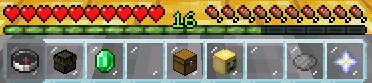
It is a great resource pack for those who like simple and compact design.
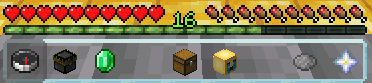
🎨 Other Variations
_You can access these variations by clicking on the photos or on my profile._
Connected
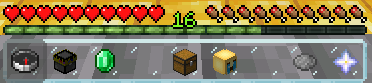
Clean
📦 Installation
- Download the resource pack .zip file.
- Place it in your Minecraft resourcepacks folder.
- Launch Minecraft and go to Options > Resource Packs.
- Select the pack from the left list and click the arrow to move it to the right (enabled) list.
- Click “Done” to apply the pack.
🌐 ITITAN Hosting
💬 Feedback and Request
_If you have a request or feedback, please write them in to my discord 3geetr._
常见问题
Glass Hotbar 支持哪些 Minecraft 版本?
Glass Hotbar 支持 Minecraft Java 版 1.6.1–26.3,共 87 个版本。下载时注意选择和你游戏版本一致的文件。
Glass Hotbar 怎么安装?
把下载的 .zip 文件(不用解压)放进游戏目录的 resourcepacks 文件夹,进游戏后在「选项 → 资源包」里把它移到右边启用。
3geE 的其他作品
查看全部 →
Thirst Bar
by CrafTea, 3geE
Adds a thirst bar to the game.
2.9万
1 个月前
Modrinth

Glass Hotbar Connected
by CrafTea, 3geE
This resource pack changes the hotbar background to glass.
2.8万
3 个月前
Modrinth

Dennis Painting On Java Mod
by CrafTea, 3geE
Adds the Dennis(Good Boy) painting from Bedrock Edition to Java Edition.
1.3万
1 年前
Modrinth

Coordinate Bar
by 3geE, CrafTea
Displays your current coordinates in the action bar.
1.1万
1 年前
Modrinth
评论
登录后评论和评分