
截图
介绍
📍 Coordinate Bar
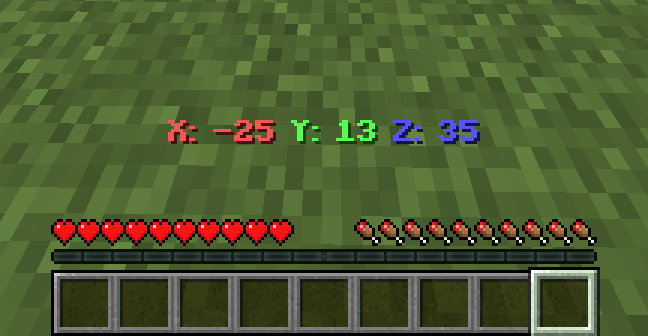
Coordinate Bar is a simple Minecraft datapack that shows your current coordinates (X, Y, Z) in the action bar.
✨ Features
- Shows coordinates in real-time.
- Works in singleplayer and multiplayer.
- Supports Smithed Actionbar Libary.
📦 Optional Library Support – Actionbar
This datapack allows the actionbar to be shared across multiple datapacks on a server, preventing conflicts and ensuring compatibility.
🔗 Download: Smithed – Actionbar Library
- Enable support with the following command: `
scoreboard players set .library thirstbar 1`
- Disable support with the following command: `
scoreboard players set .library thirstbar 0`
📦 Installation
- Download the datapack
.zipfile. - Place it in your world’s
datapacksfolder. - Use
/reloadafter joining the world. - You’re all set! Move around and see your coordinates at the bottom of your screen.
🧱 Compatibility
- Minecraft Java Edition 1.20.2+
- No external resource packs needed
–
🌐 ITITAN Hosting
💬 Feedback and Request
_If you have a request or feedback, please write them in to my discord 3geetr._
常见问题
Coordinate Bar 支持哪些 Minecraft 版本?
Coordinate Bar 支持 Minecraft Java 版 1.21–26.3,共 17 个版本,可用的加载器:Fabric / Forge / NeoForge / Quilt。下载时注意选择和你游戏版本一致的文件。
Coordinate Bar 怎么安装?
先用 PCL2 或 HMCL 启动器安装对应版本的 Fabric / Forge / NeoForge / Quilt,再把下载的 .jar 文件放进游戏目录的 mods 文件夹,重新启动游戏即可。开启了版本隔离的,mods 文件夹在 versions/版本名 下面。运行环境:客户端 / 服务端。
3geE 的其他作品
查看全部 →
Thirst Bar
Adds a thirst bar to the game.

Glass Hotbar Connected
This resource pack changes the hotbar background to glass.

Dennis Painting On Java Mod
Adds the Dennis(Good Boy) painting from Bedrock Edition to Java Edition.

Glass Hotbar
This resource pack changes the hotbar background to glass.
评论
登录后评论和评分