
XXL Enderchest
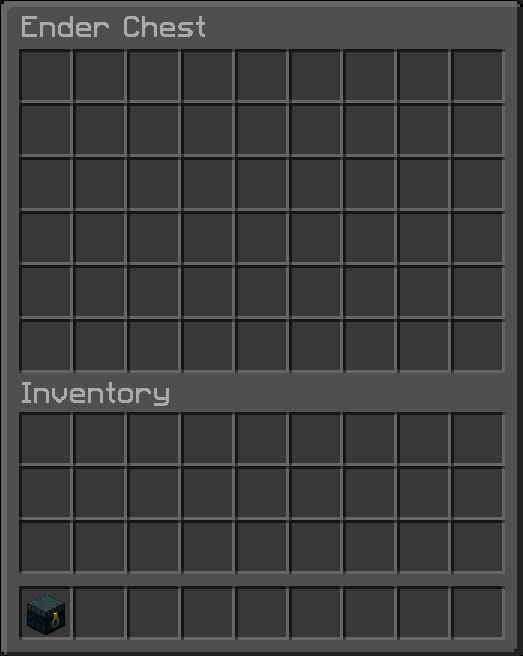
A mod that expands your enderchest from the vanilla 3 rows (27 slots) to up to 6 rows (54 slots).
截图
介绍

A mod that expands your enderchest from the vanilla 3 rows (27 slots) to up to 6 rows (54 slots).
✨ Features
| Rows | Slots | Use case |
|——|——-|———-|
| 3 | 27 | Vanilla default, always available to everyone |
| 4 | 36 | Extra storage for selected players or groups |
| 5 | 45 | Mid-tier storage upgrade |
| 6 | 54 | Maximum XXL storage |
- Vanilla access is preserved: every player can always use a normal 3-row ender chest.
- Fixed config mode for simple servers or single-player worlds.
- Optional LuckPerms mode for per-group row upgrades.
- Optional Mod Menu + Cloth Config integration for an in-game config screen on the client.
- Optional /enderchest command, it opens the player’s own enderchest.
- Automatic fallback to config mode if LuckPerms is enabled in config but the mod is not installed.
- Hidden rows keep their items stored safely; lowering access does not delete inventory contents.
- Works on dedicated servers and in single-player.
❗ How it works
XXL Enderchest always keeps the internal enderchest container at 54 slots so data is never thrown away.
What players can actually open depends on the active mode:
enabled=false: vanilla behavior only, 3 rows.enabled=trueanduseLuckPerms=false: everyone gets the configuredrowsvalue.enabled=trueanduseLuckPerms=truewith LuckPerms installed: everyone keeps vanilla 3 rows by default, and permissions can upgrade that to 4, 5, or 6 rows.enabled=trueanduseLuckPerms=truewithout LuckPerms installed: automatic fallback to configuredrows.commandEnabled=true: players can use/enderchest; in LuckPerms mode they also need the command permission node.
⚙️ Configuration
Config file: config/xxlenderchest.json
{
  "enabled": true,
  "useLuckPerms": false,
  "rows": 6,
  "commandEnabled": false
}
Config Options
| Field | Type | Description |
|——-|——|————-|
| enabled | boolean | When false, the mod stays inactive and the ender chest remains vanilla. |
| useLuckPerms | boolean | When true, XXL Enderchest checks LuckPerms row nodes if LuckPerms is installed. |
| rows | integer | Fallback row count from 3 to 6. Used when LuckPerms mode is off, or when LuckPerms is missing. |
| commandEnabled | boolean | Enables /enderchest. Default is false. In LuckPerms mode, players also need the command node. |
After editing the config, run /xxlenderchest reload.
If you install Mod Menu and Cloth Config API on the client, XXL Enderchest exposes a full config screen in-game.
🔄 LuckPerms permissions
There is intentionally no use permission.
Every player must always be able to open a vanilla 3-row ender chest.
If LuckPerms mode is active, these nodes can increase the available rows:
xxlenderchest.rows.4xxlenderchest.rows.5xxlenderchest.rows.6xxlenderchest.command.enderchestfor/enderchestwhencommandEnabled=true
Highest granted row wins.
LuckPerms quick start
Example: default users get 4 rows, moderators get 5 rows, VIPs get 6 rows.
/lp group default permission set xxlenderchest.rows.4 true
/lp group moderator permission set xxlenderchest.rows.5 true
/lp group vip permission set xxlenderchest.rows.6 true
Example: give one player full 6-row access.
/lp user <player> permission set xxlenderchest.rows.6 trueExample: enable the /enderchest command for one player.
/lp user <player> permission set xxlenderchest.command.enderchest trueOfficial LuckPerms docs:
🔄 Commands
| Command | Permission | Description |
|———|————|————-|
| /enderchest | Config toggle, plus xxlenderchest.command.enderchest when LuckPerms mode is active | Opens the player’s own ender chest. Uses vanilla 3 rows when the XXL storage feature is disabled. |
| /xxlenderchest info | OP | Shows mod status, whether LuckPerms is loaded, and whether row access currently uses config mode or LuckPerms mode. |
| /xxlenderchest reload | OP | Reloads config/xxlenderchest.json without restarting the server. |
❗ Important notes
Lowering row access
If a player had access to more rows before, the extra items remain stored.
They are simply hidden until that player regains enough rows again.
Removing the mod
Vanilla Minecraft only uses the first 27 ender chest slots.
If you remove XXL Enderchest from an existing world, items stored below the first 3 rows may no longer be accessible.
Make a backup before removing the mod from a world or server.
🏜️ Test Server
Feel free to join my Minecraft server to test my mods: play.swordfishbe.eu
常见问题
XXL Enderchest 支持哪些 Minecraft 版本?
XXL Enderchest 支持 Minecraft Java 版 1.21.11–26.3,共 6 个版本,可用的加载器:Fabric / NeoForge。下载时注意选择和你游戏版本一致的文件。
XXL Enderchest 怎么安装?
先用 PCL2 或 HMCL 启动器安装对应版本的 Fabric / NeoForge,再把下载的 .jar 文件放进游戏目录的 mods 文件夹,重新启动游戏即可。开启了版本隔离的,mods 文件夹在 versions/版本名 下面。运行环境:仅服务端。
SwordfishBE 的其他作品
查看全部 → XXL Enderchest
A mod that expands your enderchest from the vanilla 3 rows (27 slots) to up to 6 rows (54 slots).

TravelBag
A reliable backpack mod with configurable sizes and shortcut support.

GetSpawners
Move mob spawners in survival with Silk Touch. Give yourself any type of spawner with just one command.

Elevator
A simple Elevator Mod for Fabric Minecraft
评论
登录后评论和评分