
截图


介绍
This datapack will help you create custom villagers very easily. Meant for server administrators or map creators. Trades are infinite and unblockable.
Get the Villager Creator Kit
/function vg.xtabay:give/villager_creator_kit
USE.
Villager Creator Stick
Put all the items you want your villager to trade in a chest in this order, from left to right: 1st buy item, 2nd buy item, sell item. This means every 3 slots are used for a single trade row, up to a maximum of 9 trades per chest. Every trade must have this structure: [Required Item] [Required Item]\(optional) [Offered Item], if they don’t have this structure, the items will be ignored and the trade won’t be added.
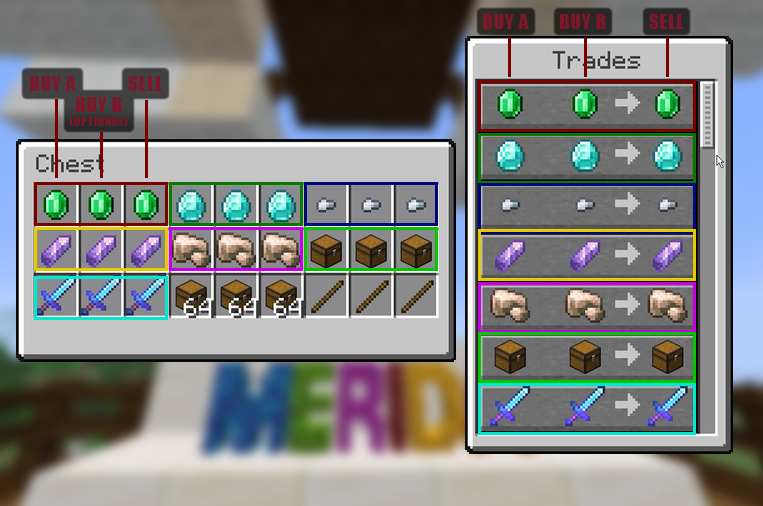
Once you’re done filling a chest with this structure, right click it with a Villager Creator Stick and the villager will be created.
All villagers created by Villager Creator have 40 heart containers, are leatherworkers and snow villagers by default. They’re also riding a block display so they can’t move or be moved.
Add Trade Stick
Put a chest next to a villager created with the Villager Creator datapack and repeat the same process as with the Villager Creator Stick but using the Add Trade Stick this time. Once done, all the trades in the chest will be added to the nearest villager and the chest will be deleted.
Villager’s Properties Stick
This stick allows you to fully customize your villagers.
These are the values you can modify:
- Profession
- Type
- Name (custom name, styling, color, visibility)
- Invulnerability
- Health
- Size
- Silent
Villager Eraser Stick
Kill any villager created by the Villager Creator datapack by right clicking it.
常见问题
Xtabay’s Villager Creator / Generator 支持哪些 Minecraft 版本?
Xtabay’s Villager Creator / Generator 支持 Minecraft Java 版 1.20.6–26.2,共 11 个版本,可用的加载器:Fabric / Forge / NeoForge / Quilt。下载时注意选择和你游戏版本一致的文件。
Xtabay’s Villager Creator / Generator 怎么安装?
先用 PCL2 或 HMCL 启动器安装对应版本的 Fabric / Forge / NeoForge / Quilt,再把下载的 .jar 文件放进游戏目录的 mods 文件夹,重新启动游戏即可。开启了版本隔离的,mods 文件夹在 versions/版本名 下面。运行环境:客户端 / 服务端。
ferbook3000 的其他作品
查看全部 →
Simplest Chairs | Sit
Simplest functional chairs: 1 stair, 2 signs or shelves, that's it. | You can now also sit anywhere!

Simplest Chairs | Sit
Simplest functional chairs: 1 stair, 2 signs or shelves, that's it. | You can now also sit anywhere!
评论
登录后评论和评分