What is going on (WIGO)
Look at what's actually happening on other players' screens right now.
介绍
What is going on (WIGO)




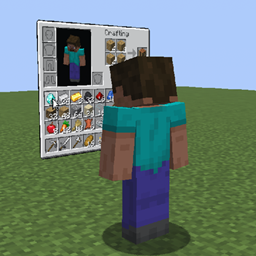
WIGO displays nearby players’ open menus as panels beside them in the world. You can watch another player’s menu without controlling it. Panels use your own textures and fonts.
Features
- View inventories, containers, crafting, trading, books, chat drafts and supported game screens.
- See item icons, stack counts, cursor movements and tooltips.
- Choose which menus to share, who can view them, viewing sides and distance. Optional observer counter and cursor styles.
- Adjust panel size, transparency, manual or automatic brightness, height, tilt and curvature. Preview changes beside the settings.
- Set server limits for shared menus, distance, observer counts and display modes.
Requirements
- A build matching your Minecraft version and loader: Fabric, Forge or NeoForge.
- Fabric builds require Fabric API and Fabric Loader 0.19.5 or newer.
- Java 17 for Minecraft 1.16.5–1.20.4, Java 21 for 1.20.5–1.21.11, or Java 25 for 26.x. Forge 1.16.5 also supports Java 8.
Some custom screens added by other mods are unsupported.
Getting started
- Put WIGO in the
modsfolder on the server or LAN host and each participating client. - Join the same world and open a supported menu. The default sharing distance is 8 blocks.
- Press F8, then Settings. My menus controls sharing; Other players’ menus changes how you see panels.
常见问题
What is going on (WIGO) 支持哪些 Minecraft 版本?
What is going on (WIGO) 支持 Minecraft Java 版 1.16.5–26.3,共 35 个版本,可用的加载器:Fabric / Forge / NeoForge。下载时注意选择和你游戏版本一致的文件。
What is going on (WIGO) 怎么安装?
先用 PCL2 或 HMCL 启动器安装对应版本的 Fabric / Forge / NeoForge,再把下载的 .jar 文件放进游戏目录的 mods 文件夹,重新启动游戏即可。开启了版本隔离的,mods 文件夹在 versions/版本名 下面。
EyeCrasher 的其他作品
查看全部 →
pv-LazoDiscs
Record music links onto Minecraft discs and play them in jukeboxes with Plasmo Voice positional audio.

pv-LazoBoombox
A portable, dyeable boombox for LazoDiscs. Play music while holding it or place it in the world with Plasmo Voice.

Plasmo Everywhere
A mod that allows players with this mod and Plasmo Voice installed to talk to each other, even on servers that don't have Plasmo Voice installed.
Jukebox Playlists
Brings new playlist mechanics to older Minecraft versions.
评论
登录后评论和评分