介绍
Jukebox Playlists




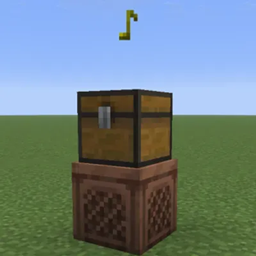
- Place a single Chest, Trapped Chest, or any Copper Chest variant directly above a Jukebox to use its Music Discs as a playlist.
- Discs play in slot order, skipping empty slots and non-music-disc items, then looping back to the start.
- When a disc finishes, the Jukebox swaps it with the next disc in the chest.
- If the chest has no Music Discs, the disc in the Jukebox plays again.
- Ejecting the current disc skips to the next available disc.
Installation
Download the JAR for your exact Minecraft version and Fabric, Forge or NeoForge loader. Install it in mods on the server and clients, or in single-player. Fabric also requires Fabric API. Supports 35 Minecraft releases from 1.16.5 through 26.3, with 90 separate builds. Double chests are excluded. Item data and the playlist position survive swaps and world reloads.
Optional LazoDiscs support
Install LazoDiscs 1.0.7 and matching Plasmo Voice 2.1.17 to mix recorded and native discs in the same chest. The queue follows the recording’s actual completion, preserving its URL, title, UUID, volume and radius. A recording longer than its vanilla base disc is not truncated by the vanilla timer. Without LazoDiscs, native discs work independently.
Forge 1.20.2 with LazoDiscs requires the separately identified Plasmo Voice metadata fix in the full GitHub release ZIP. Its classes are unchanged; license and upstream source are included. Vanilla/Paper cannot load these mods. Hybrid servers and arbitrary modpacks have not been verified.
License and development disclosure
GPL-3.0-only. Source and exact dependency matrix: GitHub.
常见问题
Jukebox Playlists 支持哪些 Minecraft 版本?
Jukebox Playlists 支持 Minecraft Java 版 1.16.5–26.3,共 35 个版本,可用的加载器:Fabric / Forge / NeoForge。下载时注意选择和你游戏版本一致的文件。
Jukebox Playlists 怎么安装?
先用 PCL2 或 HMCL 启动器安装对应版本的 Fabric / Forge / NeoForge,再把下载的 .jar 文件放进游戏目录的 mods 文件夹,重新启动游戏即可。开启了版本隔离的,mods 文件夹在 versions/版本名 下面。
EyeCrasher 的其他作品
查看全部 →
pv-LazoDiscs
Record music links onto Minecraft discs and play them in jukeboxes with Plasmo Voice positional audio.
What is going on (WIGO)
Look at what's actually happening on other players' screens right now.

pv-LazoBoombox
A portable, dyeable boombox for LazoDiscs. Play music while holding it or place it in the world with Plasmo Voice.

Plasmo Everywhere
A mod that allows players with this mod and Plasmo Voice installed to talk to each other, even on servers that don't have Plasmo Voice installed.
评论
登录后评论和评分