
What do you have in your hand
utility for Minecraft that allows you to instantly identify any item another player is holding from a distance. By simply aiming your crosshairs, a customizable HUD displays the item's icon, stack count, and full enchantment and more...
截图

介绍
✨ Hand Item Features
Long-Distance Inspection – Use a custom high-range raycast to “peek” at players up to 256 blocks away. Perfect for scouting gear in PvP or just satisfyng your curiosity from afar.
Detailed HUD Overlay – When you look at a player, a compact HUD appears showing exactly what is in their main hand, including the 2D item model and stack count.
Legible Enchantments – No more guessing! The HUD lists up to 5 enchantments with proper localized names and Roman numerals (e.g., Sharpness V, Protection IV) using Minecraft’s native formatting.
Target Identification – The HUD automatically displays the name of the player you are currently inspecting, ensuring you always know who you’re looking at.
Draggable Interface – Don’t like where the HUD is? Enter Edit Mode to click and drag the overlay to any position on your screen. It even saves its position as a percentage, so it stays perfectly placed regardless of your GUI scale.
Toggle with a Click – Quickly enable or disable the entire HUD with a simple keybind to keep your screen clean when you don’t need the info.
True Client-Side – This mod is 100% client-side. It doesn’t need to be installed on the server and works on any multiplayer world.
📸 Screenshots
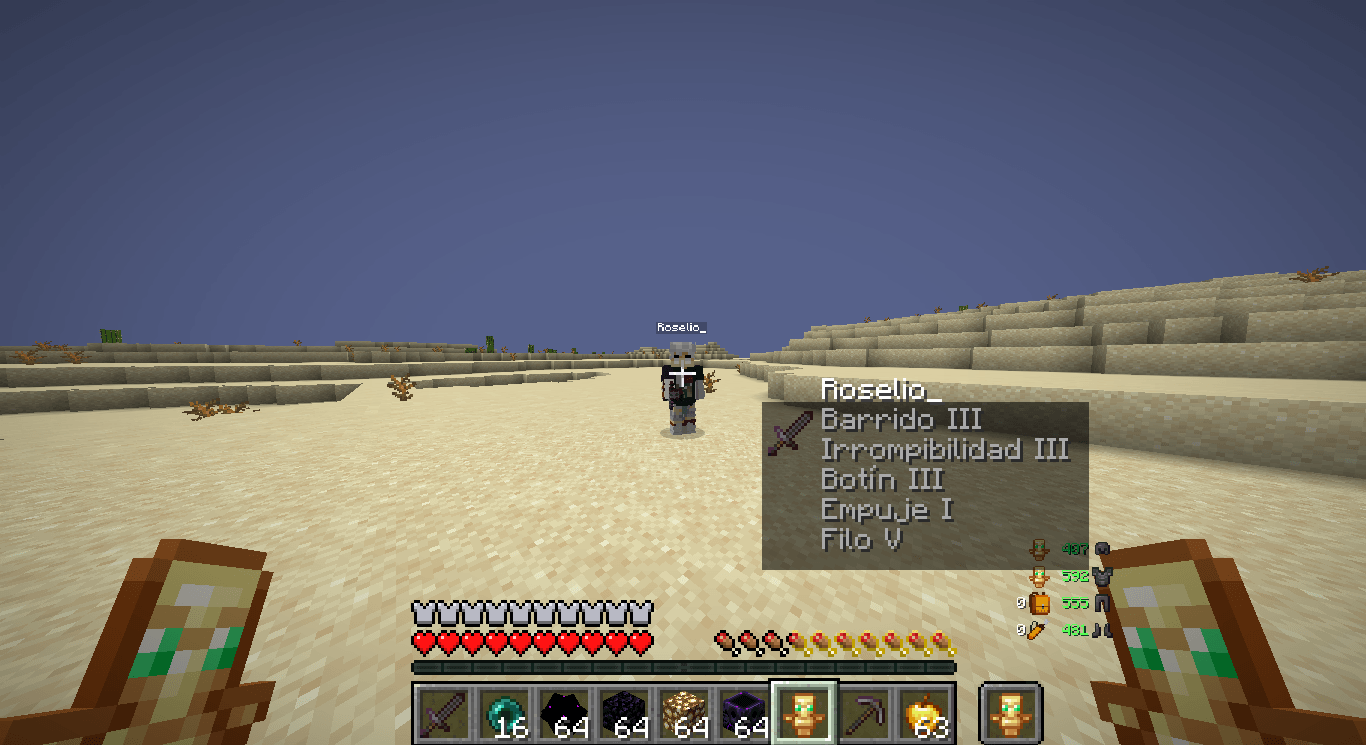
In-Action – Inspecting a player from a distance, showing a Netherite Sword with Sharpness and Unbreaking.
🔧 Requirements
> Fabric Loader ≥ 0.15.0
> Fabric API
> Java 21
🎮 How to use
Install the mod and launch Minecraft 1.21.8.
Aim your crosshair at any player—even those very far away.
The HUD will appear automatically showing their held item and its enchantments.
Press H (default) to toggle the HUD visibility on or off.
Press J (default) to open the HUD Configuration.
In the config screen, click and drag the HUD to your preferred location, then press ESC to save.
⚠️ Disclaimer
This mod is client-side only and does not modify game files or network packets. It simply reads publicly available entity data provided by the server. However, some competitive servers may have specific rules regarding “inspect” mods or HUD modifications.
Use this mod at your own risk. Always check the rules of the servers you play on before using any client-side modifications.
🐛 Bug reports & suggestions
Send me a DM on Discord
“`
marcellesa
“`
常见问题
What do you have in your hand 支持哪些 Minecraft 版本?
What do you have in your hand 支持 Minecraft Java 版 1.21.4–1.21.8,共 4 个版本,可用的加载器:Fabric。下载时注意选择和你游戏版本一致的文件。
What do you have in your hand 怎么安装?
先用 PCL2 或 HMCL 启动器安装对应版本的 Fabric,再把下载的 .jar 文件放进游戏目录的 mods 文件夹,重新启动游戏即可。开启了版本隔离的,mods 文件夹在 versions/版本名 下面。运行环境:仅客户端。
demoflash 的其他作品
查看全部 →
Quantum Hitbox
一款让你完全掌控实体碰撞箱的模组。支持实时 RGBA 自定义、流畅的色彩循环效果和高级可见性筛选,是提升画面清晰度、打造个性化 Minecraft 游戏体验的终极工具。

Fast Pot
Fast Pots 是一款 Fabric 客户端模组,按下快捷键即可快速将喷溅药水和滞留药水移入快捷栏。无需拖动——只要按住 Shift 并将鼠标悬停在药水上,它们就会自动填入快捷栏空位。

Legit Elytra Swap
Legit Elytra Swap 是一款客户端实用模组,可自动在胸甲和鞘翅之间切换,无需使用快捷键,并保持合法、自然的视觉效果。

HitTarget Highlighter
HitTarget Highlighter是一个轻量级客户端Fabric模组,当你击中实体时为其添加可自定义颜色的高亮,为实体身体及其盔甲提供清晰的战斗视觉反馈。
评论
登录后评论和评分