Useful Commands
This mod adds 20 useful commands that any user can execute on your server.
介绍
_This mod needs to be installed on the server to function. However, you can install it onto the client, so it will function in a single-player world, but not on public servers._
This is a mod that adds 20 useful commands that players on your server could execute at the permission level 0, so any player could execute them without cheats/OP.
Part of the commands in a screenshot:
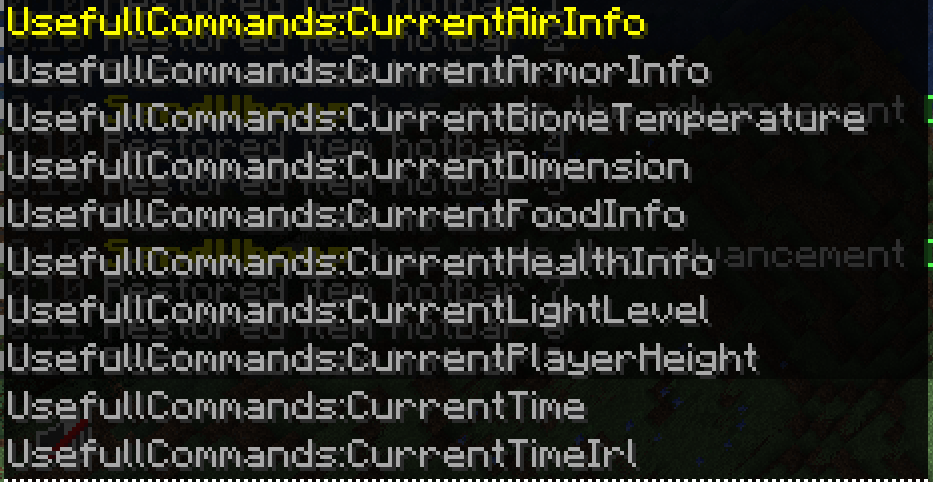
Here is the list of commands this mod includes (I misspelled useful [the first part of the command], as usefull for some reason, XD):
- /UsefullCommands:CurrentAirInfo – Shows how many ticks of oxygen you have left.
- /UsefullCommands:CurrentArmorInfo – Shows how many points of armor you have equipped.
- /UsefullCommands:CurrentBiomeTemperature – Shows the temperature of the biome you’re in.
- /UsefullCommands:CurrentDimension – Shows the current dimension you are in (The Overworld, The Nether, or The End).
- /UsefullCommands:CurrentFoodInfo – Shows how many points of Food, and Saturation you have.
- /UsefullCommands:CurrentHealthInfo – Shows current H.P, and absorption H.P.
- /UsefullCommands:CurrentLightLevel – Shows current light level of where you are standing.
- /UsefullCommands:CurrentPlayerHeight – Shows how tall you are.
- /UsefullCommands:CurrentTimeIrl – Shows the current date (mm-dd-yyyy format).
- /UsefullCommands:CurrentWalkSpeed – Shows the walk speed of the player.
- /UsefullCommands:Events:Raid? – Shows if there is a raid at your region, or not.
- /UsefullCommands:ExperienceInfo – Shows how many experience levels you have, and how many experence points are needed to reach the next level.
- /UsefullCommands:ServerPlayerCount – Shows how many players are connected to the server/world.
- /UsefullCommands:ShowCurrentCoordnates – Shows current X, Y, and Z coordnates.
- /UsefullCommands:ShowCurrentItemsInHands – Shows current item (and count) in your main-hand, and off-hand.
- /UsefullCommands:ShowCurrentXYZVelocities – Shows current X, Y, and Z velocity (how fast you are moving).
- /UsefullCommands:ShowPlayerDisplayName – Shows current display name (username) of the player.
- /UsefullCommands:TicksLeftOnFire – Shows how many ticks you will be on fire for.
- /UsefullCommands:TicksYouHaveBeenFrozenFor – Shows how many ticks you have been frozen for.
- /UsefullCommands:CurrentTime – Shows the current time of day (there is a vanilla command that displays the time, but this one is for non-oped players, so they can access it too).
_All outputs from these commands are printed in chat._
Side Features
- Player respawn message (shown in Minecraft’s action-bar), E.G “SandWhoop _Just Respawned!_”. This also has a sound on respawn: _minecraft:entity.evoker.prepare_wololo_.
- Player death message (also shown in action-bar) E.G: “SandWhoop _Died._ You were holding in your main-hand, and in your off-hand”.
- Entity death sound (plays the sound: “_minecraft:entity.player.death_”), when any entity in the world/server dies.
Donation
If you want, you can support me by donating with the link on this page.
常见问题
Useful Commands 支持哪些 Minecraft 版本?
Useful Commands 支持 Minecraft Java 版 1.19.2–1.19.3,共 2 个版本,可用的加载器:Fabric。下载时注意选择和你游戏版本一致的文件。
Useful Commands 怎么安装?
先用 PCL2 或 HMCL 启动器安装对应版本的 Fabric,再把下载的 .jar 文件放进游戏目录的 mods 文件夹,重新启动游戏即可。开启了版本隔离的,mods 文件夹在 versions/版本名 下面。运行环境:仅服务端。
ExiledLizard635 的其他作品
查看全部 →
Item Landing Sound
This is a very simple Fabric mod, that plays a sound (based on block), at the block an item landed on.

Render Distance Command
This is a simple Fabric mod that allows you to set your render distance via command (up to 128 chunks).

ExiledLizard635’s Small Totem Overlay
This resource pack makes the default Totem overlay smaller, significantly increasing visibility upon a Totem pop.

Small Totem Overlay
This resource pack makes the default Totem overlay smaller, significantly increasing visibility upon a Totem pop.
评论
登录后评论和评分