
Render Distance Command
This is a simple Fabric mod that allows you to set your render distance via command (up to 128 chunks).
截图
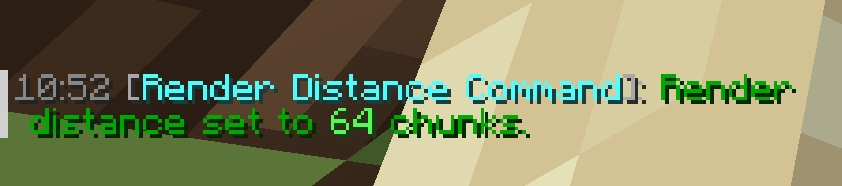

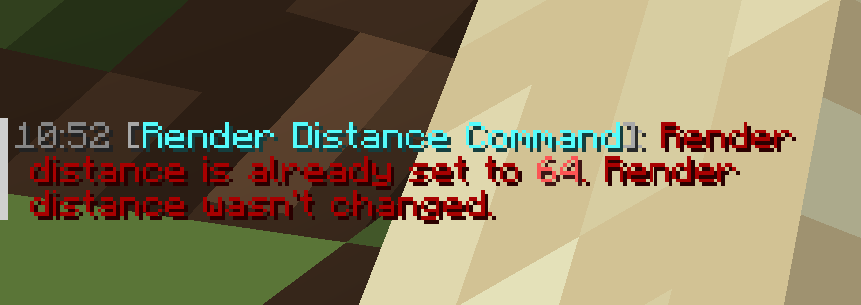

介绍
_Thanks for 1000+ downloads – you guys are awesome!_
⚠️IMPORTANT⚠️
This mod requires Fabric API.
Due to vanilla limitations, you must install Bobby, in order to set render distances past 12 chunks with the command.
Mod Description
_Ever just wanted to set your render distance instantly from chat? Then you came to the right place!_
Render Distance Command (also published on Curseforge) is a client-sided Minecraft mod for the Fabric Loader, that adds the
/renderdistance command, which sets your current render distance to what ever you want (2 chunks min, 128 chunks max). Here’s an example command for setting your render distance to 20 chunks:
/renderdistance 20
Also, as of v1.0.1 of the mod, there is a new command that allows you to see the currently set render distance. Here’s how you would type it in in chat to get your current render distance:
/getcurrentrenderdistance
For a visual of this mod, please play the Mod Demonstration Video below, or check out this mod’s Gallery Tab. _In the Gallery Tab, there are screenshots with a feature from another mod, which is called Timestamp Chat, by Abbie._
Mod Demonstration Video
Donation
If you want, you can support me by donating with the link on this page.
常见问题
Render Distance Command 支持哪些 Minecraft 版本?
Render Distance Command 支持 Minecraft Java 版 1.19.3–1.21.3,共 2 个版本,可用的加载器:Fabric。下载时注意选择和你游戏版本一致的文件。
Render Distance Command 怎么安装?
先用 PCL2 或 HMCL 启动器安装对应版本的 Fabric,再把下载的 .jar 文件放进游戏目录的 mods 文件夹,重新启动游戏即可。开启了版本隔离的,mods 文件夹在 versions/版本名 下面。运行环境:仅客户端。
ExiledLizard635 的其他作品
查看全部 →
Item Landing Sound
This is a very simple Fabric mod, that plays a sound (based on block), at the block an item landed on.

Small Totem Overlay
This resource pack makes the default Totem overlay smaller, significantly increasing visibility upon a Totem pop.

Realistic Falling Sound
Experience falling in a windy manner like never before!

Client Counter
This is a simple mod for the Fabric Loader, that allows you to see how many total players are connected to a server.
评论
登录后评论和评分