
TPS HUD TickPulse
Lightweight client‑side NeoForge overlay for live TPS and MSPT. No server install and no custom packets. Safe on any server.
截图

介绍
TPS HUD (TickPulse)
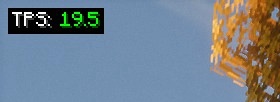
See tick health at a glance. A super-lightweight client-side overlay for TPS and MSPT on NeoForge.
No server install. No custom packets. Just local math.

Highlights
- Live TPS and MSPT overlay (top-left by default)
- Client-only: join any server without them installing this mod
- Zero network impact: no handshake channels, no custom payloads
- Stable readout via world-time sampling with a short smoothing window (client-tick fallback)
- Tidy, always-on Detail layout (labels + values)
- Tiny footprint (low CPU and memory)
Config & keybinds
- Open in-game config: Mods → TPS HUD → Config
- Tweak the HUD: anchor, padding, scale, precision, format (TPS / MSPT / BOTH), smoothing, color thresholds
- Buttons: Apply (save without closing), Preview (overlay-only view), Reset (defaults), Done/Cancel
- Keybinds (rebindable): F7 = Toggle HUD, F8 = Reload config
Why use it?
- The vanilla debug screen doesn’t show TPS or MSPT
- Players and server owners can spot lag quickly (entity spikes, heavy bases, farms)
- Works in single-player, LAN, and public servers
Compatibility
- Minecraft: 1.21.1
- Loader: NeoForge 21.1.213
- Plays nicely with performance mods (Sodium, ModernFix, etc.)
Quick Start
- Install NeoForge 1.21.1
- Drop
tpshudneoforge-<version>.jarinto yourmodsfolder - Launch the game, the overlay appears once ticks start
FAQ
Is this server-side?
No. It is client-side only.
Does it send packets or open channels?
No. It passively reads timing and estimates locally.
Why do I see TPS: -- at first?
The sampler has no data yet. Move around or wait a moment.
Why doesn’t TPS ever show above 20?
For clarity the display is capped at 20.00 (internally we still track the true rate for coloring and logic).
Why does the HUD disappear when I press F3?
Enable/disable Auto-hide on F3 in the config.
Where is “Compact” mode?
Removed for simplicity. The default Detail layout is clearer and consistent.
Can I edit the config file directly?
Use the in-game config whenever possible. Editing the JSON is optional if the game isn’t running.
Credits
- Inspired by the Fabric mod
tpshud-fabricby mooziii - NeoForge port and re-implementation by Zivalez
常见问题
TPS HUD TickPulse 支持哪些 Minecraft 版本?
TPS HUD TickPulse 支持 Minecraft Java 版 1.21.1,可用的加载器:NeoForge。下载时注意选择和你游戏版本一致的文件。
TPS HUD TickPulse 怎么安装?
先用 PCL2 或 HMCL 启动器安装对应版本的 NeoForge,再把下载的 .jar 文件放进游戏目录的 mods 文件夹,重新启动游戏即可。开启了版本隔离的,mods 文件夹在 versions/版本名 下面。运行环境:仅客户端。
Zivalez 的其他作品
查看全部 →
Create Analyzer Lite
Client-only HUD for Create mod metrics (RPM, stress, nodes) with in-game configuration
Create Analyzer Lite
Client-only HUD for Create mod metrics (RPM, stress, nodes) with in-game configuration

Idle Lens
Give idle players a cinematic camera
评论
登录后评论和评分