
Create Analyzer Lite
作者:Zivalez
Client-only HUD for Create mod metrics (RPM, stress, nodes) with in-game configuration
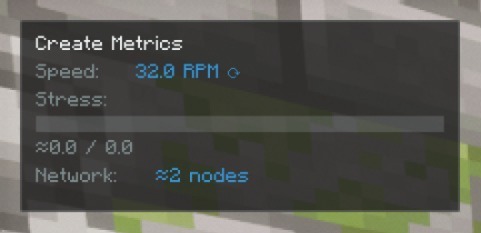
截图


介绍
中文介绍正在准备中,下面暂时显示原文。

Create Analyzer Lite
Client-only HUD overlay for Create mod metrics.
Features
- Real-time RPM, stress, and node count
- Compact/Expanded display modes
- Theme system (Light/Dark/Auto)
- In-game configuration
Installation
- Download from Modrinth
- Place
.jarinmods/folder - Launch with NeoForge 21.1+
Requirements
- Minecraft 1.21.1
- NeoForge 21.1.62+
- Create 6.0+ (optional)
Configuration
Access via: Mods → CreateAnalyzerLite → Config
Keybinds
O– Toggle overlayShift+O– Cycle display mode
常见问题
Create Analyzer Lite 支持哪些 Minecraft 版本?
Create Analyzer Lite 支持 Minecraft Java 版 1.21.1,可用的加载器:NeoForge。下载时注意选择和你游戏版本一致的文件。
Create Analyzer Lite 怎么安装?
先用 PCL2 或 HMCL 启动器安装对应版本的 NeoForge,再把下载的 .jar 文件放进游戏目录的 mods 文件夹,重新启动游戏即可。开启了版本隔离的,mods 文件夹在 versions/版本名 下面。运行环境:仅客户端。
Zivalez 的其他作品
查看全部 →
TPS HUD TickPulse
by Zivalez
Lightweight client‑side NeoForge overlay for live TPS and MSPT. No server install and no custom packets. Safe on any server.
4,244
1 年前
Modrinth
Create Analyzer Lite
by Zivalez
Client-only HUD for Create mod metrics (RPM, stress, nodes) with in-game configuration
928
1 年前
Modrinth

Idle Lens
by Zivalez
Give idle players a cinematic camera
197
3 个月前
Modrinth
评论
登录后评论和评分