
截图
介绍
Hot Swap
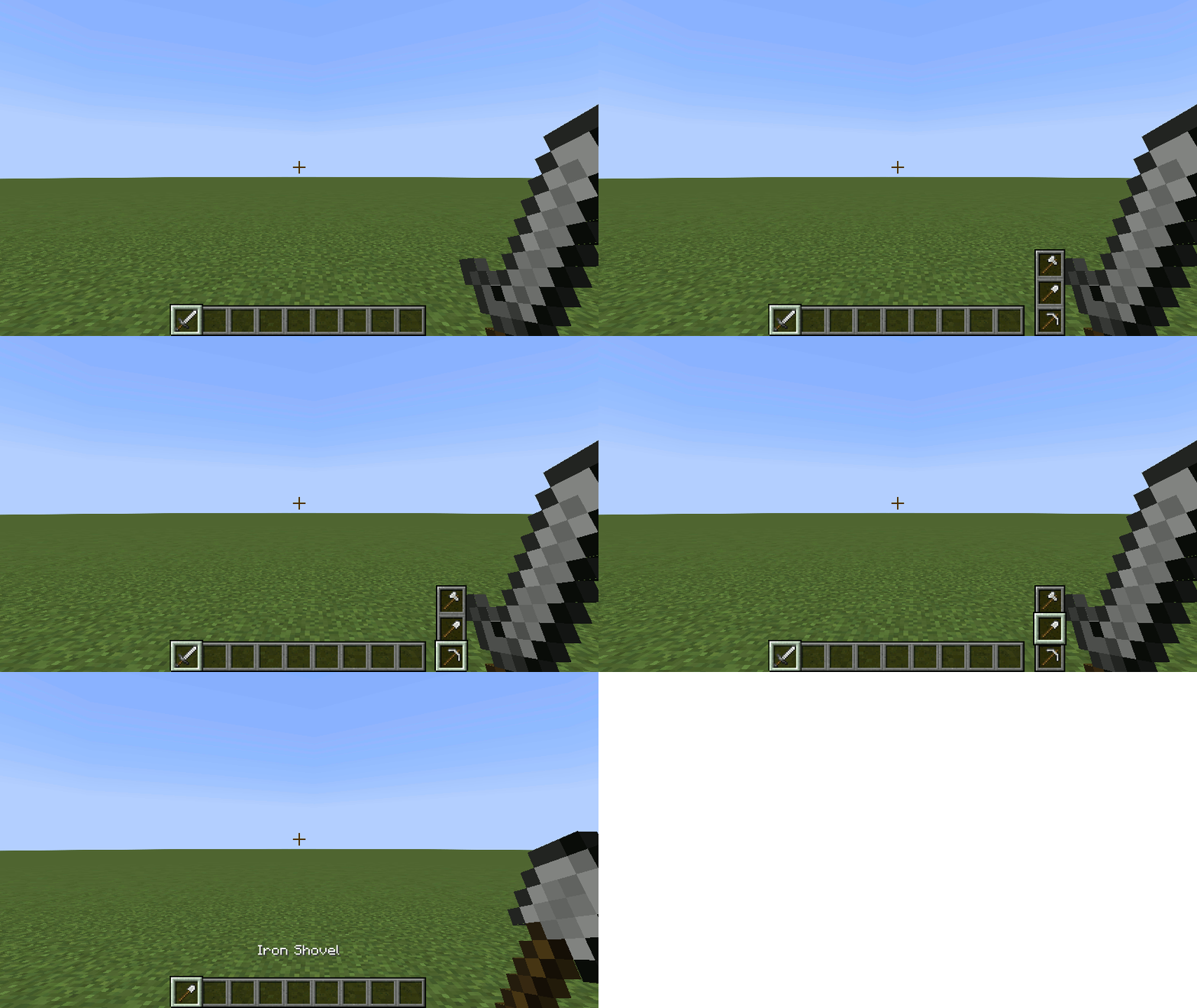
Swap hotbar items while on the move.
Adds a simple widget for hot swapping items.
See the wiki for video demos and complete details.
Inventory Hot Swap
Players may swap their hotbar items without having to open the inventory by holding down the Hot Swap key (default: _left alt_) and scrolling with the mouse wheel.
Equipment Hot Swap
Players may equip heads by right-clicking it. This feature will work for Carved Pumpkin, and any vanilla heads and skulls.
For Minecraft versions 1.19.3 and below, armor equipment may also be swapped by right-clicking it.
Item Hot Swap Settings
The position of the widget, selection type, and indexing may be changed in the options menu.
Game Rules
Inventory and/or equipment hot swapping can be enabled/disabled by setting the respective game rule.
Required Mods
Other Mods by Author
- Dream Dimension – Sends players sleeping in bed to a creative dimension.
- Sleep Config – Adds sleep-related game rules like disabling skipping the night and sleeping in bed with nearby monsters.
- Spike Trap – Adds spike traps, false floors, and trap floors.
- Torch Burnout – Makes torches, campfires, lanterns, and candles burn out and revert to its unlit state.
常见问题
Hot Swap [Fabric] 支持哪些 Minecraft 版本?
Hot Swap [Fabric] 支持 Minecraft Java 版 1.19.2–1.20.2,共 6 个版本,可用的加载器:Fabric。下载时注意选择和你游戏版本一致的文件。
Hot Swap [Fabric] 怎么安装?
先用 PCL2 或 HMCL 启动器安装对应版本的 Fabric,再把下载的 .jar 文件放进游戏目录的 mods 文件夹,重新启动游戏即可。开启了版本隔离的,mods 文件夹在 versions/版本名 下面。
thepeebrain 的其他作品
查看全部 →
Sleep Config [Fabric]
添加与睡眠相关的游戏规则,例如禁用跳过夜晚,以及附近有怪物时禁止上床睡觉。

Torch Burnout [Fabric]
火把、营火、灯笼和蜡烛都会燃尽,并恢复为未点燃状态。

Spike Trap [Fabric]
Adds spike traps, false floors, and trap floors.

Dream Dimension [Fabric]
Sends players sleeping in bed to a superflat creative dimension.
评论
登录后评论和评分