
截图

介绍
中文介绍正在准备中,下面暂时显示原文。
🔵 DESCRIPTION
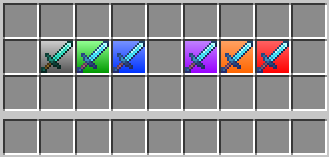
Customize how item rarities appear in your inventory, hotbar and on dropped items. Create your own rarity tiers, choose their colors and effects, and manage everything directly in-game.
🔵 FEATURES
- Custom rarities: create and manage your own rarity tiers.
- Rarity colors: choose up to three colors for each rarity tier.
- Item matching: define item rules using material, name, CustomModelData and enchantments.
- Inventory and hotbar backgrounds: turn rarity backgrounds on or off separately for inventories and the hotbar.
- Quick item setup: add the currently hovered item to your configuration with a customizable keybind.
- Dropped-item labels: customize the text, colors, size and visibility of labels above dropped items.
- Rarity effects: highlight dropped items with glowing outlines, animated fire and geometric floor effects.
- Configuration profiles: save different setups, switch between them, update them or delete them directly in-game.
- Customizable settings menu: choose its theme, color and scrolling speed, and use search to find options.
- Font options: choose from the bundled fonts to customize how text looks.
- English and Polish: select either language or follow your Minecraft language setting.
- Optimized rendering: designed to keep the performance impact low while displaying rarity backgrounds, labels and effects.
🔵 COMMANDS
- /td-rarity » Opens the in-game configuration screen
- /td-rarity reload » Reloads the current configuration without restarting the game
🔵 SUPPORT
If you encounter an error or need assistance, please contact support on Discord.
DISCORD: https://discord.gg/M3FENPR9fN
##


常见问题
TD-Rarity 支持哪些 Minecraft 版本?
TD-Rarity 支持 Minecraft Java 版 1.21.4–26.3,共 5 个版本,可用的加载器:Fabric。下载时注意选择和你游戏版本一致的文件。
TD-Rarity 怎么安装?
先用 PCL2 或 HMCL 启动器安装对应版本的 Fabric,再把下载的 .jar 文件放进游戏目录的 mods 文件夹,重新启动游戏即可。开启了版本隔离的,mods 文件夹在 versions/版本名 下面。运行环境:仅客户端。


评论
登录后评论和评分