
截图
介绍
中文介绍正在准备中,下面暂时显示原文。
🔵 DESCRIPTION
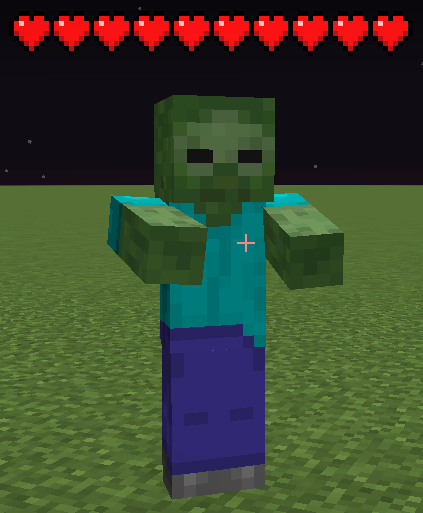
See how much health players and mobs have left, and customize how hearts look in your game.
🔵 FEATURES
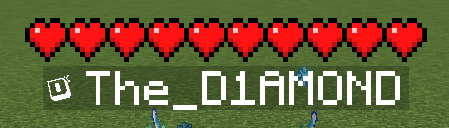
- Live health: display hearts above players and mobs, with a separate option to show hearts above your own character.
- Your health display: keep Minecraft’s default hearts above the hotbar or use your selected TD-Hearts style.
- Mob filters: show health for all mobs, hostile mobs, passive mobs or animals. You can also disable mob hearts.
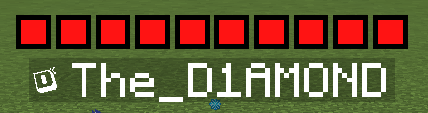
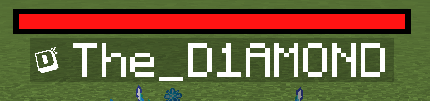
- Four styles: choose Vanilla, Square, Round or a health bar, with a selection of colors.
- Size options: choose small or large icons for Square and Round styles, or small, medium or large health bars.
- Adjustable layout: change the height above characters, the spacing between hearts and the distance between rows.
- Health animations: highlight missing health or damage from the last hit, add flashing outlines or turn blinking off.
- Golden and Hardcore hearts: supports absorption hearts, such as those from golden apples, and Hardcore heart designs.
- Configuration profiles: save different setups, switch between them, update them or delete them. The built-in Default profile lets you restore the original settings.
- Customizable settings menu: choose its theme, color and scrolling speed, and use search to find options.
- English and Polish: select either language or follow your Minecraft language setting.
- Optimized rendering: designed to reduce the performance impact when many mobs are visible.
🔵 COMMANDS
- /td-hearts » Opens the configuration screen.
- /td-hearts reload » Reloads the configuration without requiring a game restart.
🔵 SUPPORT
If you encounter an error or need assistance, please contact support on Discord.
DISCORD: https://discord.gg/M3FENPR9fN
##


常见问题
TD-Hearts 支持哪些 Minecraft 版本?
TD-Hearts 支持 Minecraft Java 版 1.21.4–26.3,共 5 个版本,可用的加载器:Fabric。下载时注意选择和你游戏版本一致的文件。
TD-Hearts 怎么安装?
先用 PCL2 或 HMCL 启动器安装对应版本的 Fabric,再把下载的 .jar 文件放进游戏目录的 mods 文件夹,重新启动游戏即可。开启了版本隔离的,mods 文件夹在 versions/版本名 下面。运行环境:仅客户端。


评论
登录后评论和评分