
截图
介绍

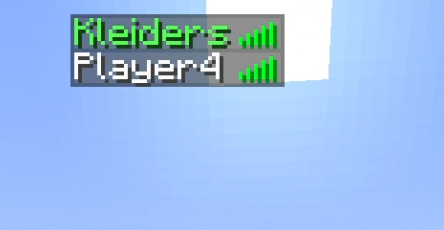
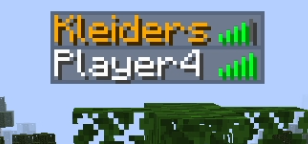
This mod adds a couple of commands to control the color of the name of your friends in servers; This is purely clientside, so you can put “/tablist add DrEggman green”, and the name “DrEggman” will always appear green when playing in any server with them! The colors supported can be found in https://minecraft.fandom.com/wiki/Formatting_codes under the colors area; You have to use the color “name”, so “red”, “light_purple”, “gold” etc.
This mod requires you to have the fabric API
This mod is fully clientisde
Use “/tablist add [name] [color]” to add a name to the list. Defaults to gold if the color introduced isn’t valid.
Use “/tablist remove [name]” to remove a name from the list.
Use “/tablist deactivate [true/false]” to disable it or enable it; “true” means disabled; it’s false by default, and it’s saved per session.
Showcase:
常见问题
Tablist Filters 支持哪些 Minecraft 版本?
Tablist Filters 支持 Minecraft Java 版 1.19.2–1.19.4,共 2 个版本,可用的加载器:Fabric。下载时注意选择和你游戏版本一致的文件。
Tablist Filters 怎么安装?
先用 PCL2 或 HMCL 启动器安装对应版本的 Fabric,再把下载的 .jar 文件放进游戏目录的 mods 文件夹,重新启动游戏即可。开启了版本隔离的,mods 文件夹在 versions/版本名 下面。运行环境:仅客户端。
kleiders3010 的其他作品
查看全部 →
Kleiders Custom Renderer API
用于通过 MCreator 模组为玩家添加纹理和模型的 API!

Vanilla Expanded – Orcz
Orcz,Orcz,Orcz。

Happy Ghast Backport
新增可骑乘、可步行的快乐恶魂,包含它的所有变种、恶魂宝宝和干燥恶魂!
Illager Plushies [Forge]
新增装饰毛绒玩偶,可通过掠夺一些灾厄村民获得!(兼容部分添加灾厄村民的模组!)
评论
登录后评论和评分