
Sound Pulse
A minimalist client-side mod that visualizes sound direction through distance-scaling HUD waves and critical threat alerts for enhanced tactical awareness.
介绍
🔊 SoundPulse
SoundPulse is a lightweight, high-performance client-side utility mod for Minecraft Fabric 26.1.x. It visualizes in-game sounds as minimalist, directional waves on your HUD, providing a tactical edge and enhanced spatial awareness without the clutter of vanilla subtitles.
Whether you are playing with your own music, have hearing difficulties, or simply want a cleaner way to track threats, SoundPulse delivers a sleek, modern solution.
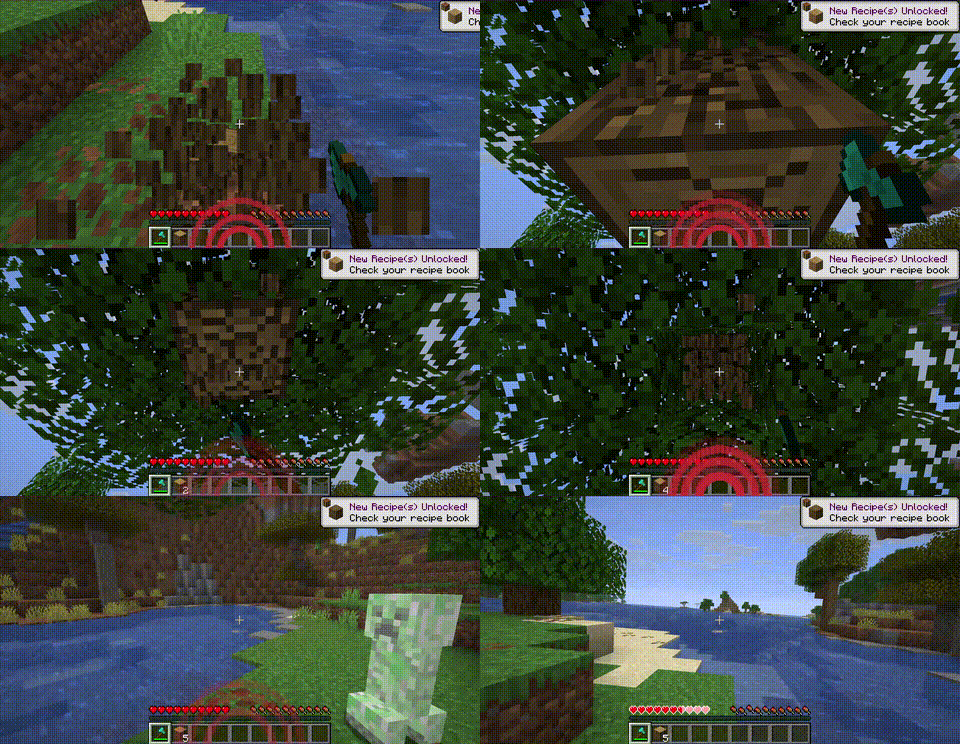
✨ Key Features
🧭 8-Way Directional Tracking
SoundPulse doesn’t just tell you a sound happened — it shows you exactly where it came from. The HUD displays curved wave icons pointing to 8 specific directions:
- Front, Back, Left, Right
- Front-Right, Front-Left, Back-Right, Back-Left
📏 Distance-Based Scaling
The visual intensity of the waves adapts to the proximity of the sound source:
- Near: Thick, aggressive lines for immediate threats
- Far: Thin, subtle lines for distant background noises
⚠️ Critical Threat Alerts (Strobe Effect)
Never get blindsided by a Creeper again. High-priority sounds like Creeper hissing or TNT priming trigger a rapid red strobe/flash effect on the corresponding direction of the HUD.
🛡️ Smart Filtering & Presets
To keep your screen clean, SoundPulse starts with Hostile sounds enabled by default. You can easily toggle other categories (Blocks, Players, Ambient, Music, Weather, Neutral, Voice) to suit your playstyle.
🎨 Category Colors
Each sound category has a distinct color:
| Category | Color |
|———-|——-|
| Hostile | Red |
| Blocks | Orange |
| Ambient | Green |
| Players | Blue |
| Music | Purple |
| Weather | Cyan |
| Neutral | Yellow |
| Voice | Gray |
💻 Commands
SoundPulse is fully configurable in-game. Every change you make is instantly saved to your configuration file.
| Command | Description |
|———|————-|
| /soundpulse toggle | Enable or disable the mod entirely |
| /soundpulse config | View your current settings and active categories in chat |
| /soundpulse category <name> <true/false> | Toggle entire sound categories on or off |
| /soundpulse color <category> <hex> | Change the wave color for a specific category |
| /soundpulse ignore add <id> | Add a specific sound to the ignore list |
| /soundpulse ignore remove <id> | Remove a sound from the ignore list |
| /soundpulse ignore list | List all ignored sounds |
⚙️ Configuration
Settings are saved to config/soundpulse.json:
{
  "enabled": true,
  "maxOpacity": 0.65,
  "enabledCategories": ["HOSTILE"],
  "categoryColors": {},
  "ignoredSounds": []
}
Only the HOSTILE category is enabled by default. Use /soundpulse category to enable others.
📄 License
MIT © Cukkoo
常见问题
Sound Pulse 支持哪些 Minecraft 版本?
Sound Pulse 支持 Minecraft Java 版 26.1–26.1.2,共 3 个版本,可用的加载器:Fabric / Forge / NeoForge。下载时注意选择和你游戏版本一致的文件。
Sound Pulse 怎么安装?
先用 PCL2 或 HMCL 启动器安装对应版本的 Fabric / Forge / NeoForge,再把下载的 .jar 文件放进游戏目录的 mods 文件夹,重新启动游戏即可。开启了版本隔离的,mods 文件夹在 versions/版本名 下面。运行环境:仅客户端。
Cukkoo 的其他作品
查看全部 →
Sound Culling
Dynamically limits and dampens overlapping sounds to reduce audio clutter and improve performance in sound-heavy areas.

Sound Culling
Dynamically limits and dampens overlapping sounds to reduce audio clutter and improve performance in sound-heavy areas.

Free Camera
A powerful client-side cinematic camera mod with Free, Orbit, Tripod, Follow, recording, paths, roll, zoom, and collision.

PingDisplay
See exact player ping in the Tab list with customizable colors, thresholds and display modes.
评论
登录后评论和评分